• Company
  • Blog
  • Case Studies
  • Partners
  • Contact

vtexpertswplogovtexpertswplogotransp2-white-small-2transp2-white-small-2

Menu
  • Home
  • Services –
    • Services

      Maintenance & Support

      Plans provide guidance, phone support, and training to get the most out of CRM.

      Customization

      Streamline & automate your sales, marketing and operations.

      Integrations

      CRM integration with leading third-party service providers, websites and apps.

      Migration

      Vtiger Upgrade

      Stay up to date with the latest features & security patches.

      Data Migration

      Transfer your important data from any other CRM, ERP or custom solution.

      Packages

      Monthly Support Plans

      Essential for growing businesses

      Kickstarter Packages

      Optimal solution for small businesses

      Projects & Incidents

      Recommended for updates & fixes
  • Solutions
    • Sales

      Contact Management

      Close more deals with single-page contact management.

      Opportunities

      Track stages and milestones of your deals to keep the sales process on track.

      360 View

      Contact data from every angle, including conversations, call notes.

      More ....

      Appointments, Reporting, Proposals & more..
      Note: The links in this menu are not clickable. Please contact us for more details.

      HelpDesk

      Ticketing

      Resolve every issue in the shortest possible time with powerful ticketing features.

      Service Level Agreements

      Set up trigger campaigns to send alerts when the ticket resolution time exceeds the due date.

      Automation

      Leverage automation to define priorities, statuses & assignments for tickets.

      More ....

      Canned responses, feedback, customer portal...
      Note: The links in this menu are not clickable. Please contact us for more details.

      Marketing

      Marketing Automation

      Marketing workflows with an easy drag-and-drop designer.

      Email Marketing

      Get complete email marketing features with newsletters, analytics, and more.

      Email Tracking

      Track your email performance with metrics that matter and notifications.

      More ....

      Landing pages, SMS, Analytics & more..
      Note: The links in this menu are not clickable. Please contact us for more details.
  • Extensions
    • Extension Pack

      Get Started

      Details, screenshots and videos

      Pricing

      Affordable and cost effective

      FAQ

      Pricing, licensing and compatibility

      Documentation

      Installation Instructions

      Step by step guide

      Helpdesk

      Documentation & user guides

      Extensions

      Extensions for Vtiger 8.x

      70+ Plugins with screenshots, videos & live demos

      Extensions for Vtiger 7.x

      70+ Plugins with screenshots, videos & live demos

      Extensions for Vtiger 6.x

      65+ Plugins with screenshots, videos & live demos.
  • Managed Hosting
  • Resources
    • Documentation

      User Guide

      Best practices and tips to keep your user engaged.

      Administrator Guide

      Designed to help manage and configure the CRM for all the Vtiger users.

      Video Tutorials

      Learn how to use Vtiger features with guided video tours

      Extensions

      Helpdesk

      Admin & User guides for all our Extensions.

      Recent Updates

      New Extension releases & enhacements to Vtiger.

      Development

      Contributions

      Enhanced features, fixes and extensions.

      Github

      Access to upcoming releases, patches & more.

      Official Resources

      Developer forums, code repository & more.
  • Extension List
  • Home
  • Managed Hosting
  • Extensions
    • Get Started
    • Installation Instructions
    • Pricing
    • FAQs
    • Extension List
  • Services
    • Support
    • Custom Development
    • Integrations
    • Vtiger Upgrade
    • Data Migration
  • Support Plans
    • Monthly Plans
    • Support Plans
    • Startup Packages
  • Resources
    • Helpdesk
    • Blog
    • Contact Us
    • Partners

Automate Vtiger Documents with VTExperts Document Designer’s Conditional Logic

Categories
  • Business Strategy
  • Document Designer
  • vTiger 7
  • vTiger 8
  • vTiger 8.x
  • VTiger Customization
  • VTiger Extensions (Releases)
  • VTiger Extensions (Tips)
  • vTiger News
  • vTiger Tips
  • vTiger Tweaks
Tags
  • Add-on
  • business strategy
  • Conditional logic
  • crm
  • customer care
  • customer portal
  • customization
  • customize vTiger
  • document designer
  • document designer for vtiger
  • email
  • integration
  • Management
  • marketing
  • sales
  • support
  • VTExperts
  • vTiger
  • vtiger 7
  • VTiger 8
  • vTiger 8.x
  • vtiger activities
  • VTiger Bugs
  • vtiger CRM
  • vTiger CRM Customization
  • vTiger CRM Errors
  • vTiger CRM Help
  • vTiger CRM Support
  • vTiger CRM Tips/Tricks
  • vTiger CRM Troubleshooting
  • vTiger customization
  • vtiger extension
  • vTiger features
  • vTiger Modules
  • vtiger tips
  • vtiger tricks
  • vtiger tweaks
  • VTiger Upgrade
  • vtiger7
  • vtigercrm

We have all been there: you are about to send a contract or an agreement, but it is filled with “N/A” markers and empty sections that do not apply to the client. It looks messy, feels impersonal, and a bit unprofessional.
In Vtiger CRM (Open Source), the “one-size-fits-all” template is a thing of the past. Thanks to VTExperts’ Document Designer, you can now use Conditional Logic to make your templates “smart.” Instead of maintaining a dozen different files, you use one Master Template that automatically hides or shows fields based on your CRM data.


Imagine you are managing properties. Not every tenant has a pet, so why should every lease include pet addendum?
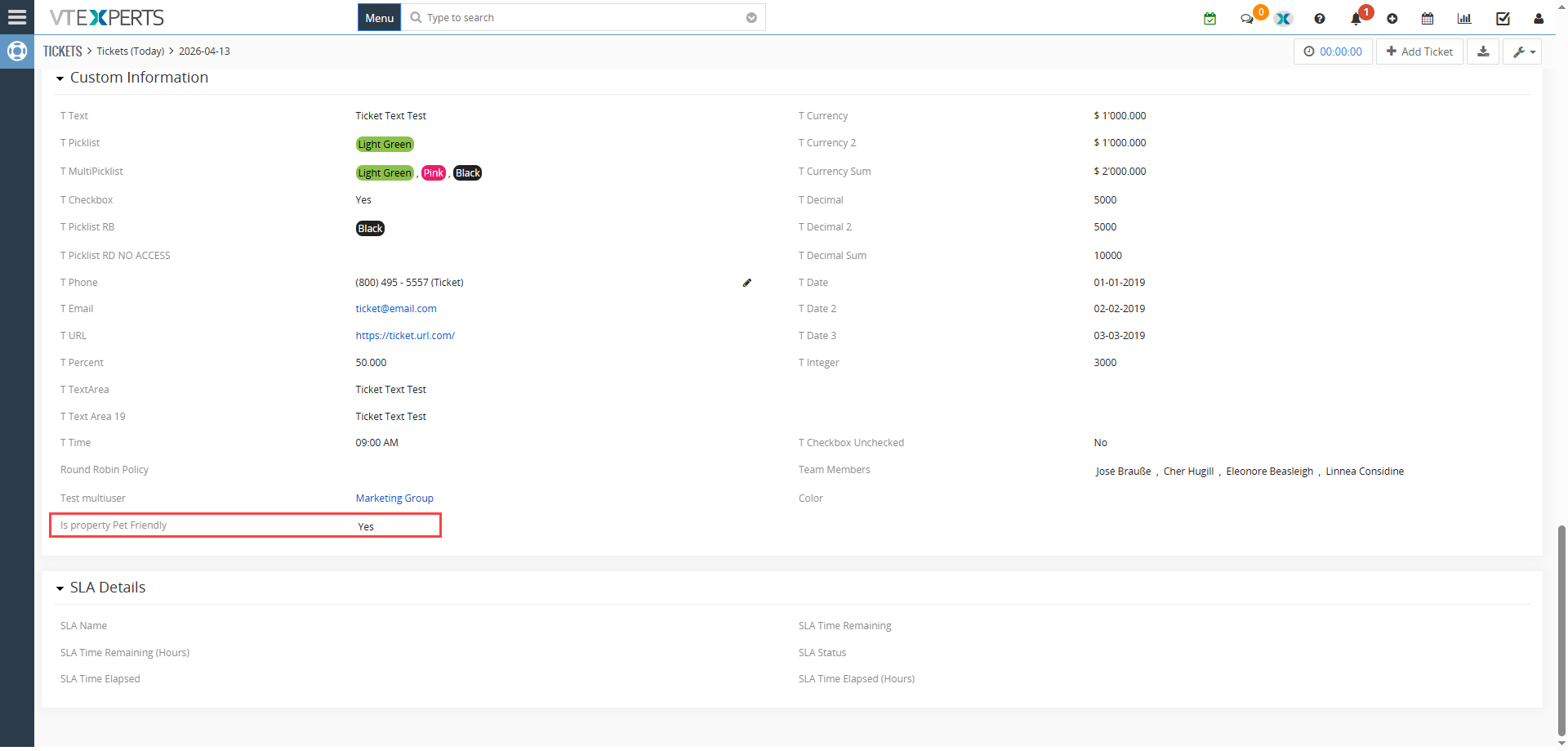
With a simple conditional logic on picklist field “Is Property Pet Friendly?” in your CRM, the Document Designer takes over:

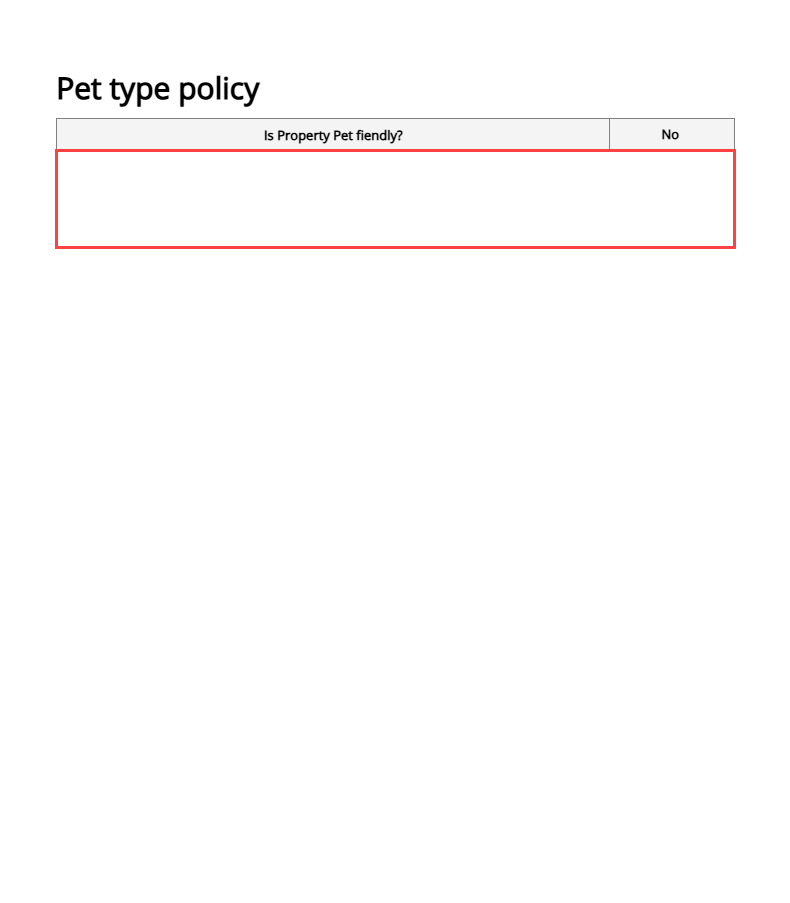
  •  If Yes: The “Pet Policy” section—complete with pet types, deposit amounts, and specific rules—instantly appears in the generated PDF.
  •  If No: The entire section vanishes. The document layout shifts up naturally, leaving no awkward white space or “N/A” placeholders.

How to Set It Up (Step-by-Step)

Configuring this logic is surprisingly straightforward. Here is how you can do it right from the Document Designer interface:

1. Define Your Rule
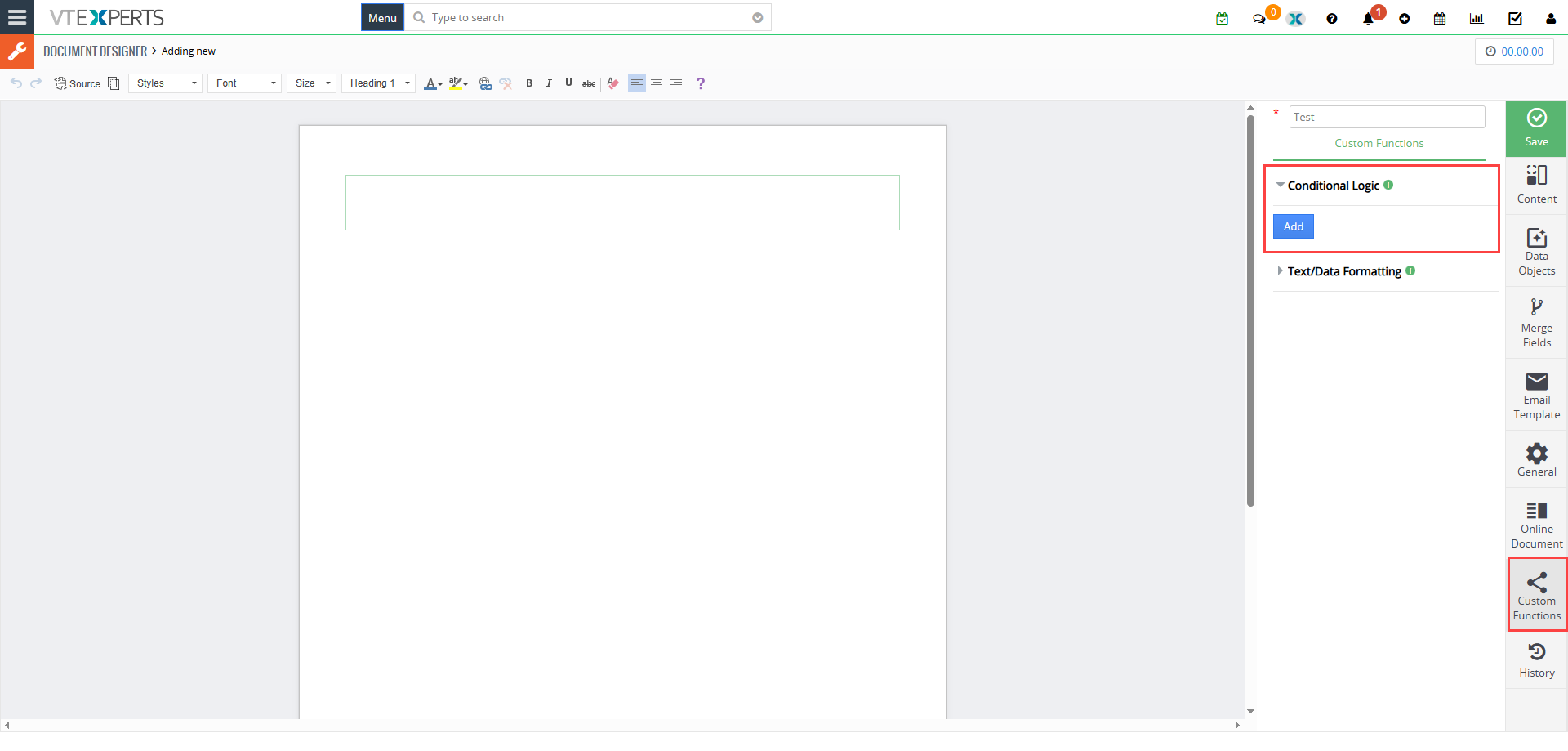
Head over to the Conditional Logic tab in the sidebar and click “Add.”
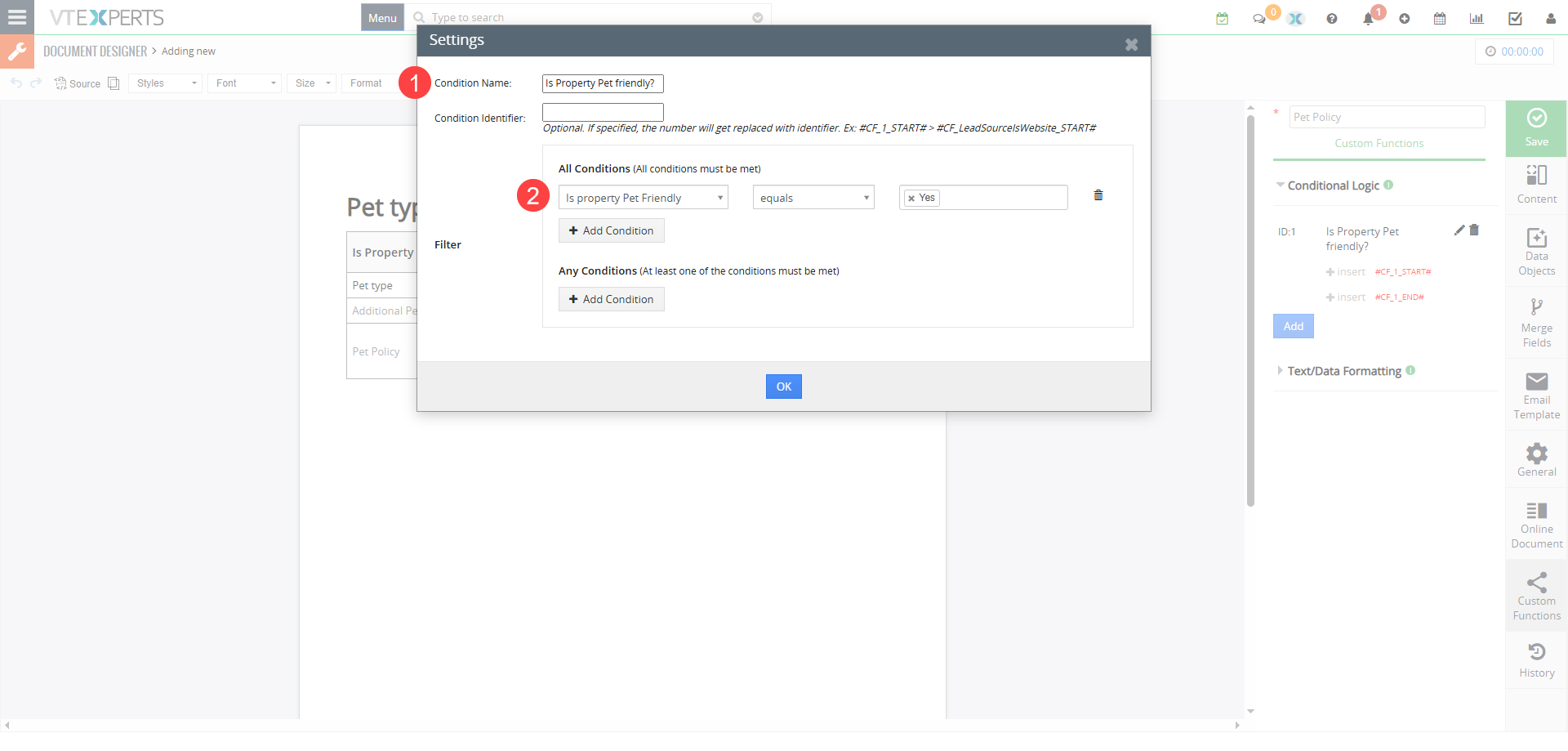
 

  • Give it a Name: Use something clear, like Is Property Pet Friendly?
  • Set the Condition/Filter: Use the standard Vtiger filter interface. For example: Pet Policy = Yes. It will define when the condition is true and related data should be shown.
  • Save: Once saved, the extension generates a unique Condition Identifier (like #C1_START# and #C1_END#).
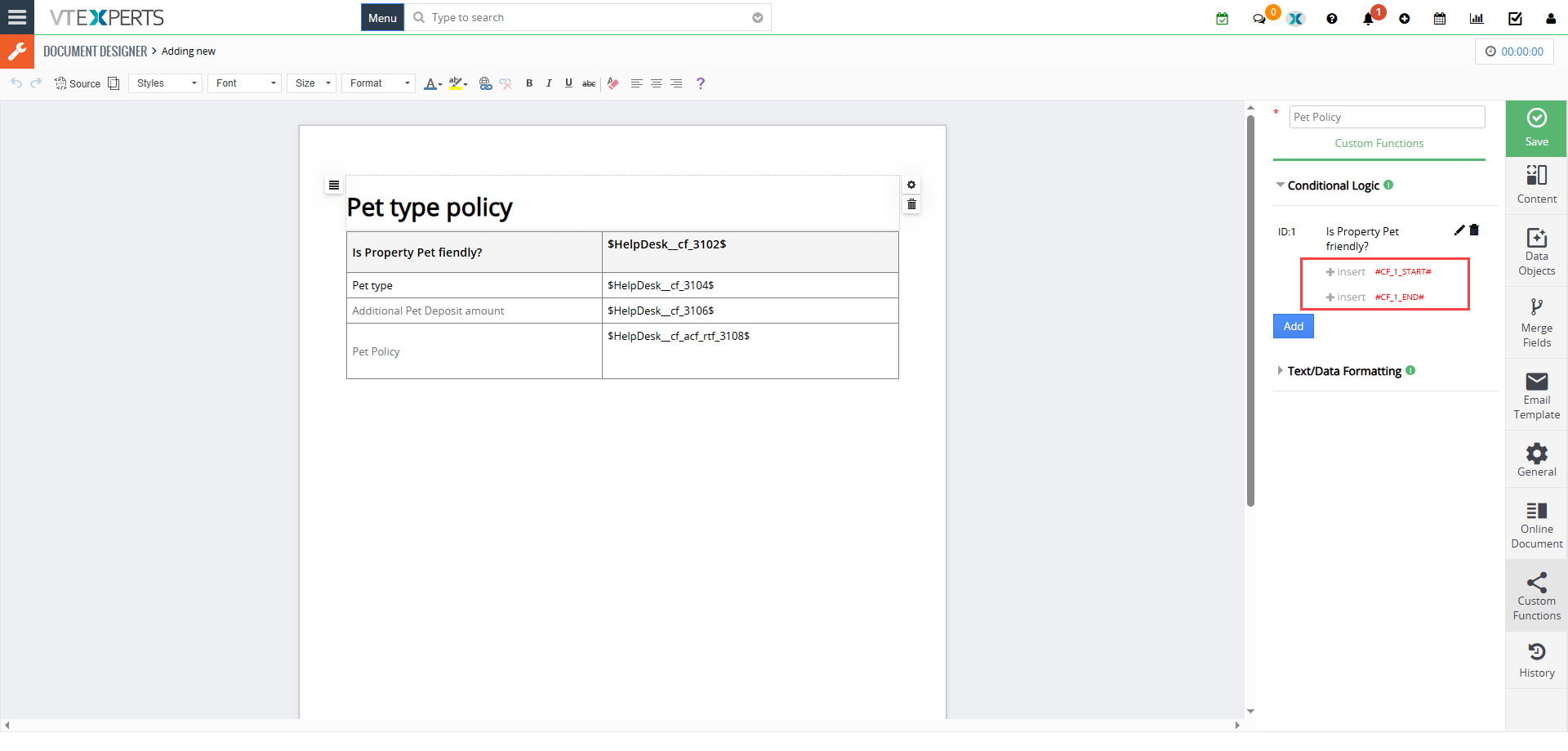
2. “Wrap” Your Content

Now, go to your document editor.
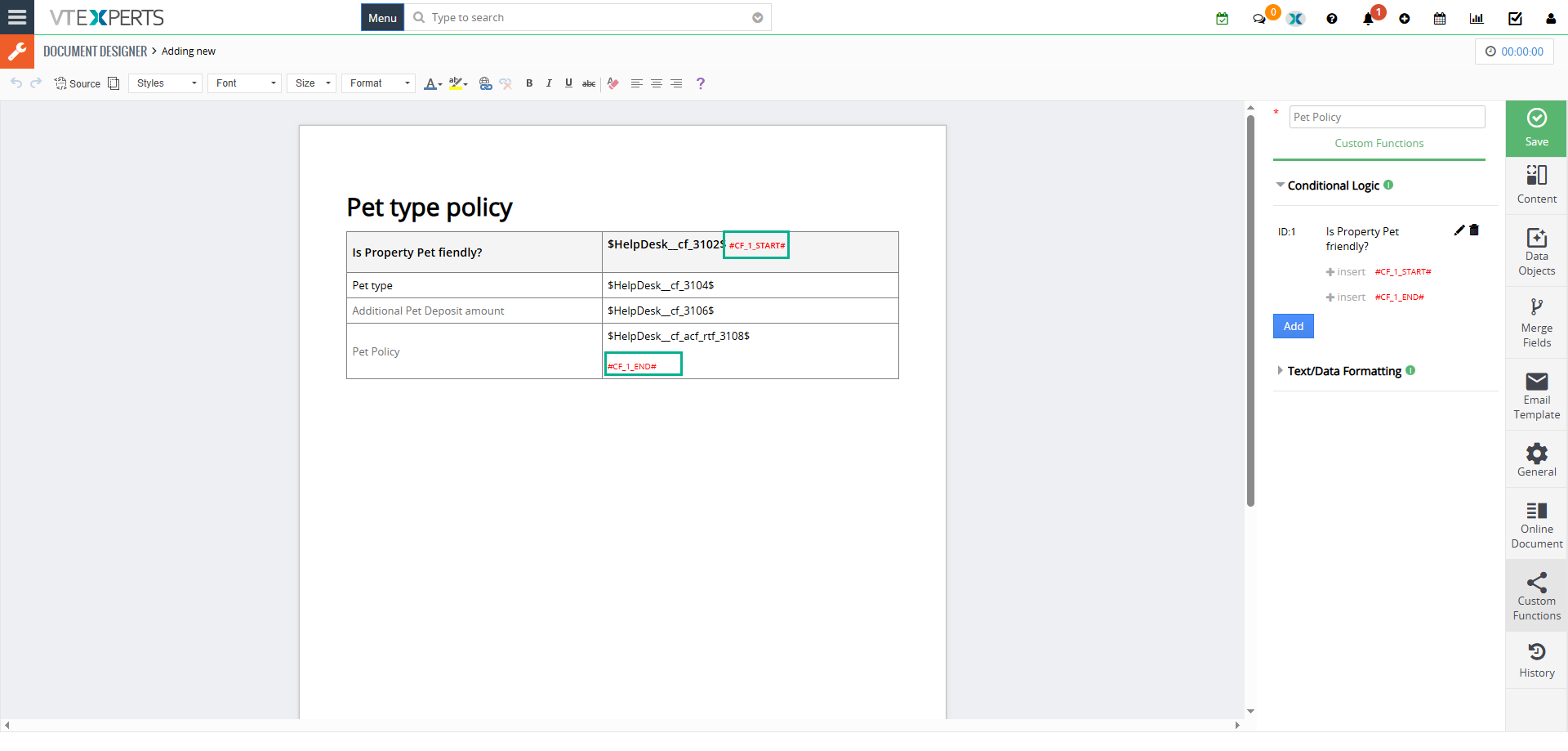
  • Find the row, table, or paragraph you want to control.
  • Place the #C1_START# tag at the beginning and the #C1_END# tag at the end.
  • The Magic: Anything sitting between those two tags is now “conditional.” It only exists if your CRM record says it should.

3. Generate & Validate

When you are ready, click Export to PDF/Email from the record. The extension does a “real-time check” of your data. If the condition is not met, it strips that entire block of content away before the file is even created. What your client sees is a perfectly tailored, clean document.

Example

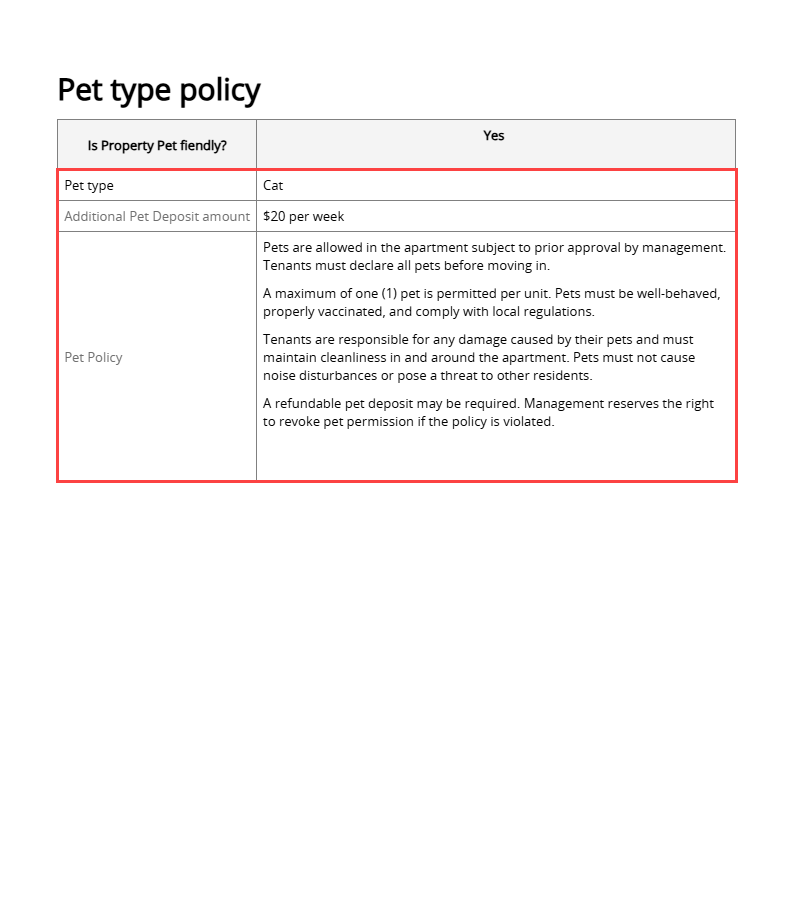
Highlighted part in the image will only be shown when pet policy is set to “Yes”
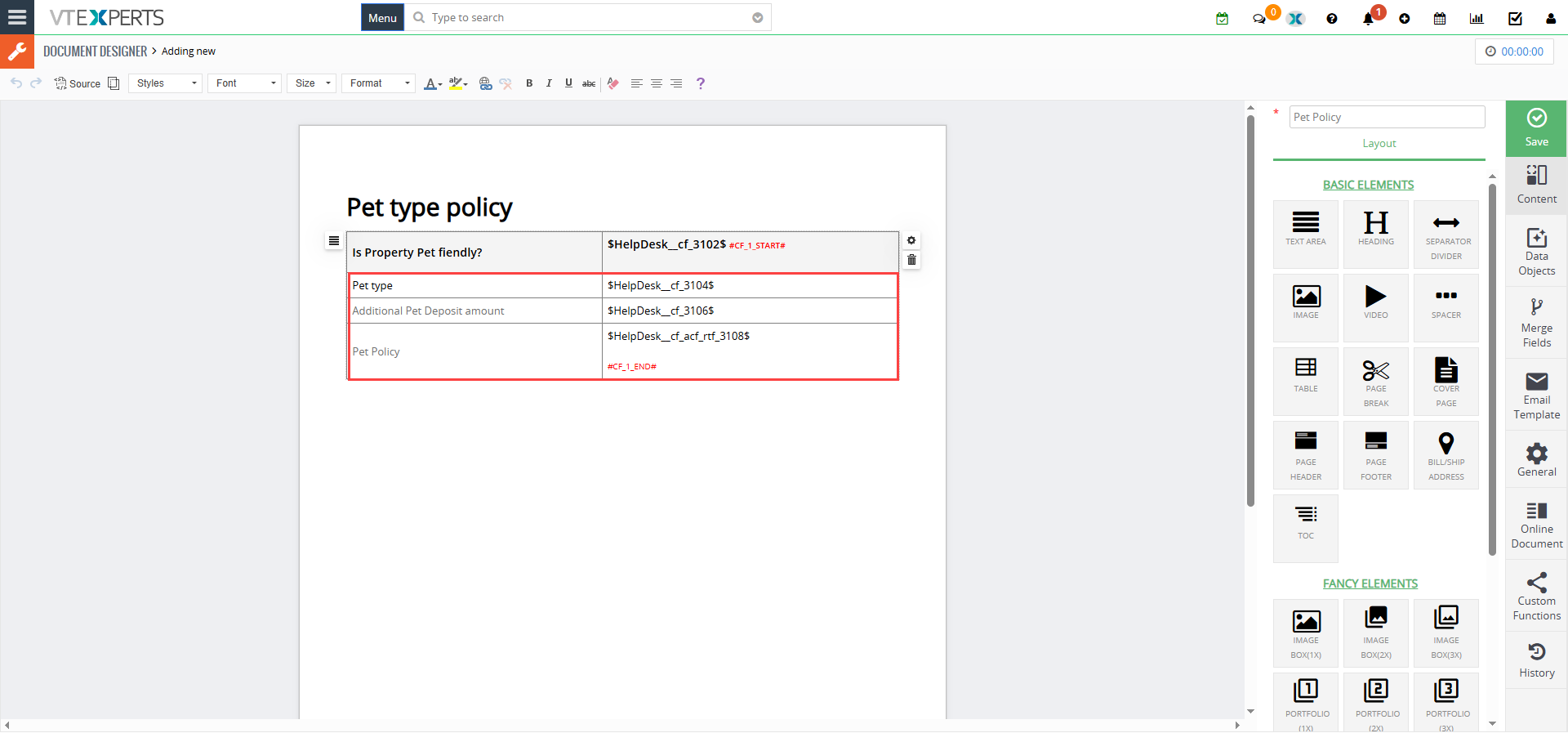

When Pet Policy is set to “Yes”, it shows the information block placed between the conditional identifier tags

[/vc_column_text]
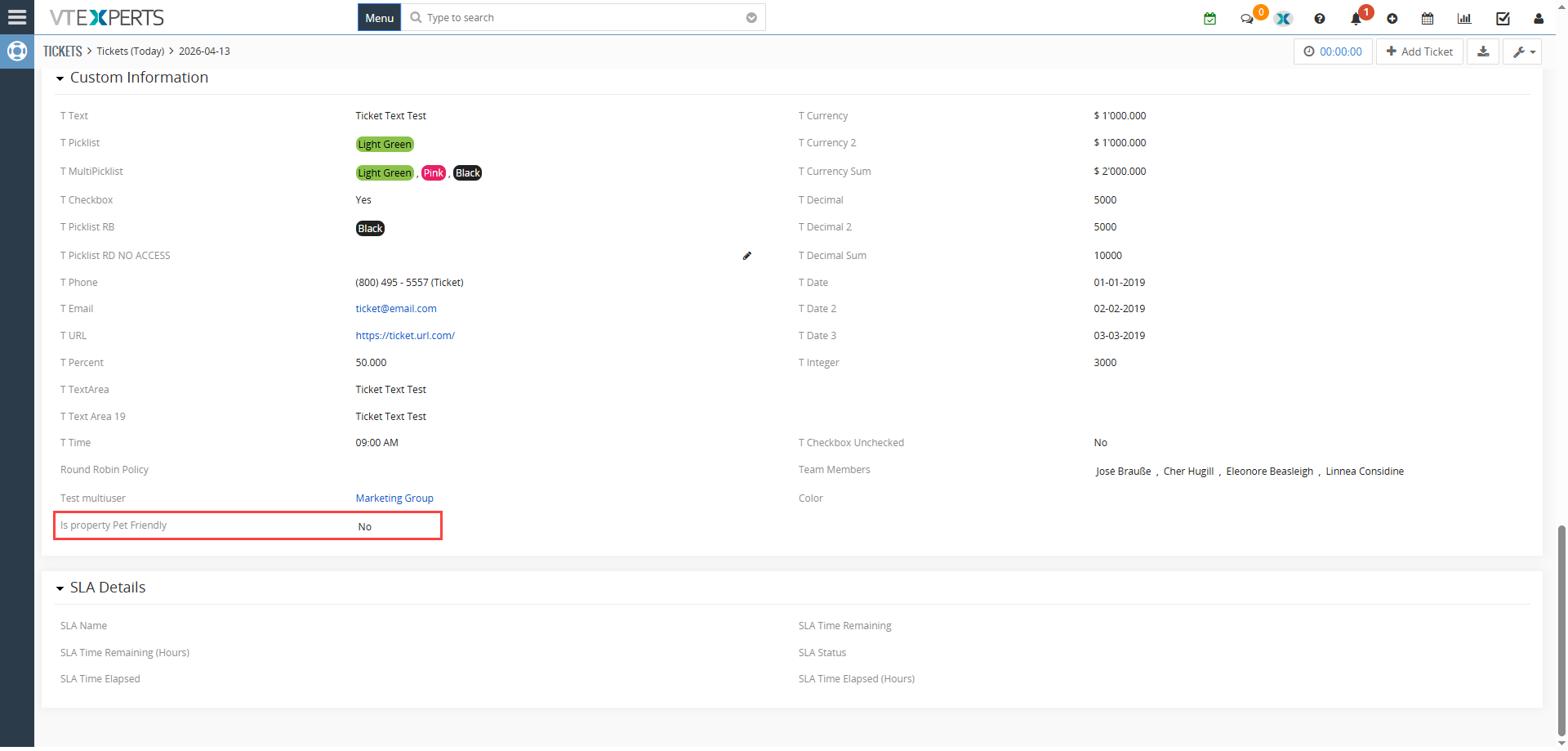
  • Pet Policy "Yes"
  • Document Designer Template output

Pet Policy "Yes"

Document Designer Template output

When Pet Policy is set to “No”, it hides the information block placed between the conditional identifier tags

  • Pet Policy "No"
  • Document Designer Template output

Pet Policy "No"

Document Designer Template output

[/vc_column][/vc_row]

Why This is a Game-Changer for Vtiger Users

• Template management: Stop managing 50 different versions of the same contract. Manage one master file that handles every scenario.

• Accuracy: Ensure that high-risk legal clauses or specific pricing tables are only included when the data triggers them.

• Better Experience: Your clients get a concise document that feels specifically prepared for them, not a generic form.


Check complete Document Designers guide Here
Related posts

VTExperts VTiger Customer Portal Direct Login – Customization

VTiger Advanced Customer Portal vs Default Customer Portal: What’s the Difference?

VTExperts: Vtiger Employee Contract Management Customization

Multi-Currency Vtiger Quotes with VTExperts IDCA (Customziation)

Multi-Currency Vtiger Quotes with VTExperts IDCA (Customziation)

Comments are closed.

EXTENSION PACK

  • Extension List
  • Pricing
  • Extension Pack Details
  • Setup Instructions
  • Documentation

SERVICES

  • Support & Consulting
  • Hosting (Dedicated & Managed)
  • Customization & Development
  • Upgrade & Migration
  • Maintenance & Ongoing Support

LINKS

  • Gmail Plugin for VTiger
  • Outlook Plugin for VTiger
  • Blog (News & Tips)
  • Extension List
  • Contact Us Form

VTExperts

  • 341 W Scott Street
    Chicago, IL 60610
    United States
[email protected]
+1 (818) 495-5557
© 2009-2026 VTExperts.com All Rights Reserved
0
Cleantalk Pixel