

VTiger Blog – News, Common Errors & Helpful Tips
VTiger 6 Customization: Convert/Generate Licenses from Sales Order/Invoice/Quote
September 18, 2017
Article
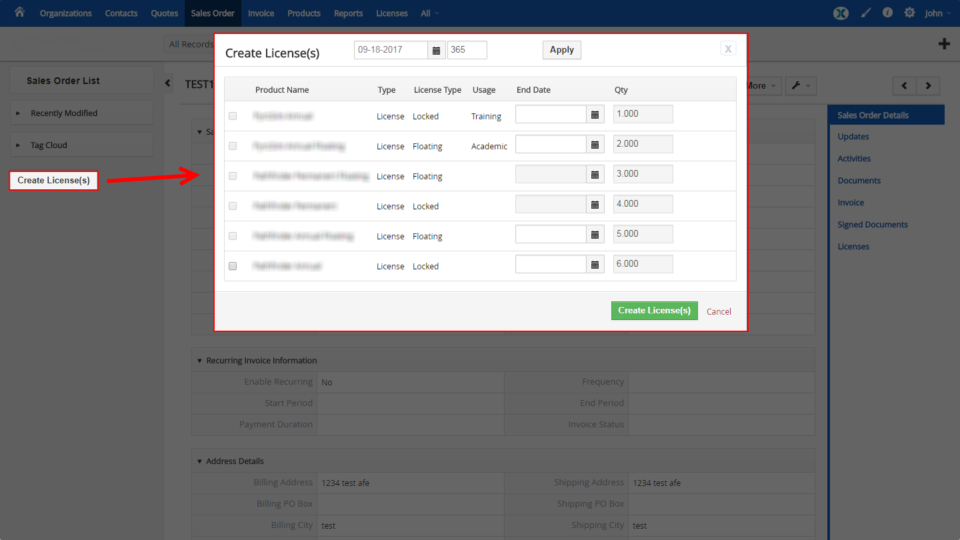
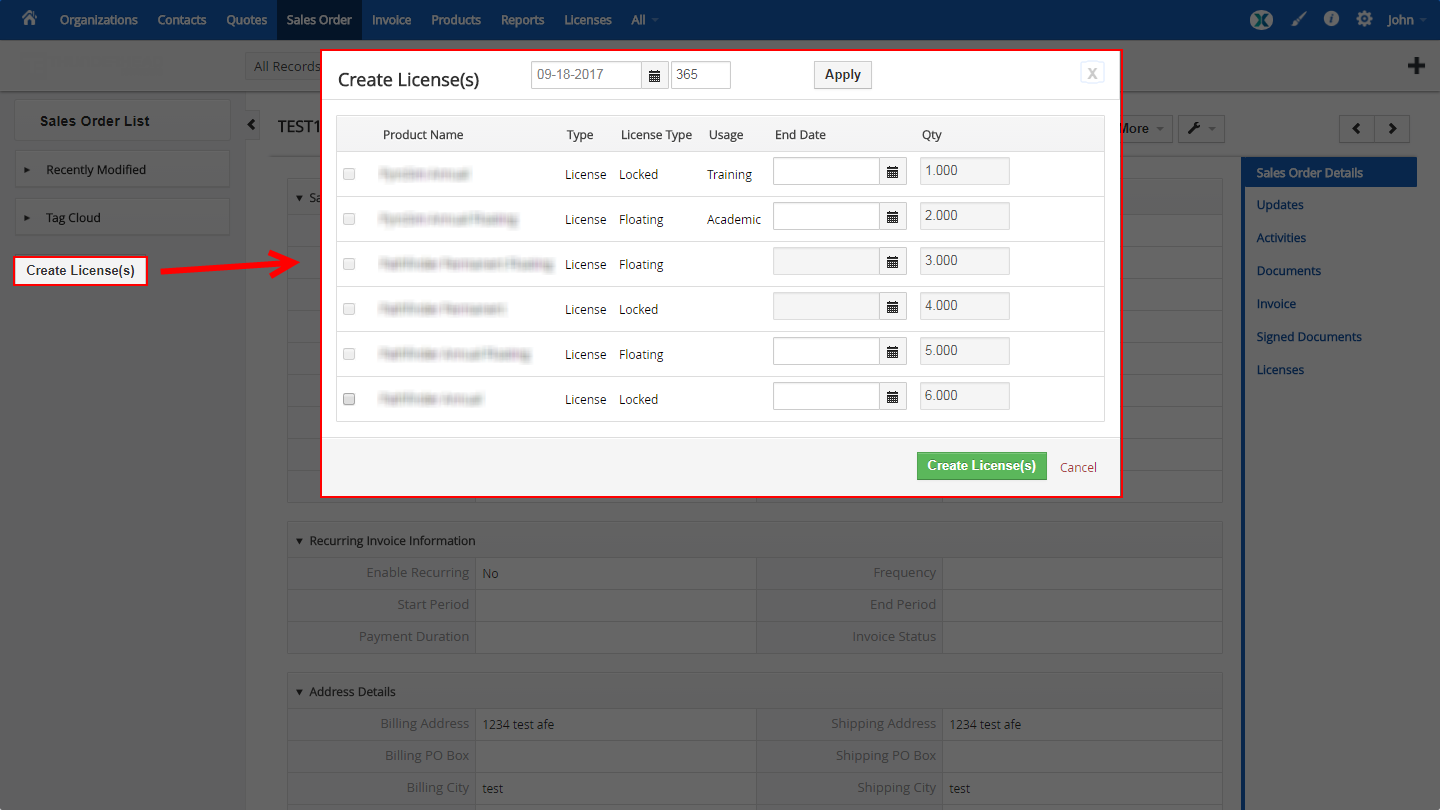
Every business has it’s own unique workflow and it is very likely that after the transaction has been made, there are steps to be taken to process the order. One of our customers is selling software with different types of licenses e.g locked, floating, annual, lifetime and requested to build an extension to VTiger Sales Orders which would allow to generate licenses for purchased products. To accommodate that, we added a button “Create License(s)”, which triggers a popup where the user can see the products on the sales order, specify expiration date and see additional information the the product. Once the user clicks to create licenses, it creates new license records (custom vtiger module) and connects to their licensing server via API to generate unique license key. This VTiger customization significantly improves the efficiency. Similar customizations can be added to invoices, quotes or any other module as each business
VTiger 7 Customization: Add/Create Opportunities from Mail Manager (Actions)
September 14, 2017
Article
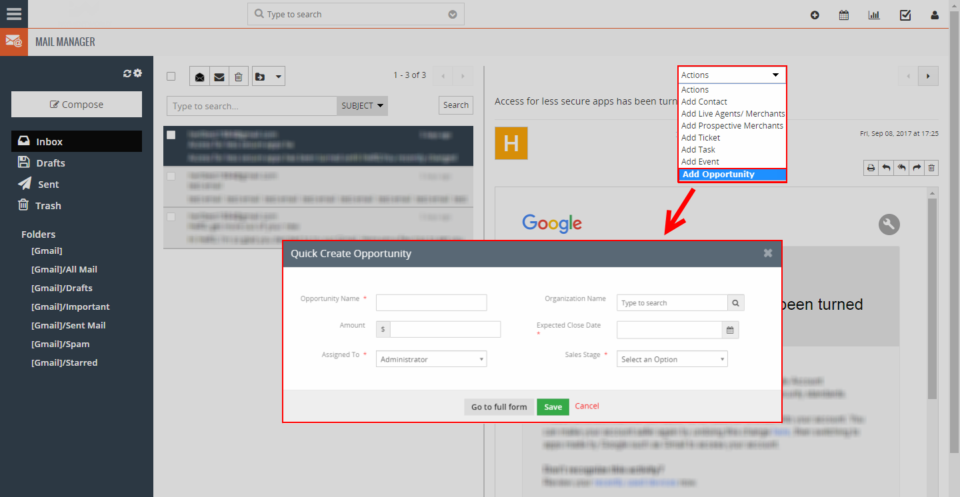
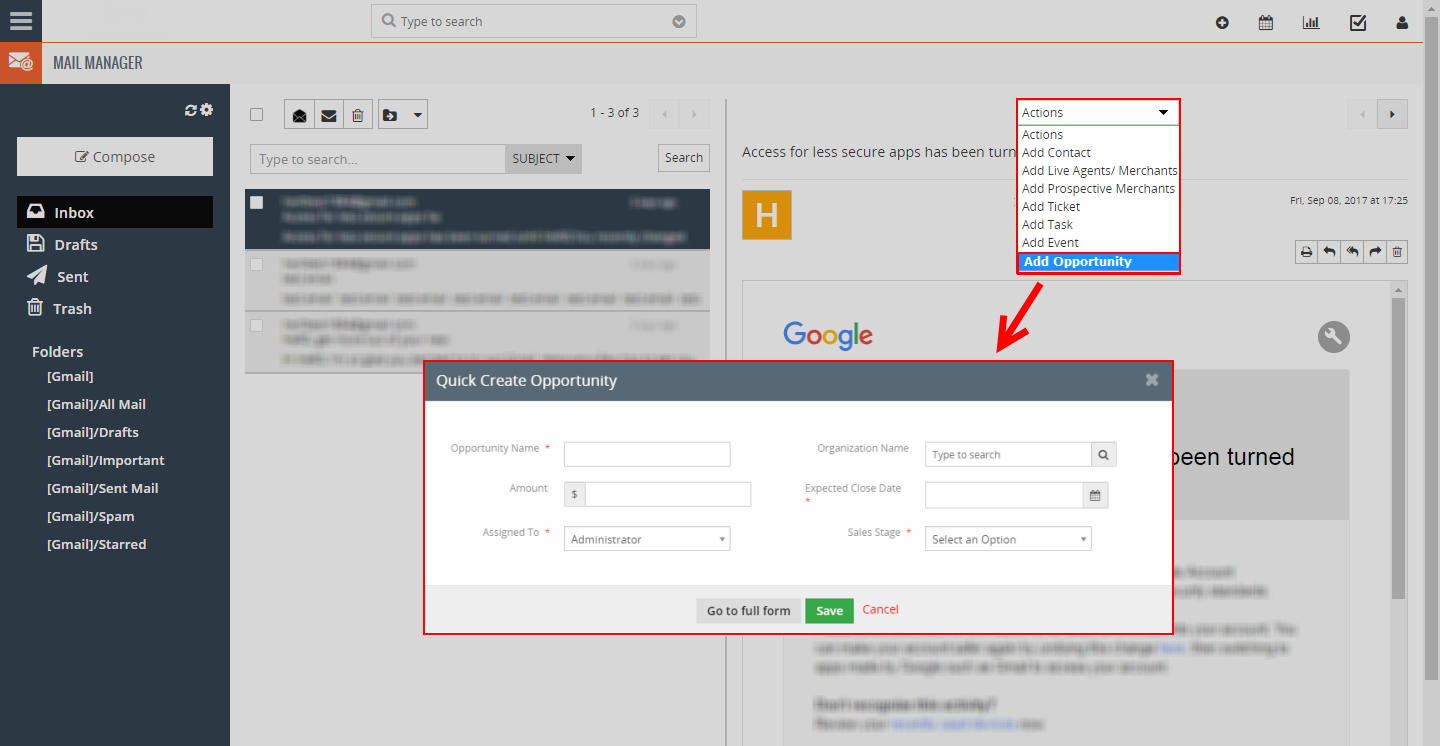
Mail Manager for VTiger 7 has improved significantly compared to the previous versions. It’s more responsible, modern and a lot easier to navigate and manage emails. As in previous versions, Mail Manager has a feature (action) that allows users to create new records from the email e.g contact, organization, lead, tickets and activities. The only thing it is missing is an action to add new opportunities. To accommodate that, we added an action to “Add Opportunity” right from the Mail Manager. It opens a quick create modal popup and creates the opportunity + links the email message. That’s just one of the VTiger customizations we’ve done, if you are looking for a similar customization e.g adding other modules to Mail Manager or customizing it in any different way – please shoot us an email at [email protected]
VTiger 7 Customization: Convert Opportunities to Organizations, Invoices, Tickets & More
September 13, 2017
Article
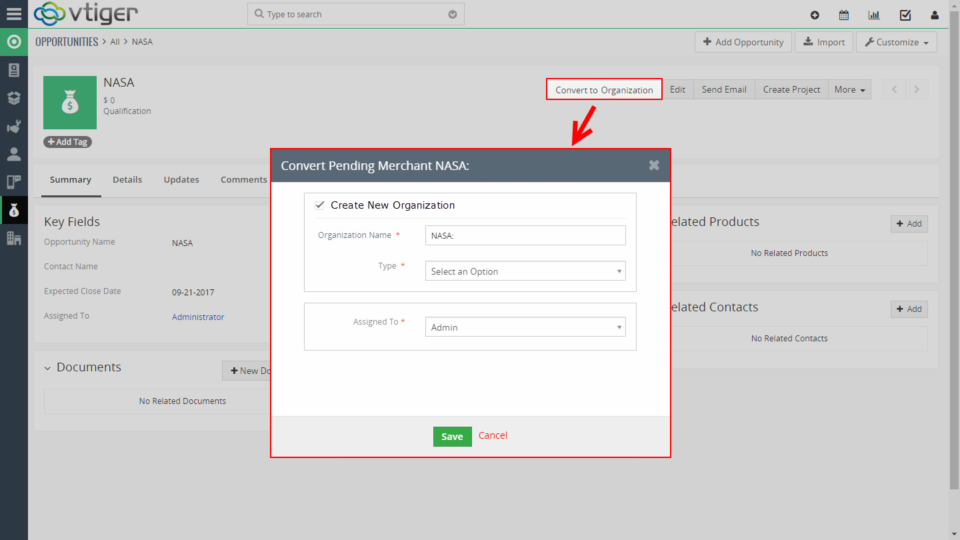
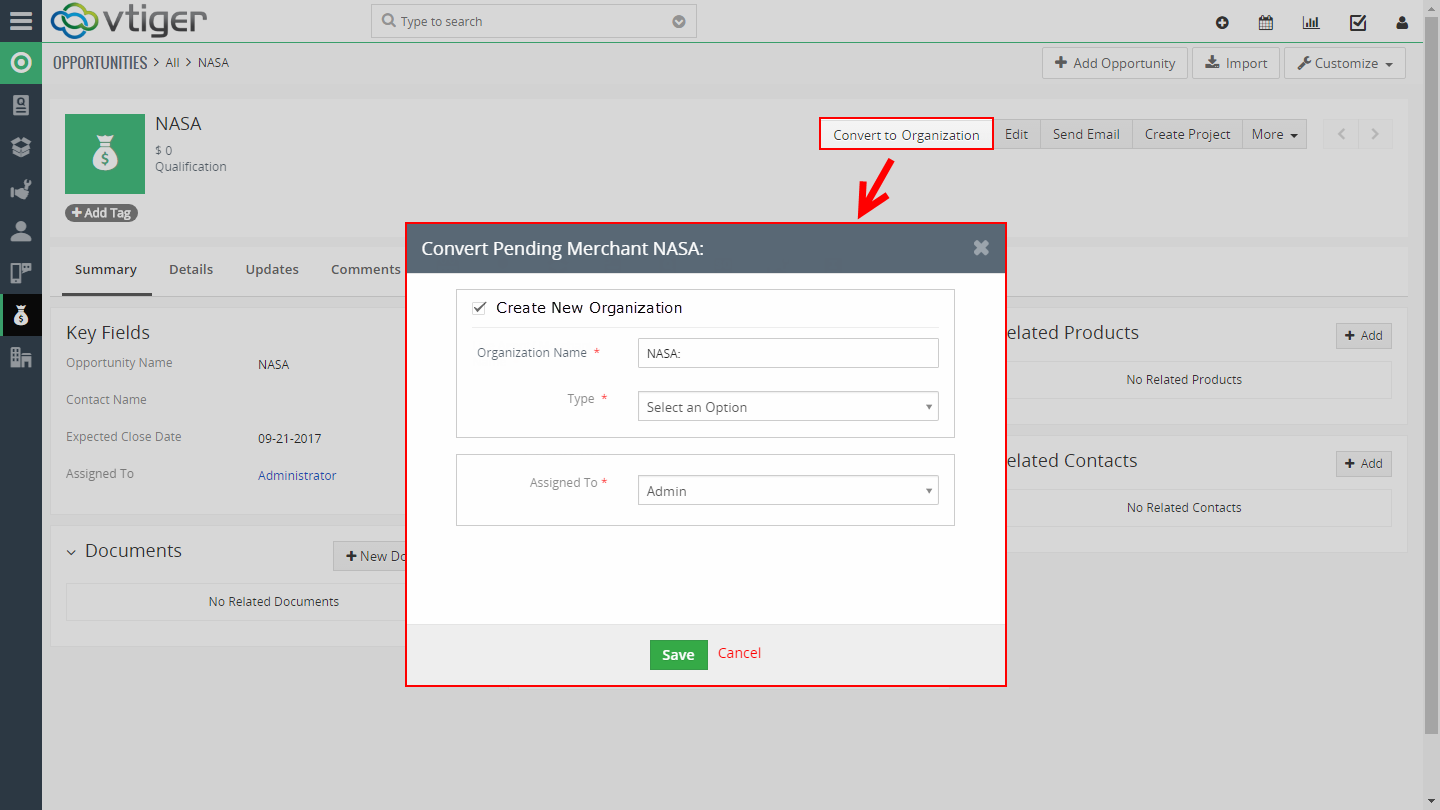
VTiger 7 has new neat feature, which allows the Opportunity to be converted into a Project. In addition, it has an area where you can map the fields from Opportunity to Project (similar to Lead to Opportunity/Contact/Organization mapping). Opportunities are widely used in almost every business and each has it’s own way of handling them. One of our customers had a request to add an option to convert Opportunity to an Organization and Invoice. To accommodate that, we added a button “Convert to Organization” on the opportunity view. Once the button is clicked – it opens up a popup to fill out/verify mandatory fields before create new organization and invoice. We also added mapping area where the user can configure how the fields will map from one module to another, so no data has to be reentered. That’s just one of the VTiger customizations we’ve done – please give
VTiger 6 Customization: Add new Picklist Values while Creating a record (Without Going to Settings)
September 12, 2017
Article
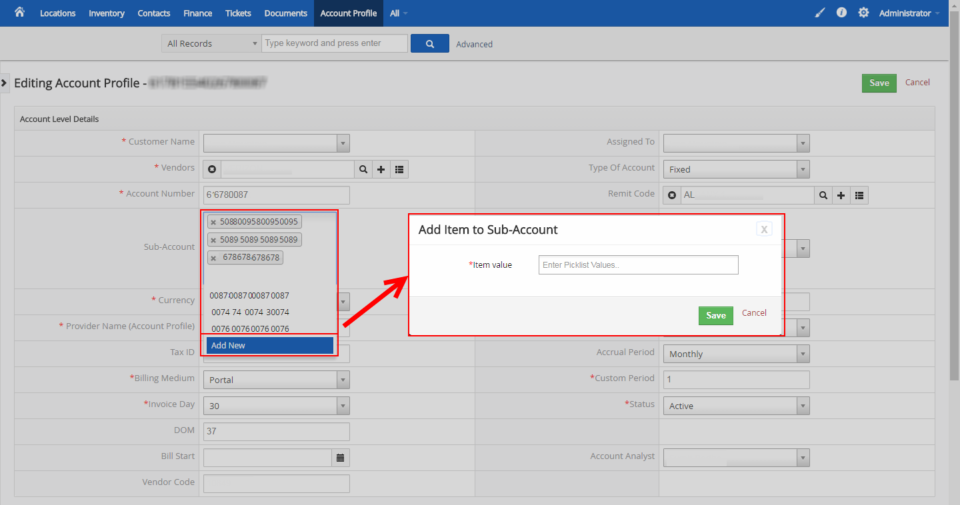
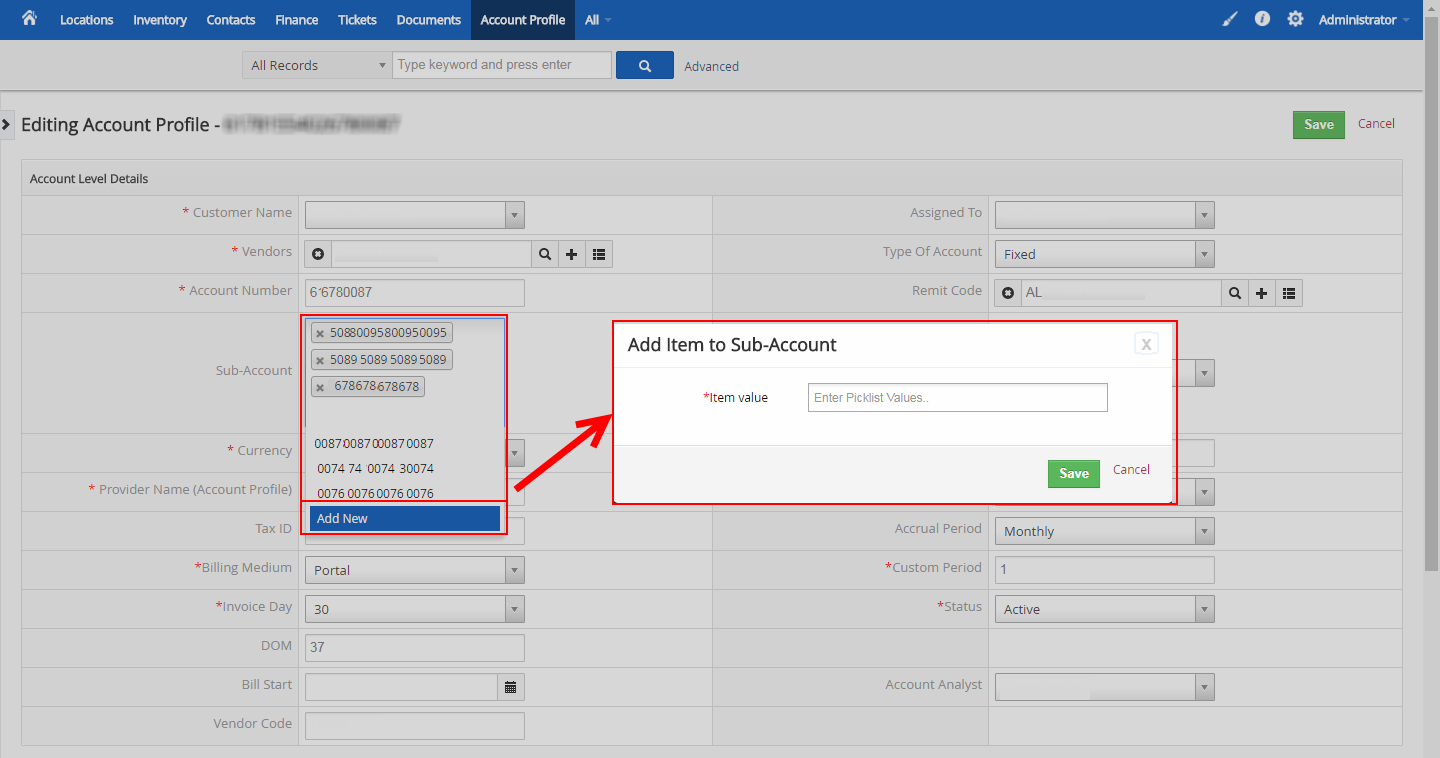
Support for VTigers multiple fields types such as text, currency, picklist, multi-select, date and many more. These fields have to be created in administration panel, which we would expect to, however picklist/dropdown and multi-select fields also require administrator privileges to add selections. We came up with a solution, where you no longer need to go into “Picklist Editor” (which requires admin access) to create picklist/dropdown options, but instead – it can be done as you are editing or creating record in VTiger. We added a “Add New” as one of the picklist values and once selected, it will prompt the user to enter new value, which will be saved as a picklist option and will be available for everyone to be used going forward. That’s just one of the VTiger customizations we’ve done – please give us a call if you need such solution or anything else related to VTiger.
VTiger 7 Customization: Reconcile Invoices, Charges, Deposits & More
September 11, 2017
Article
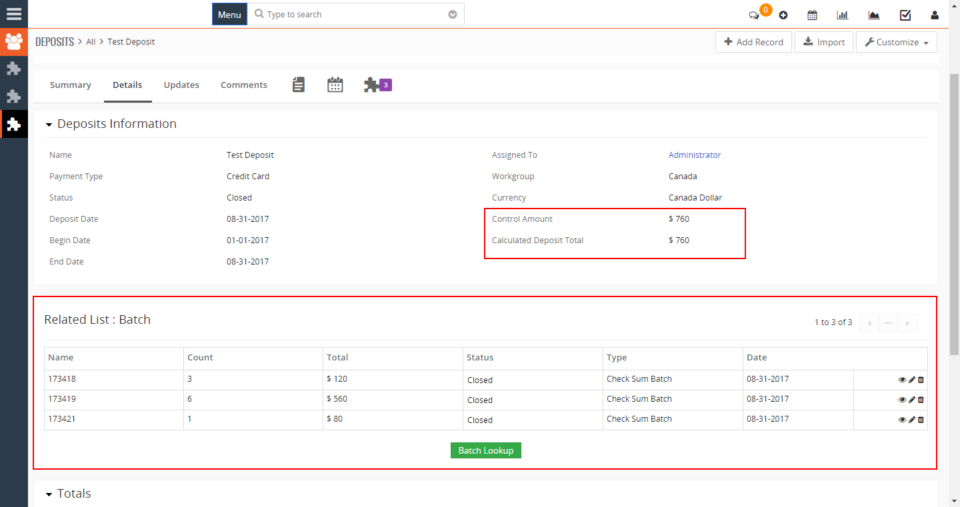
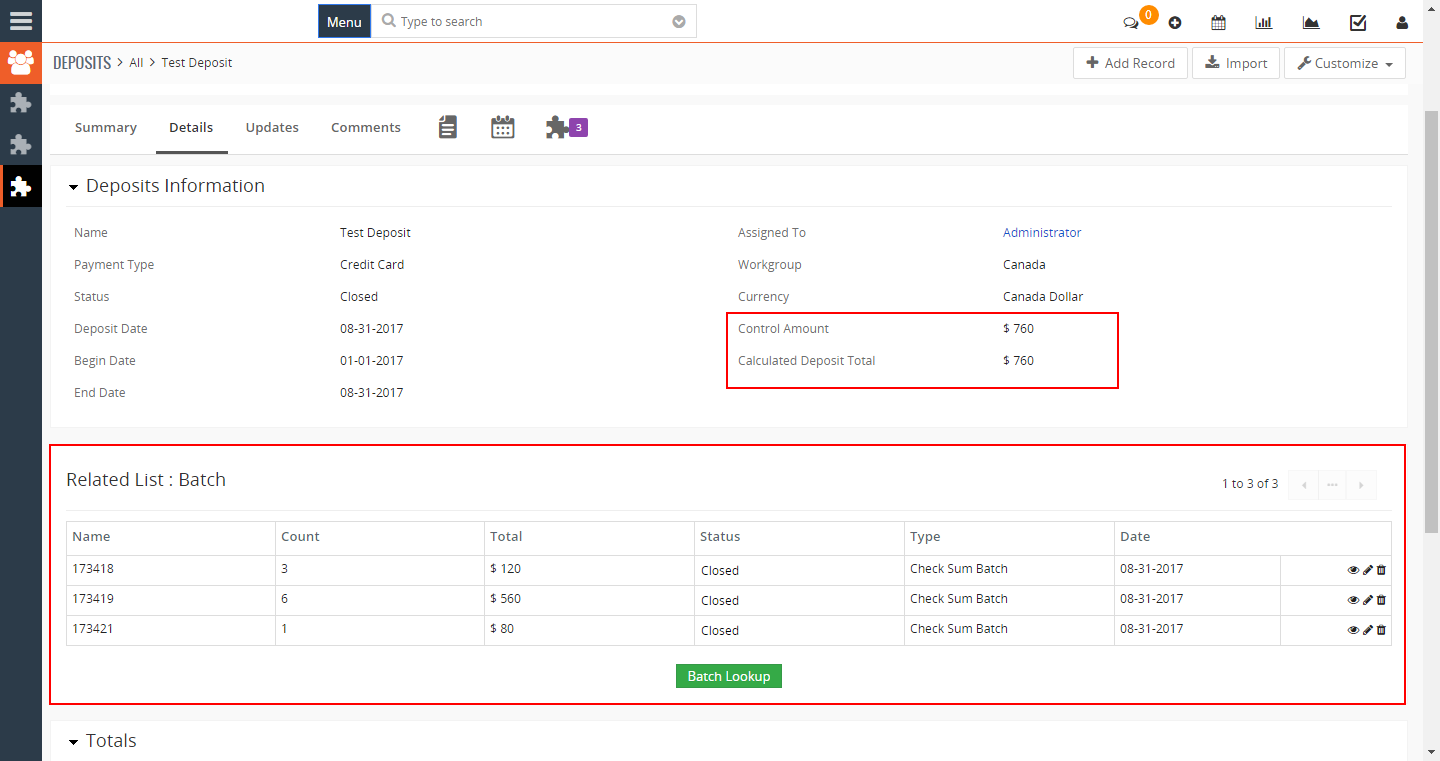
VTiger has a great accounting suite built-in, however it’s lacking a reconciliation piece. One of our customers receives donations and deposits which have to be reconciled at the end of the month. To accommodate that, we built Deposit and Reconciliation VTiger modules, which allows them to record all the donations/deposits, by doing so – they input the amount for each. Next, reconciliation process starts – the user knows exactly how much they should have received for both deposits and donations and they start reconciling by inputting total amount and lookup all the donations/deposits that have not yet been reconciled. At the end of the day, the user will have reconciliation record with all the deposits linked as well as amounts matched. In case where totals don’t add up – we builtin an alert system, which will not allow to close reconciliation record unless the amounts match up to the
VTiger 6 Customization: “Click To Call” Functionality Compatible by Most Softphones
September 8, 2017
Article
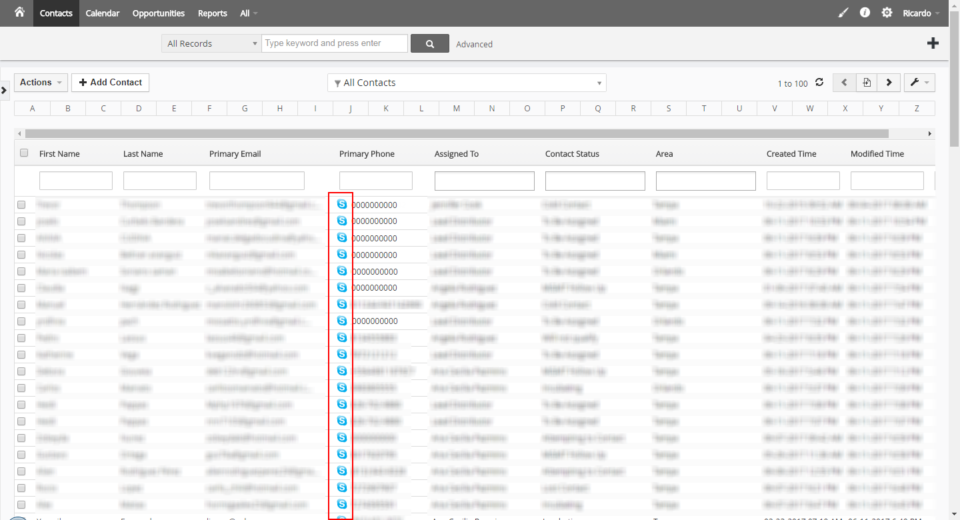
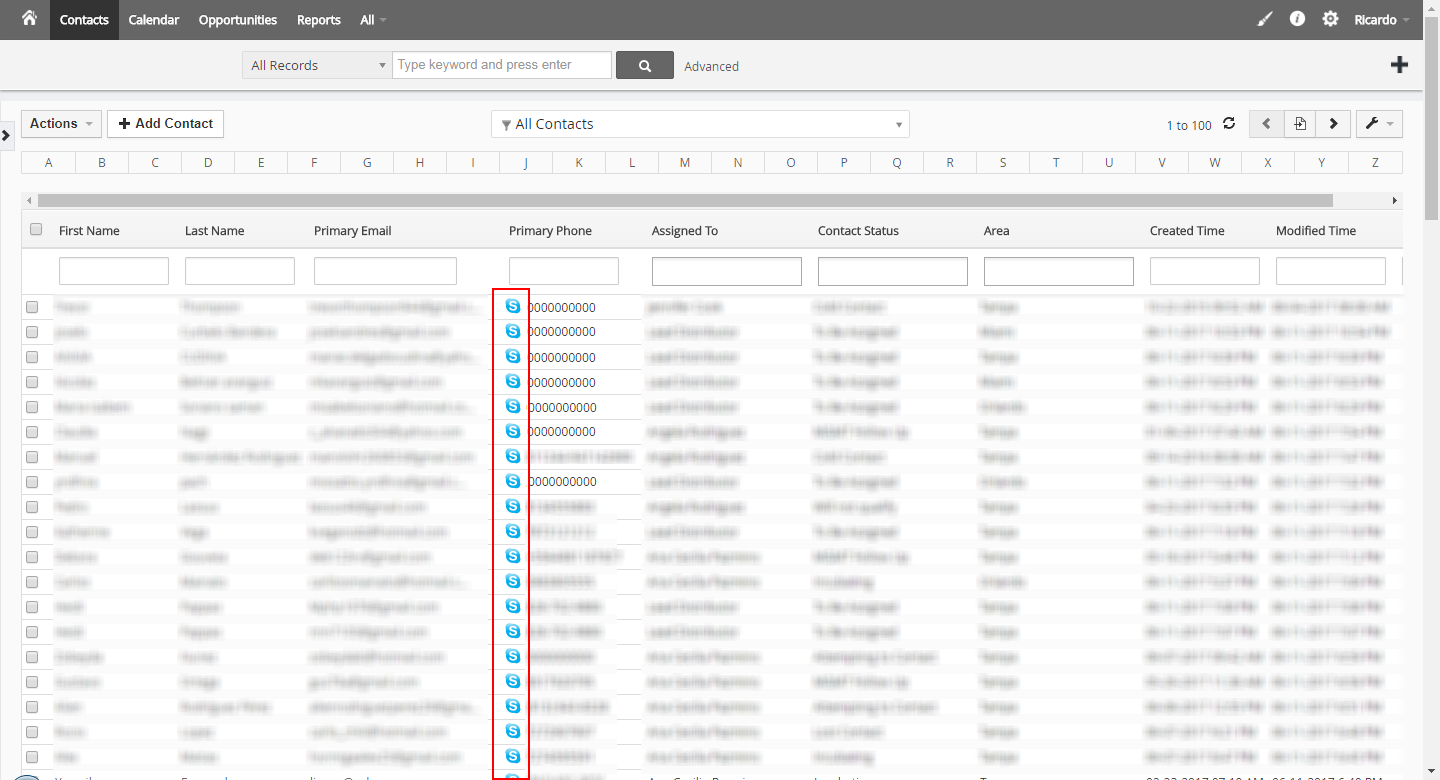
VTiger and Asterisk/PBX integration can be challenging and requires a lot of resources (direct asterisk integration, extensions, server changes, etc..) to get it right. We have come up with a more simpler solution that converts phone number field into softphone compatible hyperlink also known as “Click to Call”. The phone call is triggered by “tel: xxxx” hyperlink and each phone field in all the VTiger views (list, detail and edit) has an icon can can be clicked to trigger the call on your softphone. It’s a very elegant and cost efficient solution to quickly place calls from VTiger using your own softphone or skype. That’s just one of the VTiger customizations we’ve done – please give us a call if you need such solution or anything else related to VTiger.
VTiger 7 Customization: Do not allow out of stock products to be added to Invoice/Sales Order
September 7, 2017
Article
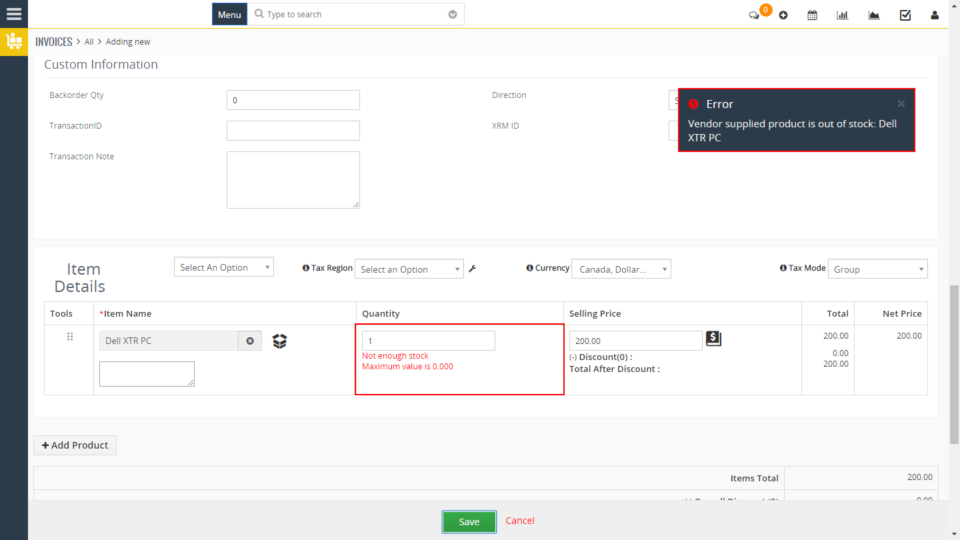
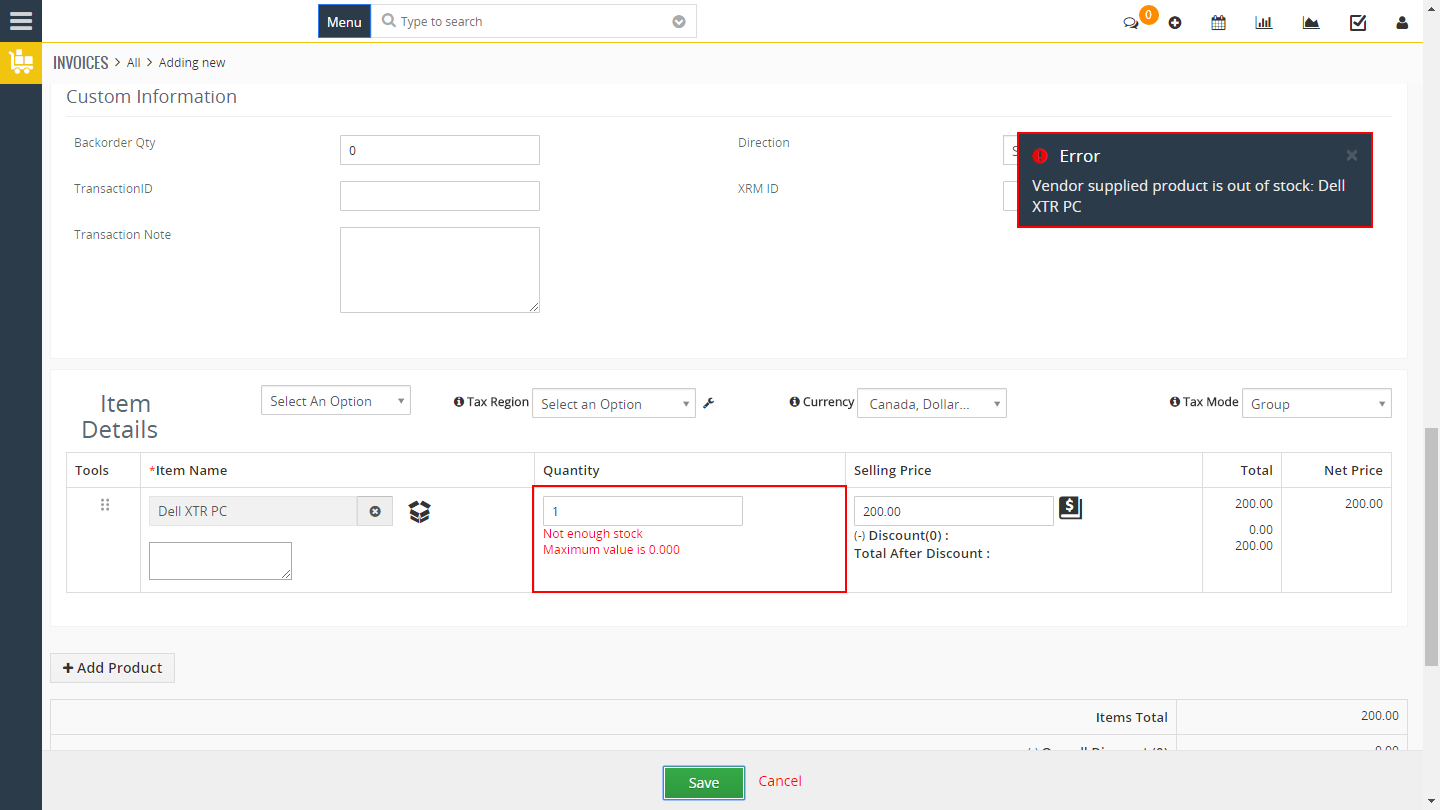
Inventory management is a crucial part of every business. VTiger already has it built in and allows you to “in” and “out” inventory as the invoices, orders and purchase orders get created. Standard VTiger functionality warns you when the product you are adding is Out of Stock, however it does not prevent the user from adding it to the invoice or sales order – you can see where that might become a problem. We customized Invoice and Sales Order section to prevent out of stock products to be saved on the record. The way it works is – the user can still select the product and see that it’s out of stock, however once record is being saved – it will show a notification and will not allow the record to be saved until the product has been removed or quantity adjusted. In addition, the user can override
VTiger Customization for Public & Private Ticket Comments
September 6, 2017
Article
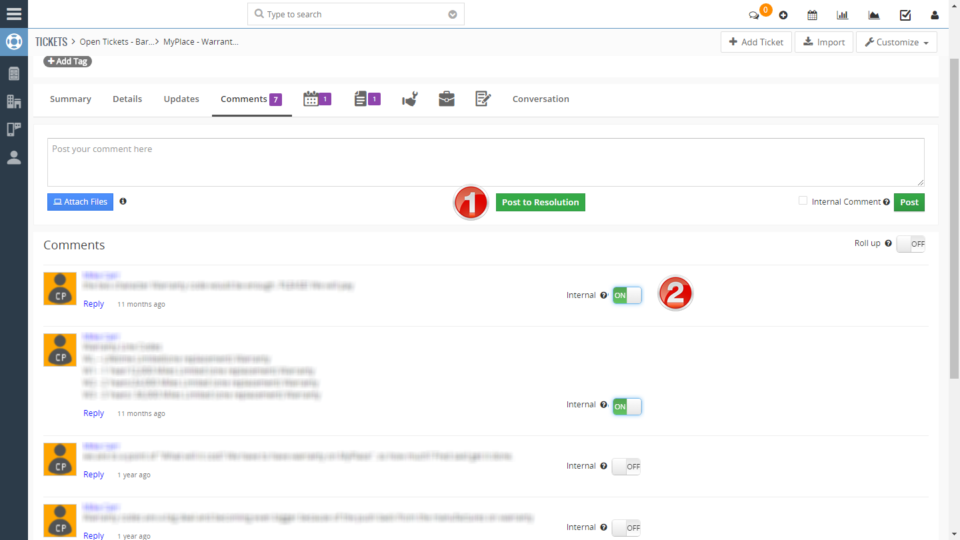
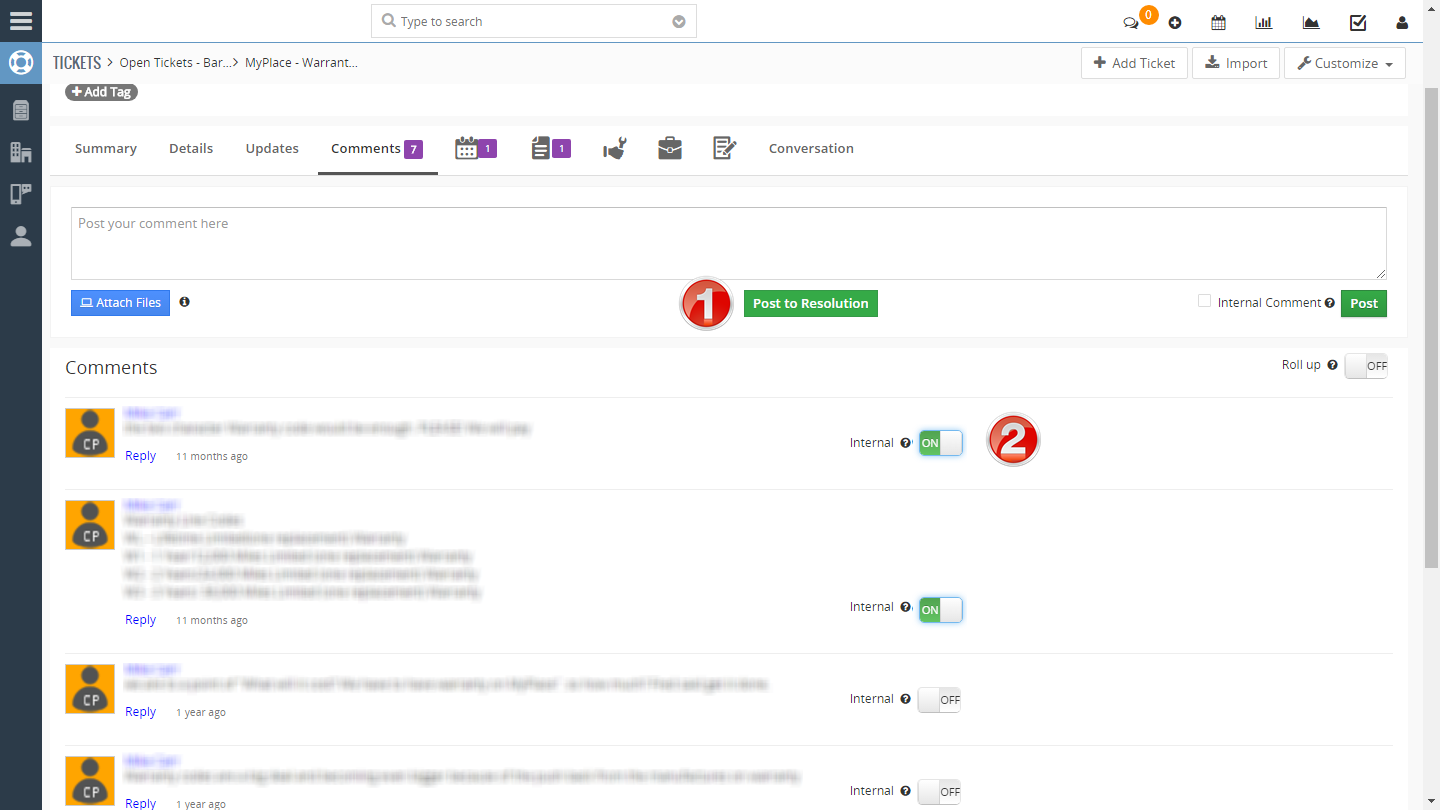
In the latest VTiger 7.0 release a feature was introduced which allows the comments to be set to Internal (private), meaning that only the users (vtiger) will be able to see the comment, while the portal users (contacts) will not. This feature is really helpful to restrict the visibility for the portal user and keep sensitive or technical details from the customer. One of our customers requested to enhance this feature where they would be able to slip the switch and set the comment to be internal (private) or external (public). In the standard VTiger, if the comment is set to internal or external – it can no longer be changed, however – we added the switch which allows that – see #1. Next, we added a “Post to Resolution” field, which basically creates a comment as well as updates “Solution” and “Status” fields on the ticket. This eliminates the
Multi Contact/Organization Relationship Field (stores multiple records)
September 5, 2017
Article
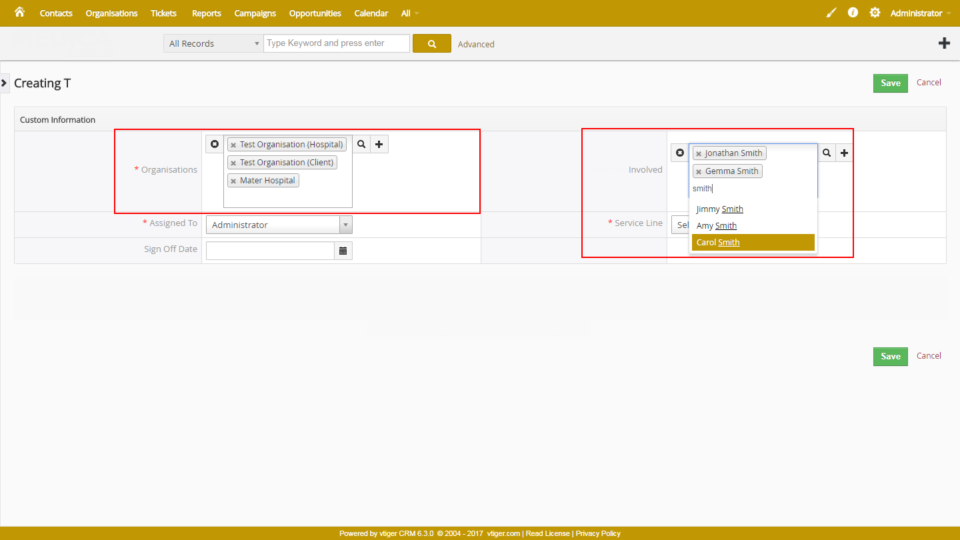
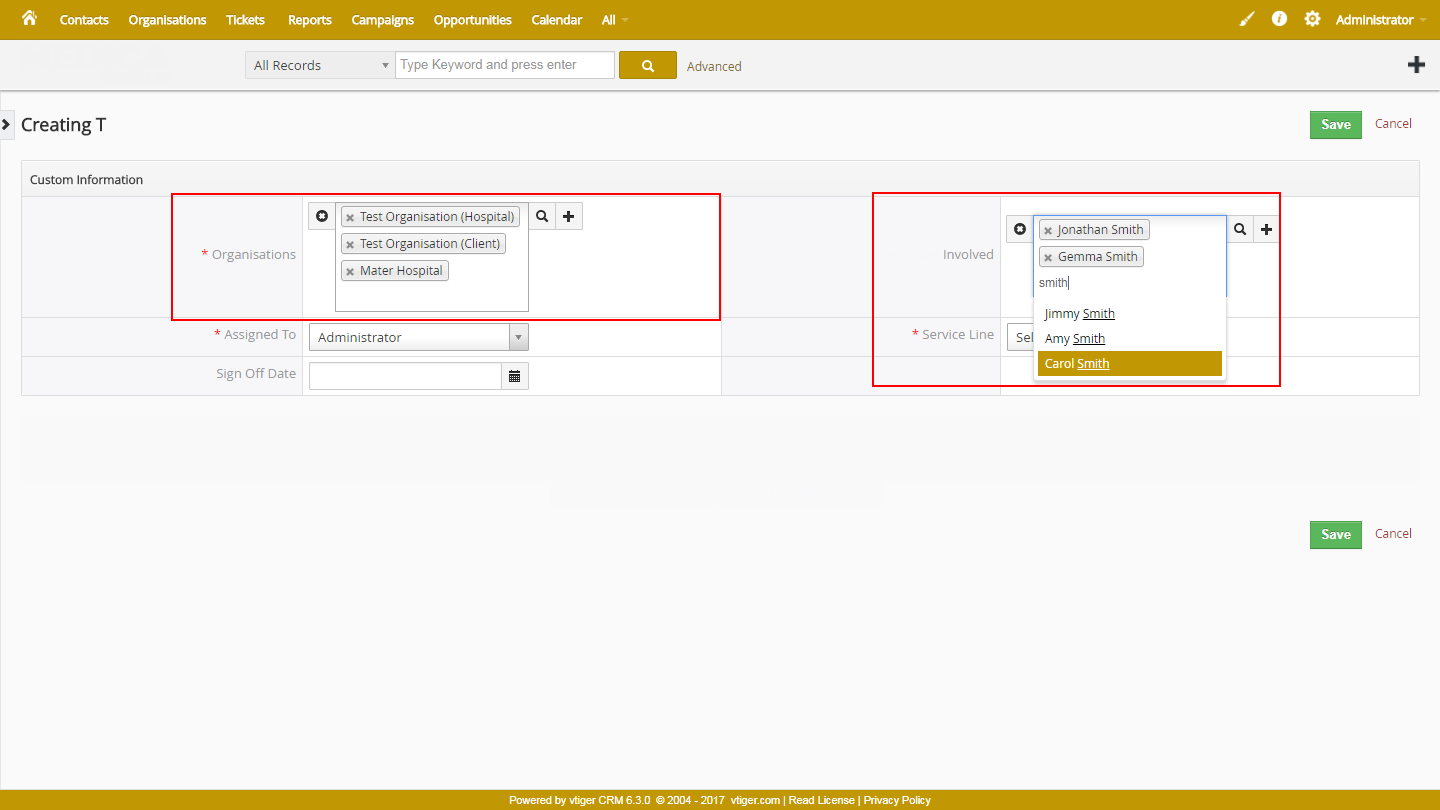
Standard Support for VTigers custom relationship fields for contacts, organizations and all the other modules. The standard functionality only allows to include ONE record in the field, meaning if you have a “Contacts” lookup field – you can only select one contact. We designed new custom UITYPES (field types) to address this issue. Using our new field types – you can now select multiple contacts or organizations into one relationship field. It is very convenient to add additional people (contacts or organization) that are potentially related to the record e.g project, opportunity, ticket and so on. That’s just one of the VTiger customizations we’ve done – please give us a call if you need such solution or anything else related to VTiger.
Advanced ‘Horizontal Calendar’ View In VTiger
June 11, 2017
Article
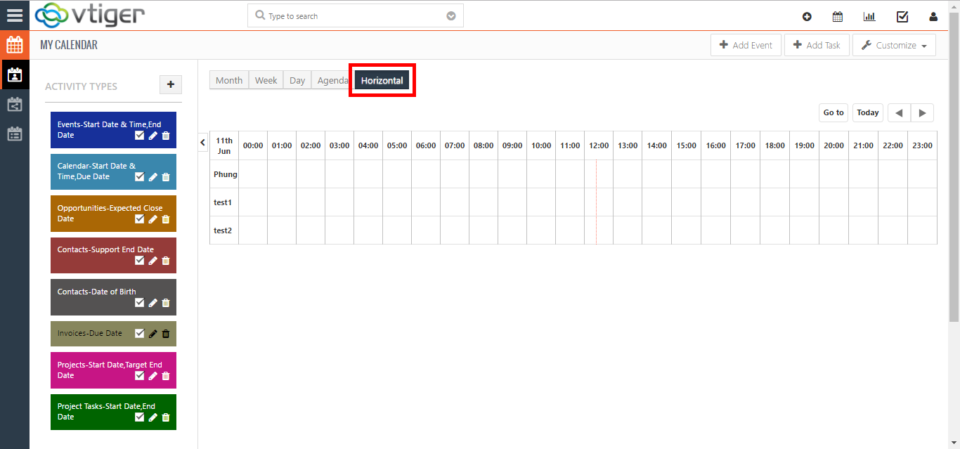
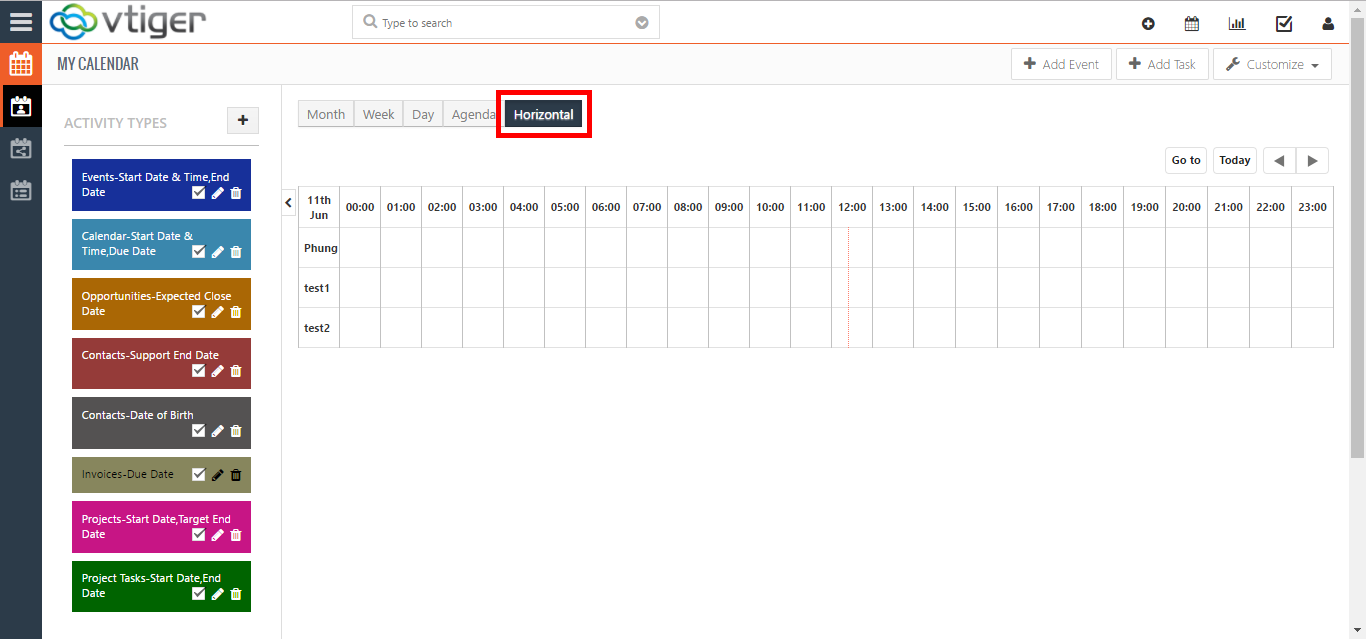
VTiger standard calendar only supports a ‘vertical’ layout of the calendar. Meaning that you can have your day, week, and month views. However, those views are displayed as columns where all the events for all the users (if using shared calendar feature) are crammed into one spot. Such setup makes it very difficult to maintain calendars for multiple people, or even see a who has what scheduled. Imagine, if you had 10 people on your team and you need to look at standard calendar – you wouldn’t be able to tell who has what booked. We enhanced standard VTiger calendar by adding a ‘horizontal’ view, which is a must-have for organizations that rely on calendar and scheduling. It was designed to show all the users/groups as rows, while the days/hours/weeks remain as columns. This allows users to see events assigned to each user without them overlapping onto other users/hours. In
VTiger 7.0.1 Patch has been released
June 6, 2017

Article
VTiger 7.0.1 GA Release VTiger 7.0 GA (Stable) was released on May 23rd, 2017, however the release had few critical bugs that needed to be addressed right away. On June 6th, 2017 VTiger 7.0.1 patch was released. Here’s the list of issues fixed: #546 – Unable to open the Mail Converter from the menu #554 – Migration errors from V6.5 to V7 #526 – google sync not working #559 – Project Summary Broken #552 – 1st Comment not show in summary #566 – Calendar Issues #517 – pie chart doesn’t have legend In addition to the above, we also have a few minor changes. #551 – Extension banner show also 6.x extensions #493 – change organization associated to opportunity from summary view Latest source code can be downloaded from git or official vtiger website. If you already installed VTiger 7.0 – you will need to go through the

VTiger 7.0 GA (Stable) has been released
May 23, 2017
Article
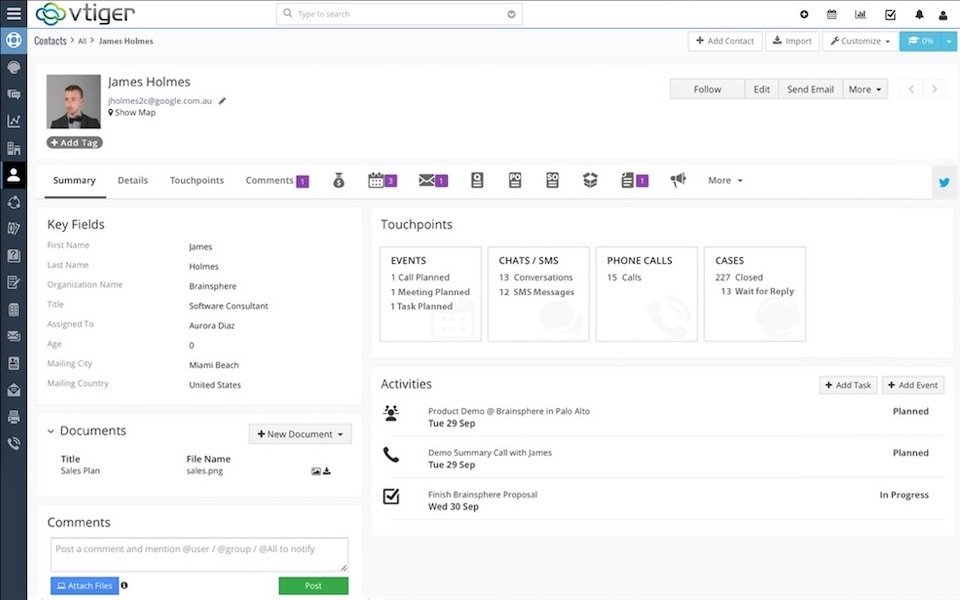
VTiger 7.0 GA (Stable) Release We are thrilled to announce the release of VTiger 7.0 GA (Stable). New version of VTiger was completely redesigned and has new user interface(theme), which a lot more responsible and user friendly. In addition, it has many new features along with the security updates. To find out more – please see offical vtiger announcement. VTiger 7.0 GA can be downloaded from vtiger.com. Official VTiger 7.0 GA (Stable) Download Link VTiger 7.0 GA interactive demo is available as well, please follow the link below VTiger 7.0 Open Source Live Demo The upgrade patch for VTiger 6.5 to 7.0, has already been released and the instructions can be found below. Step by Step Guide to Upgrade VTiger 6.5 to VTiger 7.0 Our VTiger Extension Pack has been already converted and will work with VTiger 7.0 right away. Note, that not all of the extensions have been
VTiger 7.0 GA Release & Extension Pack (Schedule, Updates & Compatibility)
May 21, 2017

Article
VTiger 7.0 GA Release VTiger 7.0 GA (Stable) has been released May 23rd, 2017. You can download it from vtiger.com or obtain latest code on git. You can find full feature list here. Here’s a VTiger 7.0 introductory/demo video which covers most of the features: https://www.youtube.com/watch?v=4jlhqKQSpP4 Extension Pack Compatibility with VTiger 7.0 Open Source Our team has been working really hard in the past few months to convert most of our extensions to be compatible with VTiger 7.0. We are excited to say, that 95% of our extensions have already been converted and are fully compatible with VTiger 7.0 open source. You can check the status of each as well as see which extensions have been discontinued for one reason or another. VTiger 7.0 Extension Pack Compatibility Chart In addition, our extension pages(on the website) have already been updated and include screenshots/videos/live demos & user guides
VTiger 7.0 Open Source Demo
May 21, 2017

Article
VTiger 7 Open Source Demo VTiger 7.0 has officially been released May 23rd, 2017. You can download the latest files from vtiger.com or code.vtiger.com. We have setup a VTiger 7.0 demo instance that has the latest vtiger stable files. VTiger 7 Demo Link: https://demo7.vtexperts.com/vtigercrm7demo/index.php VTiger 7 Demo Username: demo VTiger 7 Demo Password: demo *Note, we have disabled admin access due to security reasons. List of VTiger7 new features: Vtiger 7 UI layout Easier list views Private / Public tags Web form attachments Variable Taxes, Charges, and Regions Picklist Coloring App Menus Rollup comments Multiple dashboard tabs Controlled sharing of Lists Custom Activity Type Splitting Edit action in Create / Edit action in roles / profiles. Comment with attachments. And much more! For any questions – please contact us at [email protected] Thanks
Step by Step Guide to Upgrade to VTiger 7.0
May 21, 2017

Article
VTiger 7 upgrade path is very similar to earlier versions. You will need to download the patch, extract it, backup your files/db and run the VTiger 7 migration wizard. This article provides step by step instructions to upgrade to VTiger 7.0. VTiger 7 has a completely redesigned user interface and a lot of new features. If you haven’t had a chance to test drive vtiger 7 – you can play around with our demo. VTiger 7 Open Source Demo Link If you are a ‘do it yourself’ type of person and have enough knowledge about VTiger and its’ upgrade process – you should be able to do it yourself. On the other hand, if you consider your data too valuable to not risk, we at VTiger Experts can execute it for you. Our developers are skilled and highly experienced in upgrading VTiger to the latest version. #1: Creating Backup of
VTiger Items Details Customizer (Advanced) – Upgrading to VTiger 7.x
May 15, 2017

Article
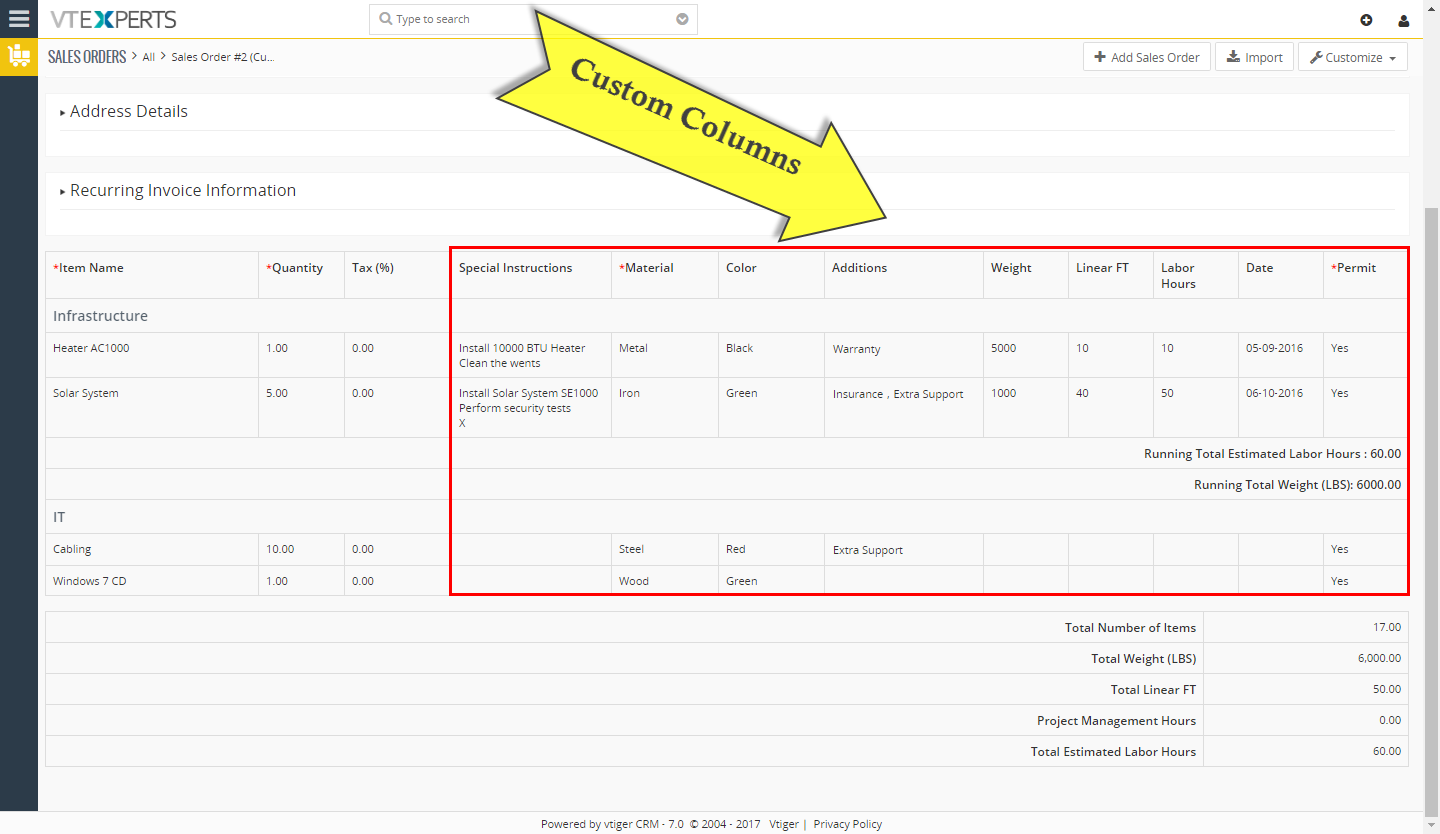
VTiger Items Details Customizer (Advanced) is one of our most utilized extensions due to its’ powerful capabilities while customizing Item details on quote/invoice/order, adding running totals, section headers and most importantly – specifying formulas for each column or total field(s). Due to increased requests to make Item Details Customizer (Advanced) compatible with reports, filters & allow to import – we added such functionality. If you are using VTiger 7.x and installed our extension on 7.x – you do not need to take any additional steps – new functionality will work out of the box, however if you are upgrading from VTiger 6.x – you will need to convert item details data to work with our upgraded module, which includes latest functionality. Here are the steps you need to take to perform the update: *Note, we assume that your VTiger has already been upgraded to 7.x. Backup your files &
VTiger 7.0 RC and GA Release Schedule
March 30, 2017
Article
We’re happy to inform that Vtiger 7.0 RC and GA have been scheduled for the release. These releases include many new features and UI changes. Click here to see our extension pack upgrade schedule and status. Release Schedule: RC (Validation) – April 10, 2017 GA – Released May 23rd, 2017. List of Vtiger7 new features: Vtiger 7 UI layout Easier list views Private / Public tags Web form attachments Variable Taxes, Charges, and Regions Picklist Coloring App Menus Rollup comments Multiple dashboard tabs Controlled sharing of Lists Custom Activity Type Splitting Edit action in Create / Edit action in roles / profiles. Comment with attachments. Once released – we’ll provide demo link. Thanks
Marketing Objectives Affect Pricing Decisions
February 15, 2017

Article
Marketing objectives are internal factors that affect pricing decision. Before setting price, the firm must decide on its price strategy for their goods. If the company has already selected its target market and positioning attentively, then its marketing mix strategy, with price, will be comparatively straightforward. For example, when Toyota developed its Lexus brand to compete with European luxurious cars in the higher-income segment, and it required charging a high price. Thus, pricing strategy is mainly determined by decisions on market positioning. Meanwhile, the company may search further general or specific objectives. General objectives include survival, market share leadership, current profit maximization, and product quality leadership. At a more specific level, a company can set prices low to avoid competition from entering the market or set prices at their competitors’ level to stabilize the market. It can set prices to keep the support and faithfulness of resellers or to stay
Benefits Of QuickBooks (Desktop) Integration With VTiger
February 8, 2017
Article
The current business environment is becoming more competitive with every passing day, but on the other side if we observe most of the new ventures fail to perform operations and go bankrupt even in the first six months of their inauguration. There are multiple reasons behind these failures and some of the prominent explanations to this phenomena include lack of funds, unprofessional behavior, limited resources etc. When we look at the performance of small scale business firms the biggest hurdle they face is limited resources, even with great planning they fail to achieve the desired results because of fund restriction. But the smart professionals incorporate solutions which are cost effective and tweak them as per their needs to get high results. One of such cost-effective tool from which small scale business are benefiting at a large scale is QuickBooks Desktop. Statistics show that 8 out of 10 new businesses
VTiger Sales Insights
February 6, 2017
Article
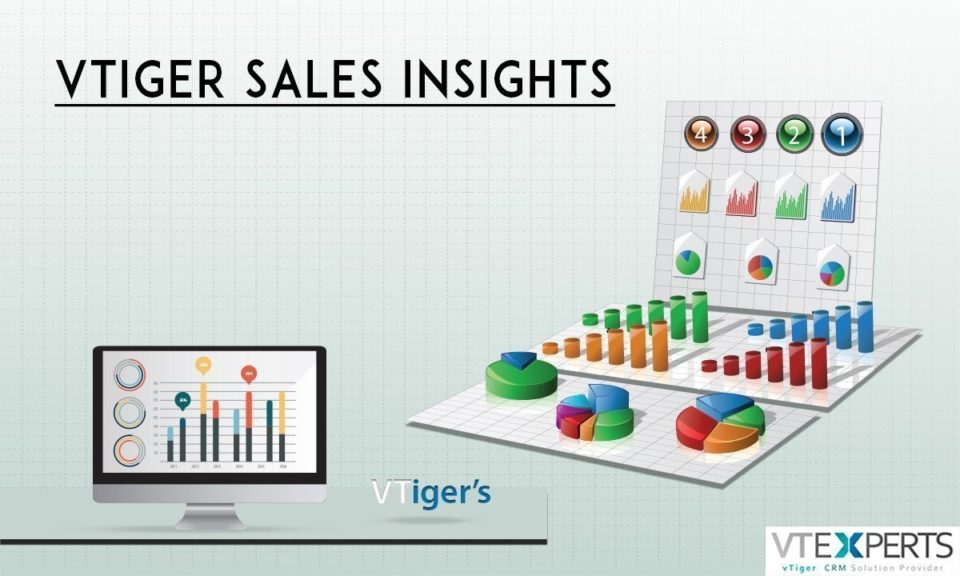
A group of different departments works together on a single client in order to yield profit. In order to make a valued client happy, right from the start when the process of initiating the customer takes place to the provision of after sales service to the client a number of different people who belong to different departments put their endless efforts. Out of all the departments (sales, marketing, human resource, accounts etc), Sales is the department who needs special care as they carry the most burden in whole process of satisfying the customer. Managing this department is a job which requires extensive efforts and deep insights regarding the performance of the whole team. Sales rep is the unit of this department and they play one of the most important role and that is engaging the customer and providing them with what they need. You don’t close a sale, you
VTiger on Steroids
January 24, 2017
Article
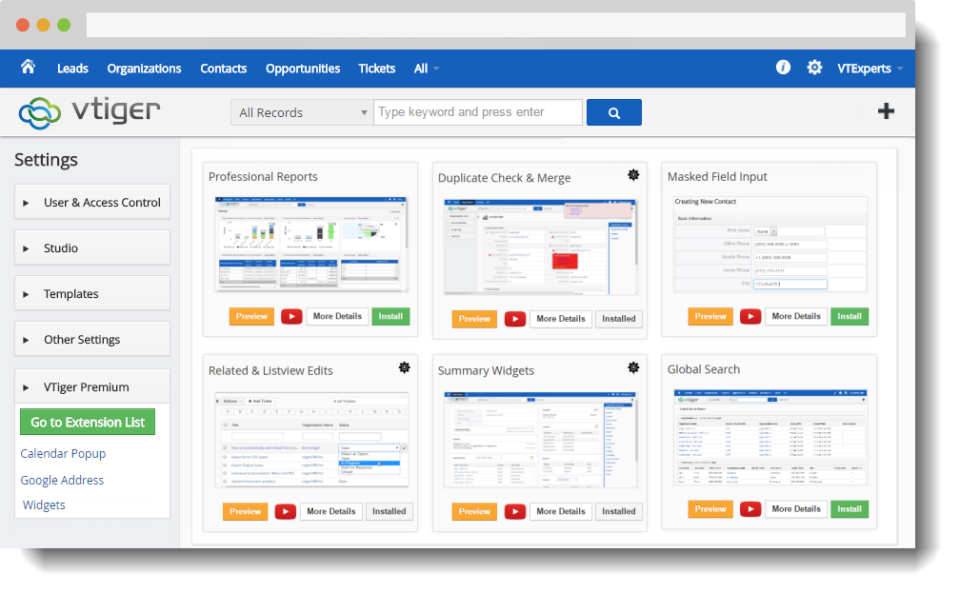
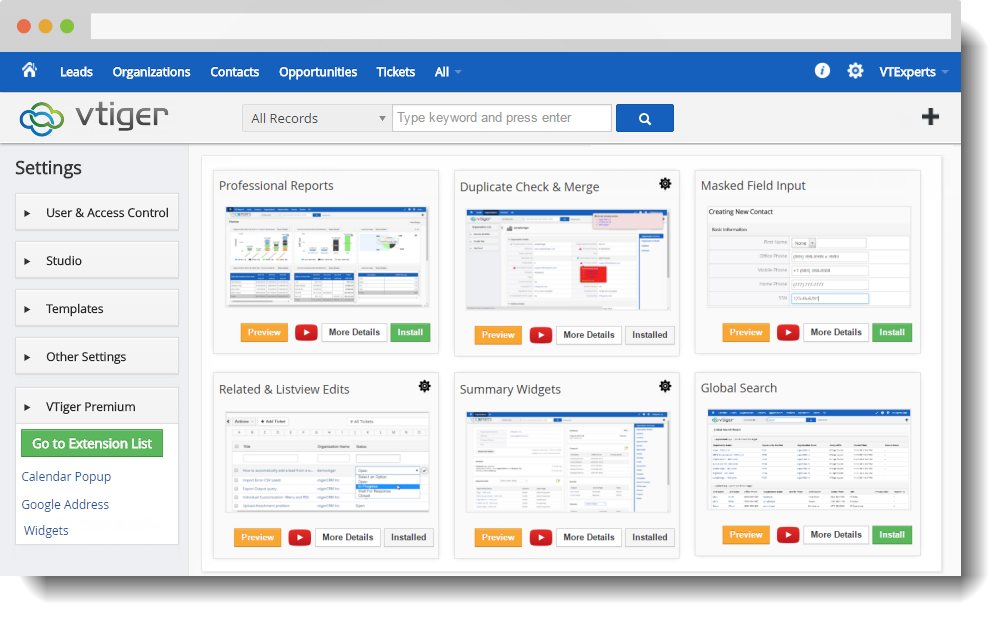
If you are reading this article, chances are – you are a heavy VTiger user. As you probably know, there is no perfect CRM solution that can do everything your business needs, however VTiger can likely do 80% of the things that your business needs and to fulfill the rest – the best way is to add extensions or plugins. We’ve put together a list of most commonly used VTiger Extensions. It includes some of our favorites such as smart search, real time duplicate check, enhanced views and many more that really make VTiger more intuitive and user friendly CRM. 1. Chat With Your Team Emails are great, but they tend to get lost or buried in the inbox, so we came up with a chat plugin for VTiger. It allows you to create channels, private & group chats. It’s very easy to use – slides out/in without closing your




VTiger 6 Customization: Custom Order Module + Item Depletion