• Company
  • Blog
  • Case Studies
  • Partners
  • Contact

vtexpertswplogovtexpertswplogotransp2-white-small-2transp2-white-small-2

Menu
  • Home
  • Services –
    • Services

      Maintenance & Support

      Plans provide guidance, phone support, and training to get the most out of CRM.

      Customization

      Streamline & automate your sales, marketing and operations.

      Integrations

      CRM integration with leading third-party service providers, websites and apps.

      Migration

      Vtiger Upgrade

      Stay up to date with the latest features & security patches.

      Data Migration

      Transfer your important data from any other CRM, ERP or custom solution.

      Packages

      Monthly Support Plans

      Essential for growing businesses

      Kickstarter Packages

      Optimal solution for small businesses

      Projects & Incidents

      Recommended for updates & fixes
  • Solutions
    • Sales

      Contact Management

      Close more deals with single-page contact management.

      Opportunities

      Track stages and milestones of your deals to keep the sales process on track.

      360 View

      Contact data from every angle, including conversations, call notes.

      More ....

      Appointments, Reporting, Proposals & more..
      Note: The links in this menu are not clickable. Please contact us for more details.

      HelpDesk

      Ticketing

      Resolve every issue in the shortest possible time with powerful ticketing features.

      Service Level Agreements

      Set up trigger campaigns to send alerts when the ticket resolution time exceeds the due date.

      Automation

      Leverage automation to define priorities, statuses & assignments for tickets.

      More ....

      Canned responses, feedback, customer portal...
      Note: The links in this menu are not clickable. Please contact us for more details.

      Marketing

      Marketing Automation

      Marketing workflows with an easy drag-and-drop designer.

      Email Marketing

      Get complete email marketing features with newsletters, analytics, and more.

      Email Tracking

      Track your email performance with metrics that matter and notifications.

      More ....

      Landing pages, SMS, Analytics & more..
      Note: The links in this menu are not clickable. Please contact us for more details.
  • Extensions
    • Extension Pack

      Get Started

      Details, screenshots and videos

      Pricing

      Affordable and cost effective

      FAQ

      Pricing, licensing and compatibility

      Documentation

      Installation Instructions

      Step by step guide

      Helpdesk

      Documentation & user guides

      Extensions

      Extensions for Vtiger 8.x

      70+ Plugins with screenshots, videos & live demos

      Extensions for Vtiger 7.x

      70+ Plugins with screenshots, videos & live demos

      Extensions for Vtiger 6.x

      65+ Plugins with screenshots, videos & live demos.
  • Managed Hosting
  • Resources
    • Documentation

      User Guide

      Best practices and tips to keep your user engaged.

      Administrator Guide

      Designed to help manage and configure the CRM for all the Vtiger users.

      Video Tutorials

      Learn how to use Vtiger features with guided video tours

      Extensions

      Helpdesk

      Admin & User guides for all our Extensions.

      Recent Updates

      New Extension releases & enhacements to Vtiger.

      Development

      Contributions

      Enhanced features, fixes and extensions.

      Github

      Access to upcoming releases, patches & more.

      Official Resources

      Developer forums, code repository & more.
  • Extension List
  • Home
  • Managed Hosting
  • Extensions
    • Get Started
    • Installation Instructions
    • Pricing
    • FAQs
    • Extension List
  • Services
    • Support
    • Custom Development
    • Integrations
    • Vtiger Upgrade
    • Data Migration
  • Support Plans
    • Monthly Plans
    • Support Plans
    • Startup Packages
  • Resources
    • Helpdesk
    • Blog
    • Contact Us
    • Partners

VTiger Advanced Customer Portal vs Default Customer Portal: What’s the Difference?

Categories
  • vTiger Tweaks
Tags

Vtiger’s default Customer Portal gives customers access to selected CRM information through a separate customer-facing interface. It works well when the standard modules and portal options meet the business requirement.

But some businesses need more control. They may want to show a custom VTiger module, give different users access to different modules and records, control which fields can be viewed or edited, add more related information, or change how records are organized in the portal.

The VTExperts Advanced Customer Portal adds these options and provides more control over how the customer portal is configured.
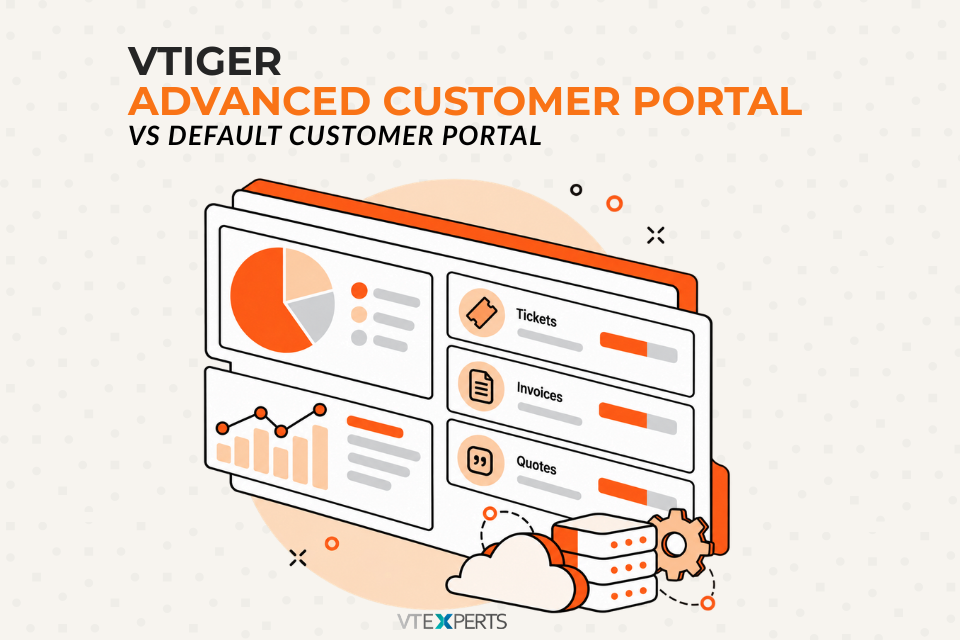
VTiger Default Customer Portal vs VTExperts Advanced Customer Portal

What Is the Default VTiger Customer Portal?

The default VTiger Customer Portal gives customers a way to access selected CRM information through a separate portal.

It supports a limited number of default VTiger modules, which may be enough when customers only need access to the modules already supported by the standard portal.

The standard portal becomes more restrictive when a business needs to expose its own custom modules or configure the portal around a more specific customer workflow.

For example, a company may have created a custom VTiger module and want customers to access it from the portal. The default portal does not support this.

This is where the Advanced Customer Portal provides additional options.

What Is the VTExperts Advanced Customer Portal?

The VTExperts Advanced Customer Portal extends the standard customer portal with additional configuration and access-control options.

It gives administrators more control over modules, profiles, fields, records, related information, lists, tickets, homepage settings, and security.

The difference is not simply how the portal looks. It is the amount of control available when configuring what portal users can access and how information is presented to them.

Key Differences Between the Default and Advanced Customer Portal

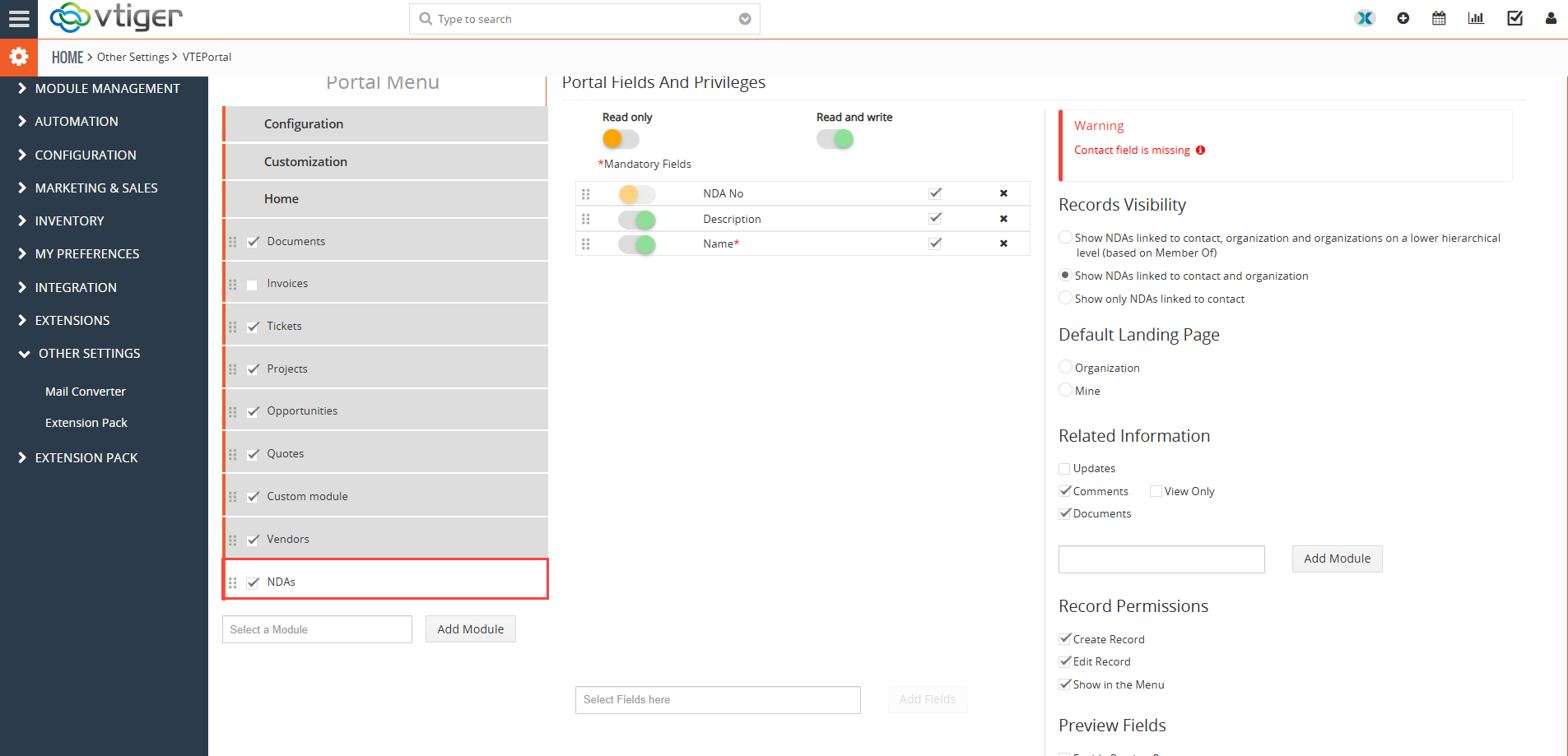
1. Custom VTiger Module Support

The default VTiger Customer Portal does not support custom VTiger modules.

The VTExperts Advanced Customer Portal supports custom VTiger modules, allowing businesses to make their own CRM modules available to portal users.

This is useful when a business has created a custom module for a particular process and wants customers to access that information through the portal.

For example, a company may have a custom VTiger module that is part of its customer workflow. Instead of keeping that information available only inside the CRM, the module can be exposed through the customer portal.

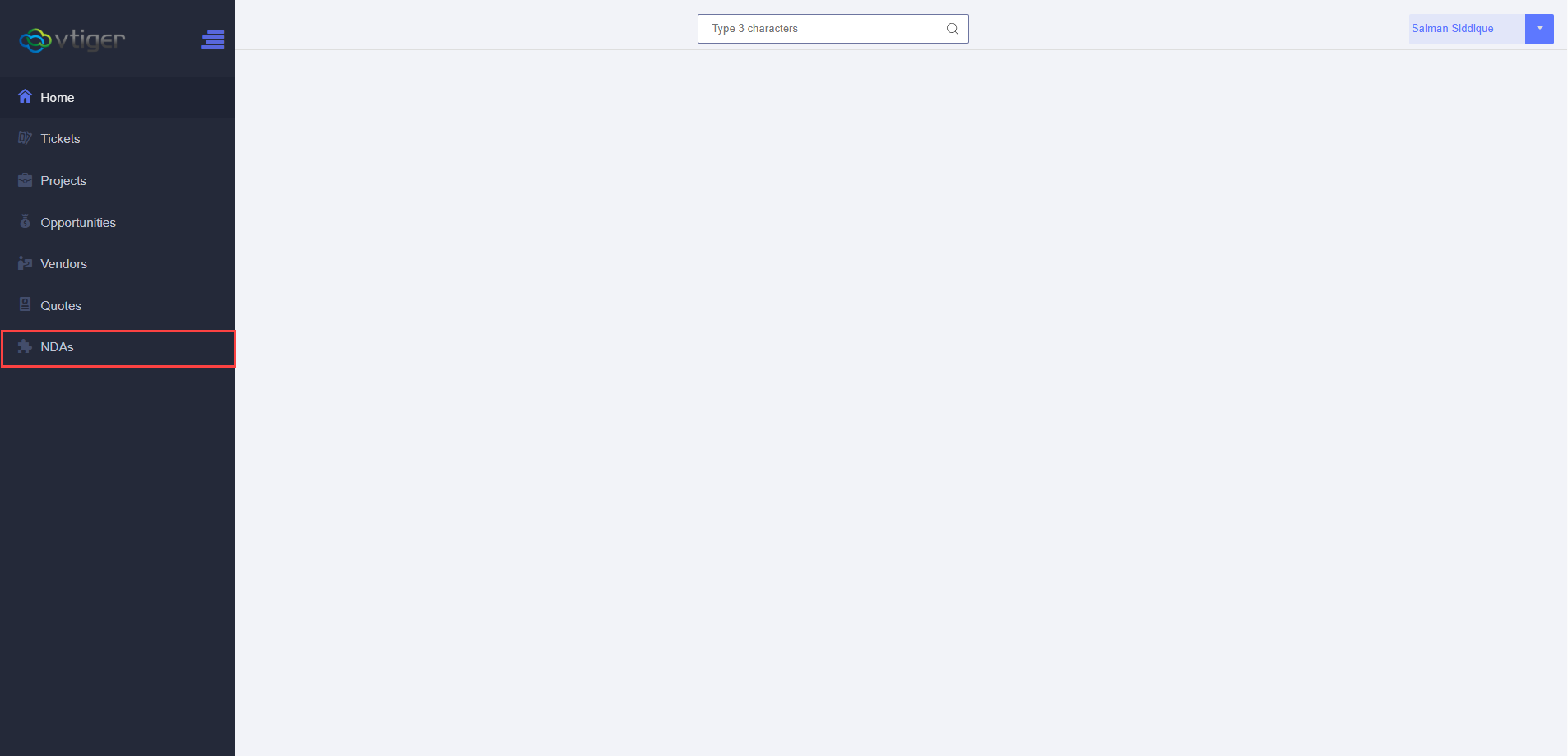
  • Portal configuration
  • Portal View

Portal configuration

Add custom modules to portal

Portal View

See how custom modules on portal

2. Portal Profiles

Portal Profiles are one of the main features that distinguish the Advanced Customer Portal from the default portal.

The default VTiger Customer Portal does not provide portal profiles.

With the Advanced Portal, administrators can create profiles and assign them to portal users.

Profiles can be configured for different access requirements. This means different users can have different access to modules and records.

For example, one portal profile may provide access to Tickets and Documents, while another may include additional modules or records.

This is useful when every portal user should not have the same level of access.

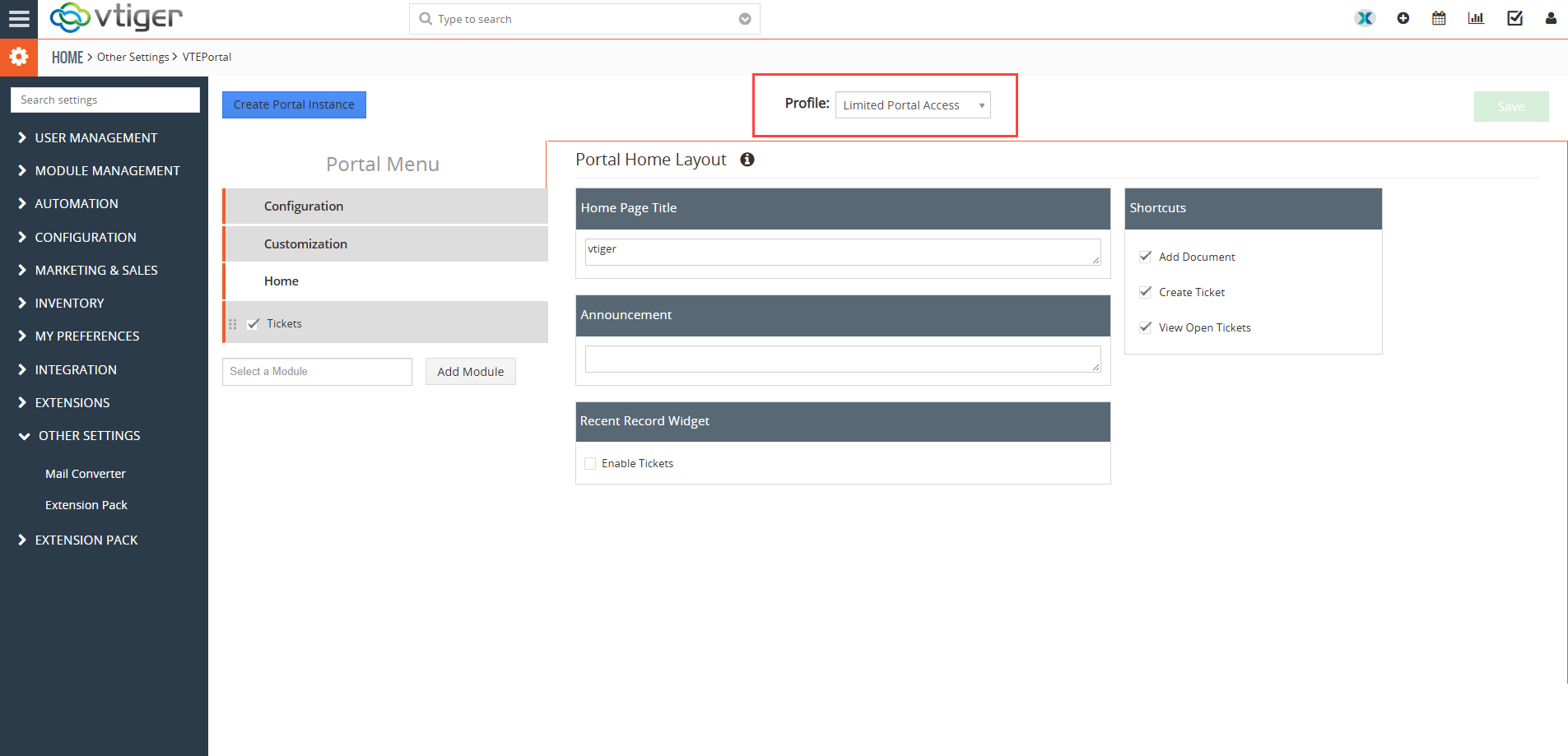
How to create Portal profiles

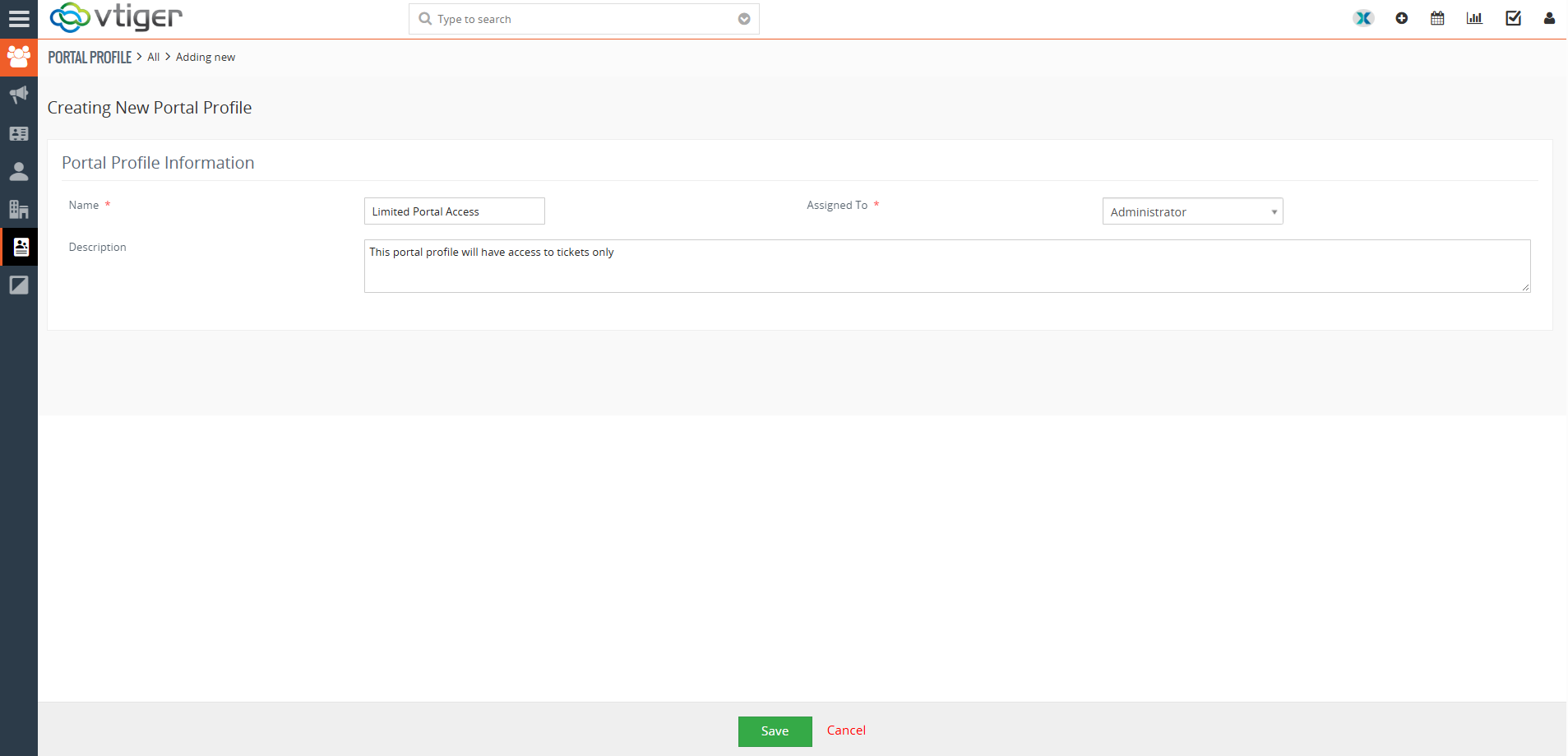
1. To Create Portal profiles: Go to > Marketing > Portal Profiles

2. Add a new Portal profile

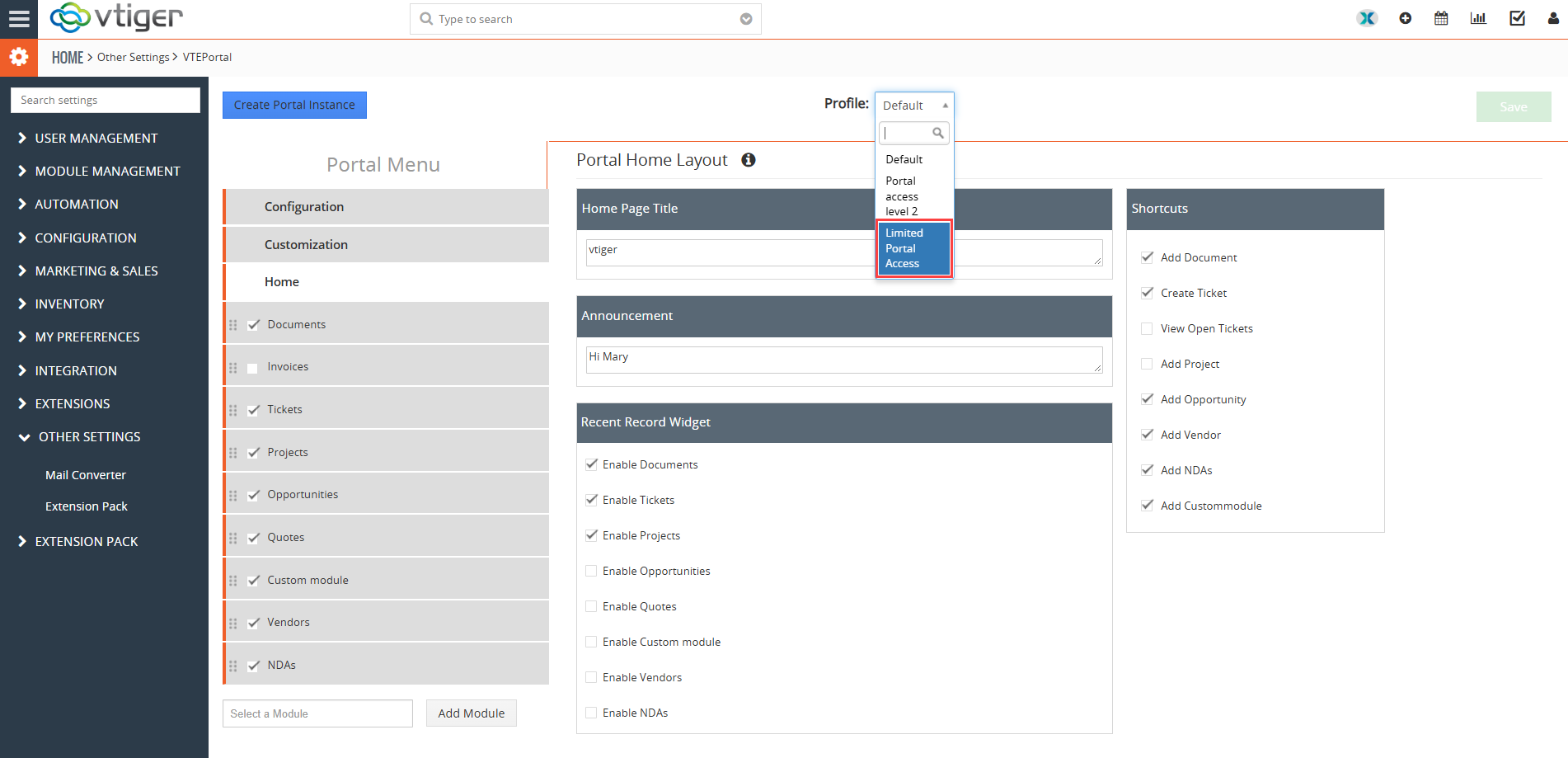
3. Once Portal Profile is added, it will start appearing on the Portal

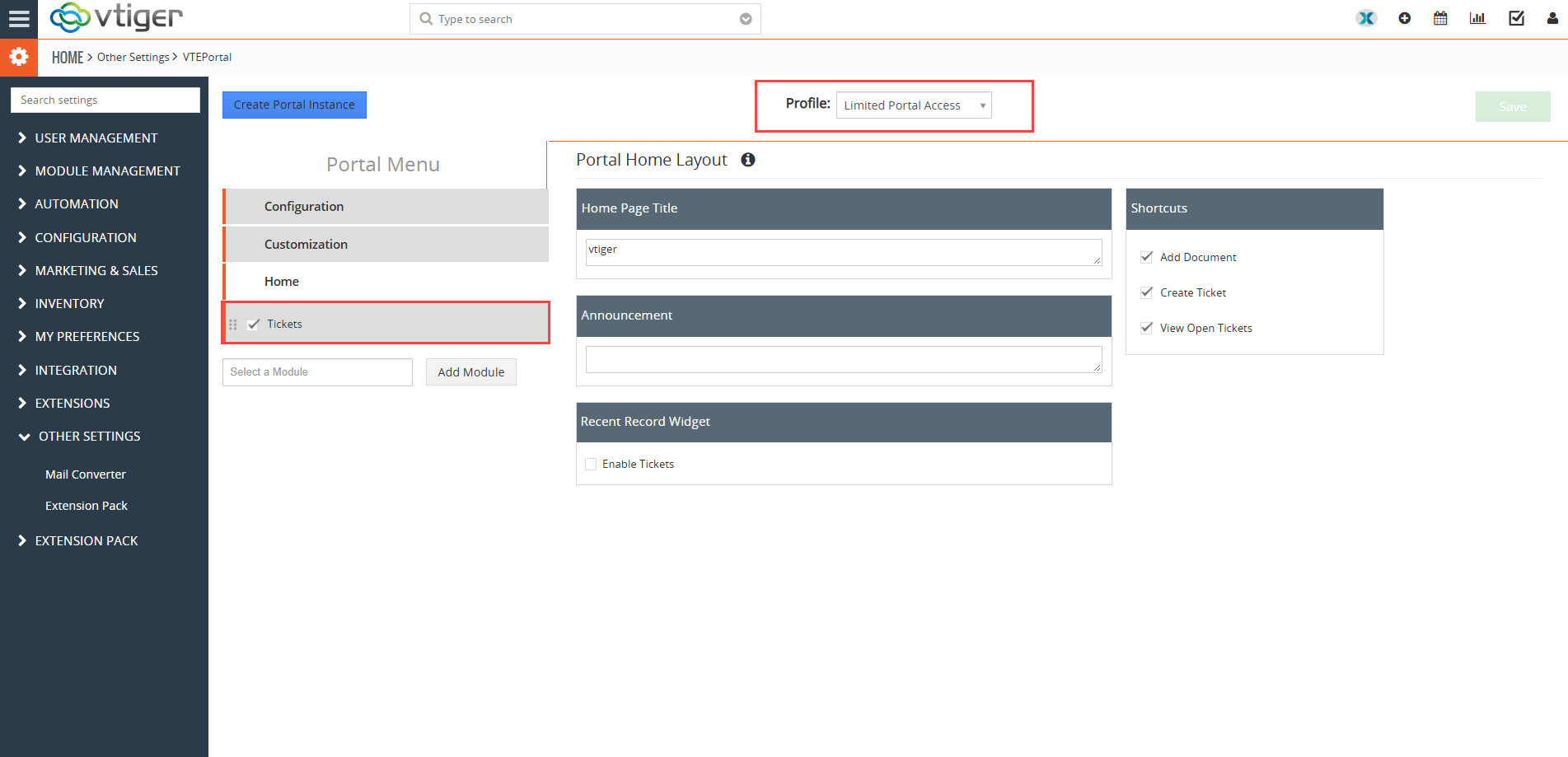
4. When selected, you can configure this profile as per your requirement. For example in this case we will only add tickets module to this Portal profile

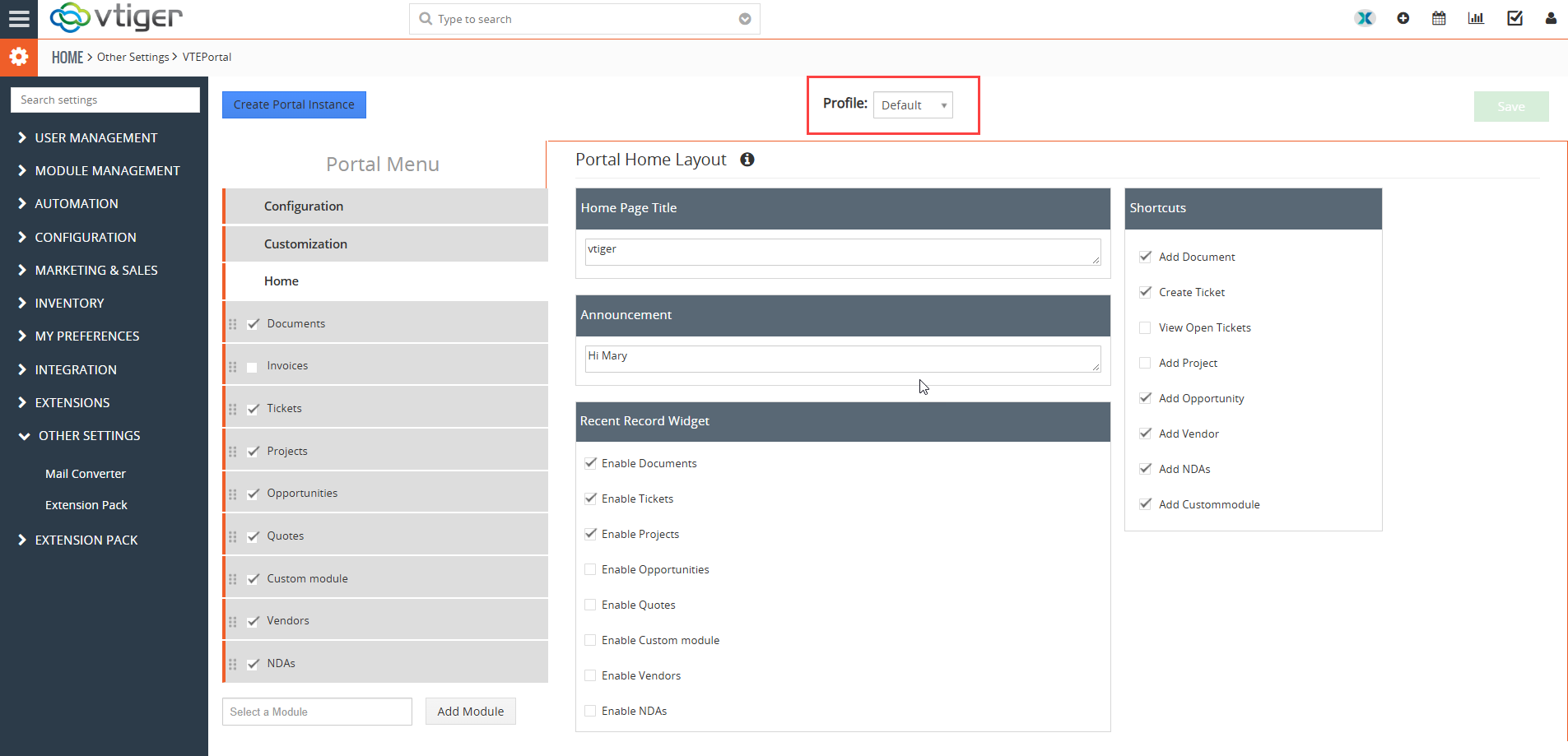
5. Now you have two different portal profiles with access to different modules

  • Default portal profile
  • Custom portal profile

Default portal profile

Custom portal profile

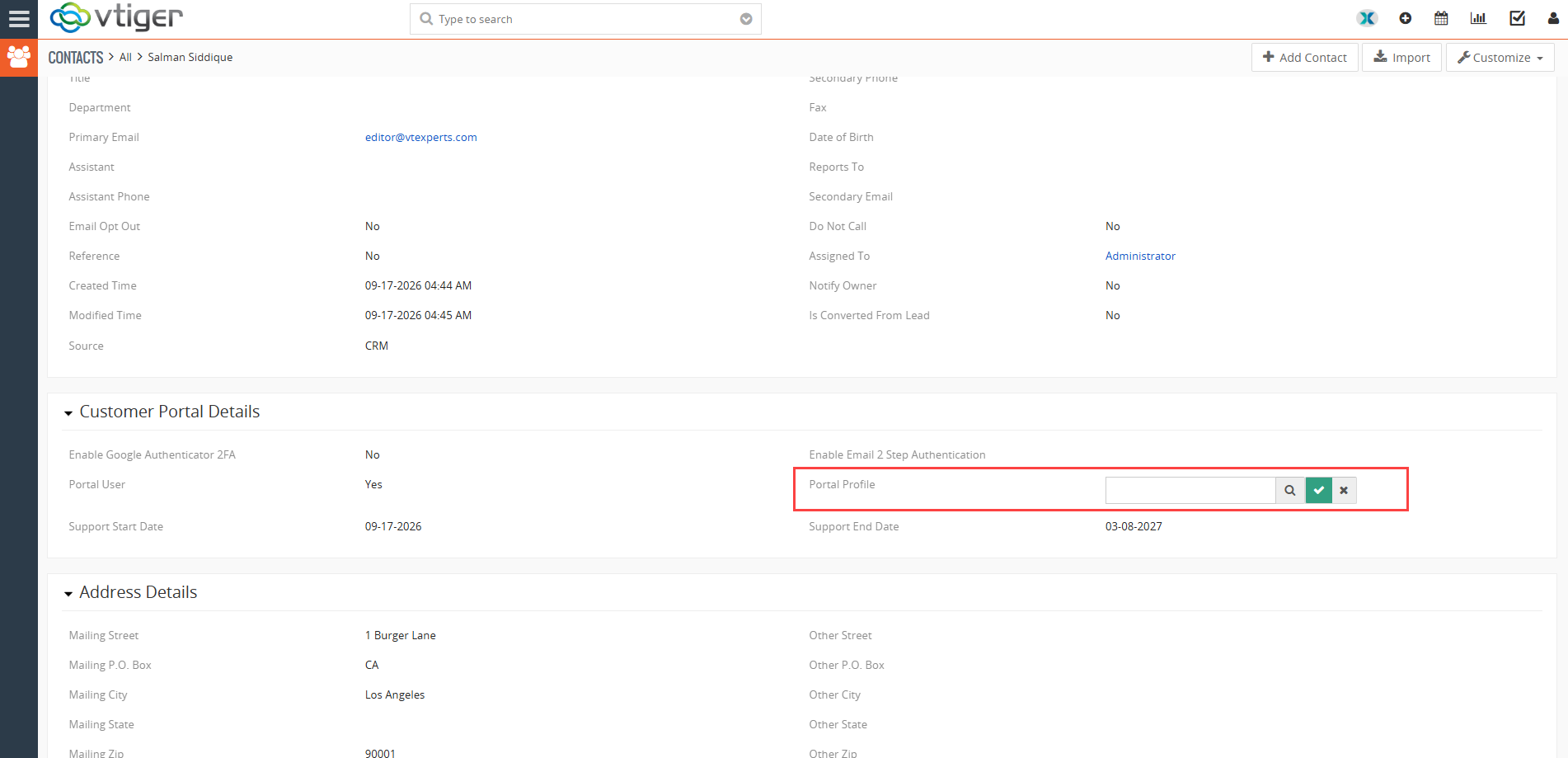
How to assign different portal profiles to the contacts

Go to contact record, scroll down to the Customer Portal section. There you will see a search pop-up filed by the label “Portal Profile”
Select the desired portal profile there

If no portal profile is selected, the default portal profile is Assigned to the contract record.

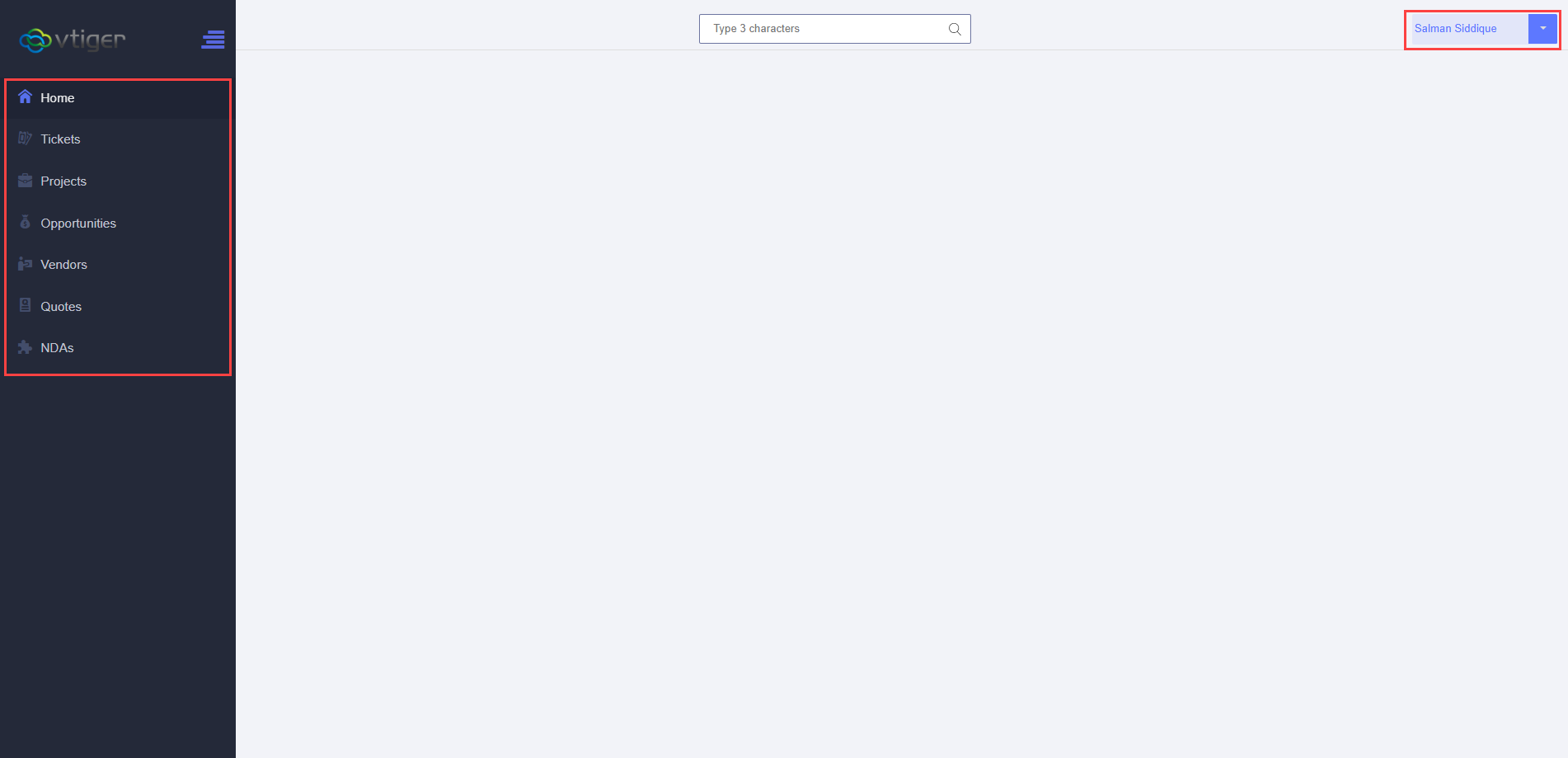
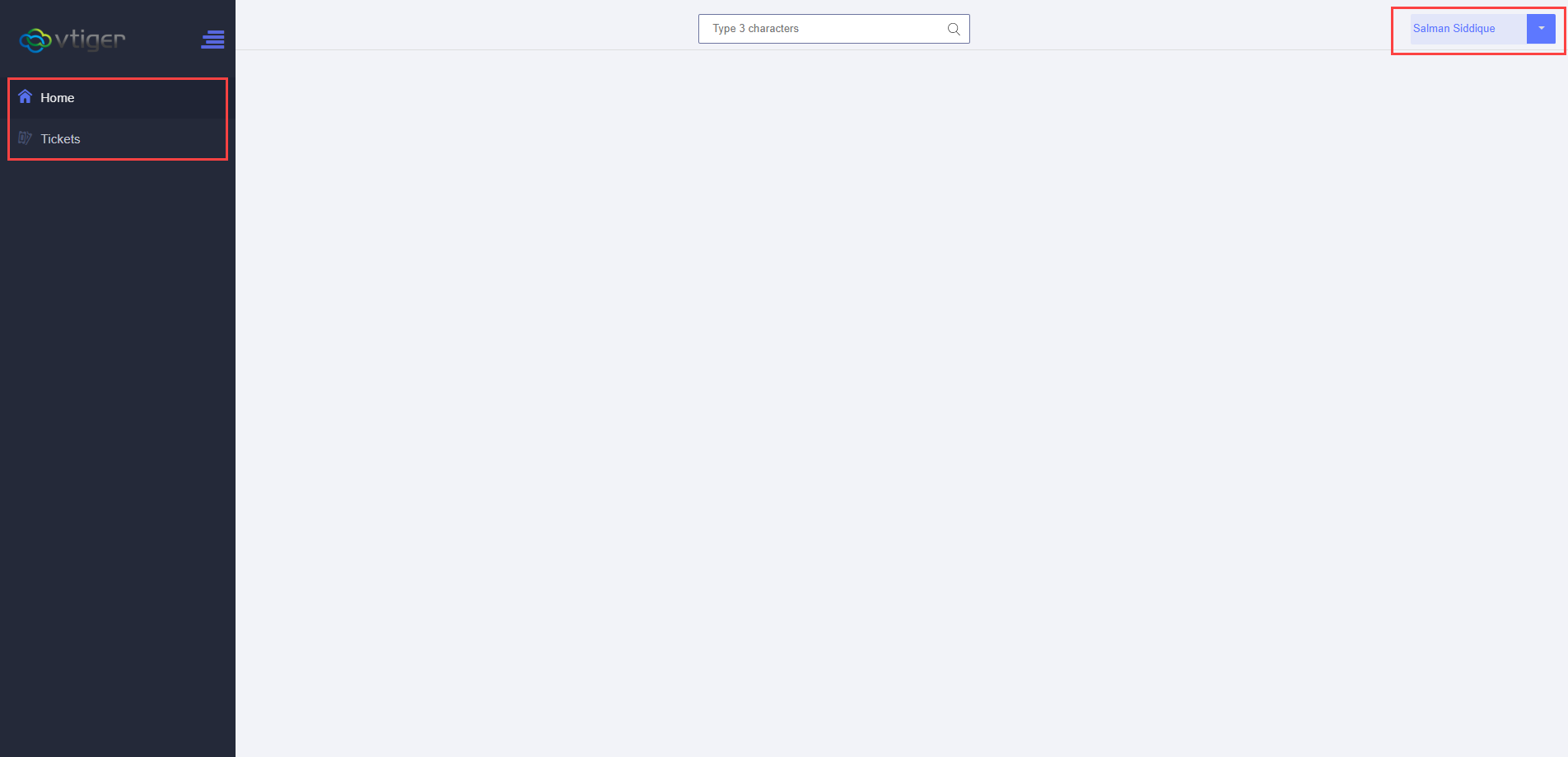
Same User with Different Portal profiles 

Depending on the Portal Profile information will be sown to the portal user

In this example we will see how same portal user have access to different information on the portal depending on the portal profile selected

  • Default portal profile
  • Custom portal profile

Default portal profile

Default portal profile showing all the modules

Custom portal profile

Custom portal profile showing limited modules

3. Portal Fields and Privileges

The Advanced Customer Portal provides more detailed control over the fields available in each portal module.

Fields can be configured as read-only or read-and-write, and required fields can be marked as mandatory.

This lets the administrator decide which information customers can view and which information they can enter or change.

Record Visibility

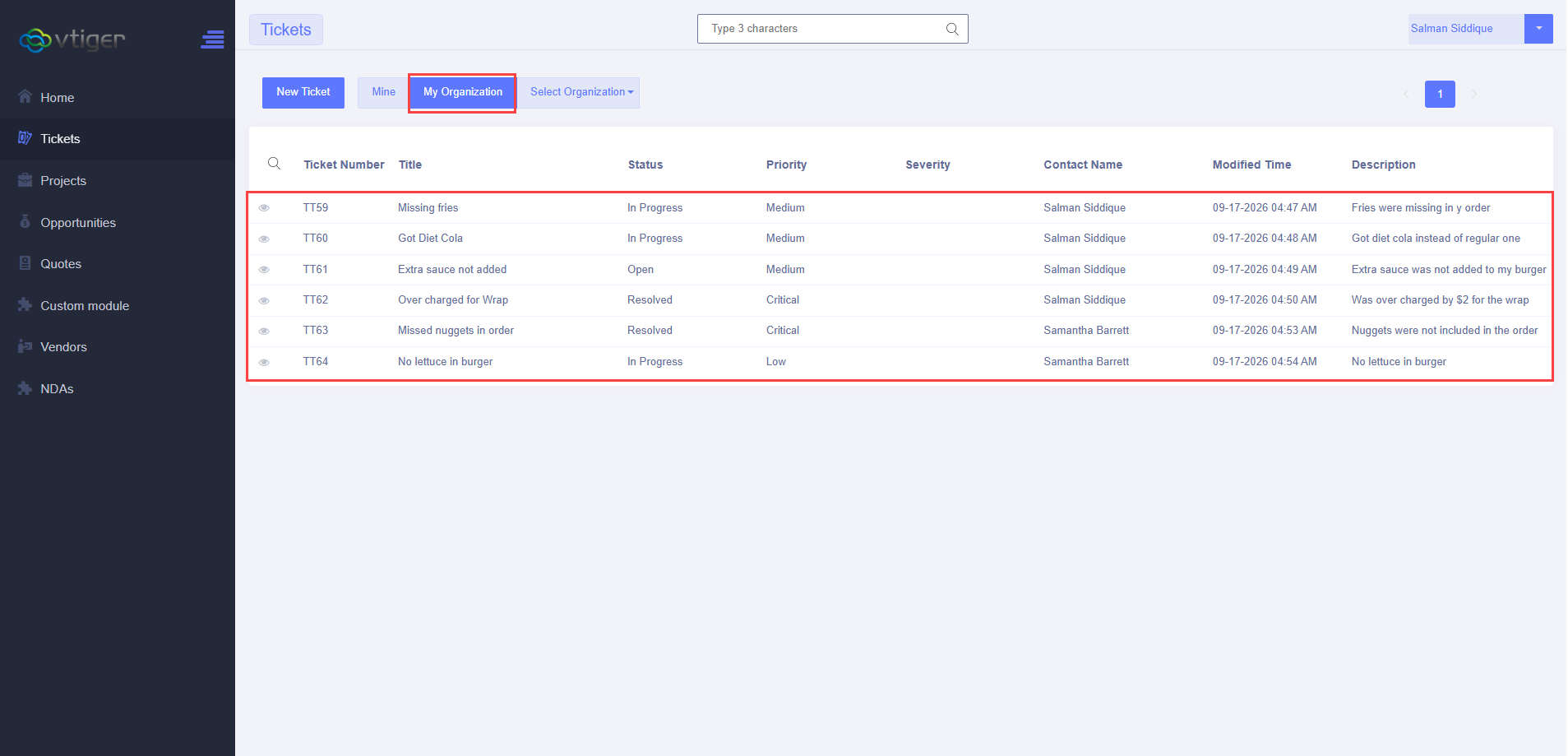
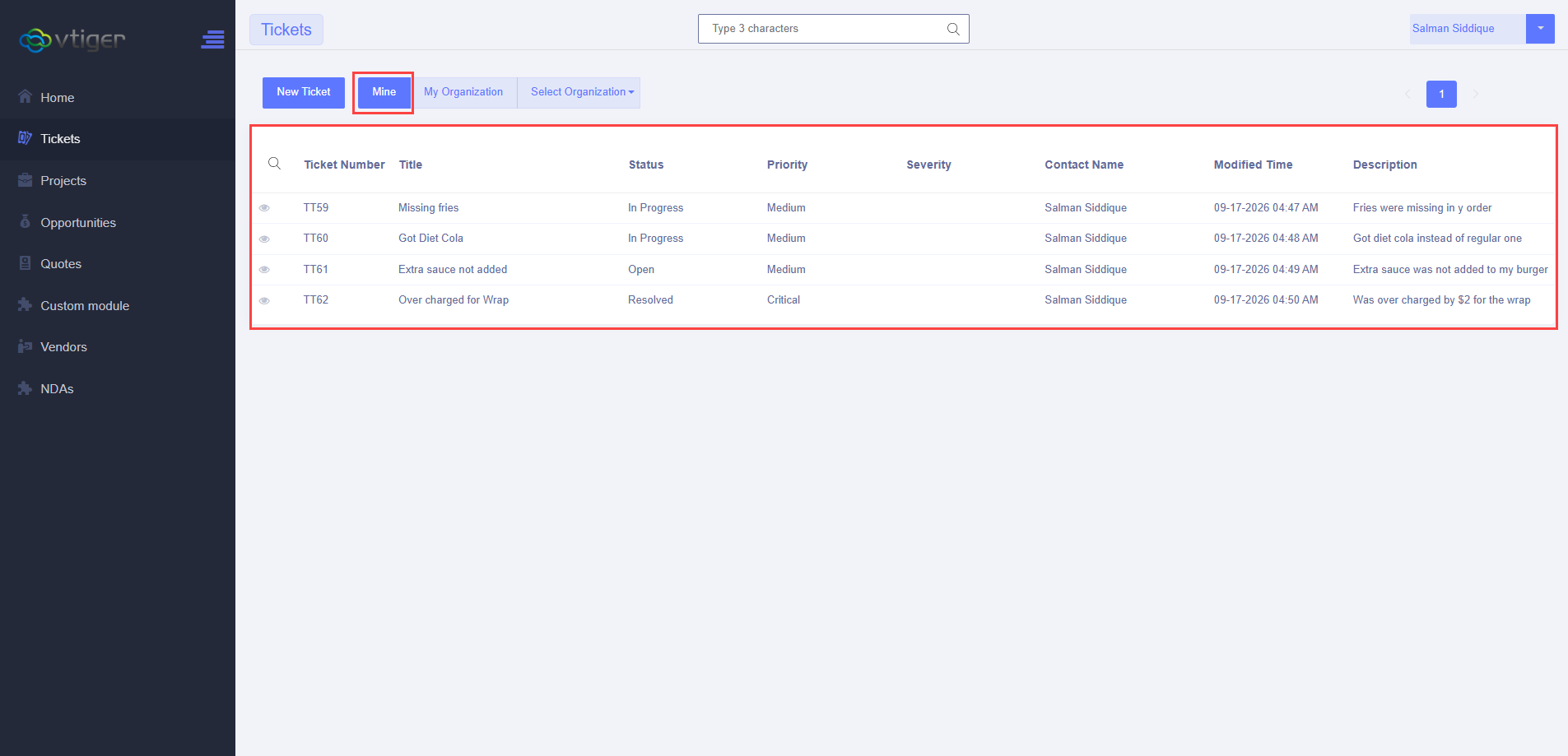
The Advanced Portal also provides additional options for controlling which records a portal user can see.

For example, in the Tickets module, records can be configured to show:

  • Tickets linked to the contact and organization
  • Only tickets linked to the contact
  • Tickets linked to the contact, organization, and organizations on a lower hierarchical level based on the Member Of relationship

This provides more control over which records are exposed to portal users.

  • Contact Tickets
  • Organization tickets

Contact Tickets

Organization tickets

4. Related Modules

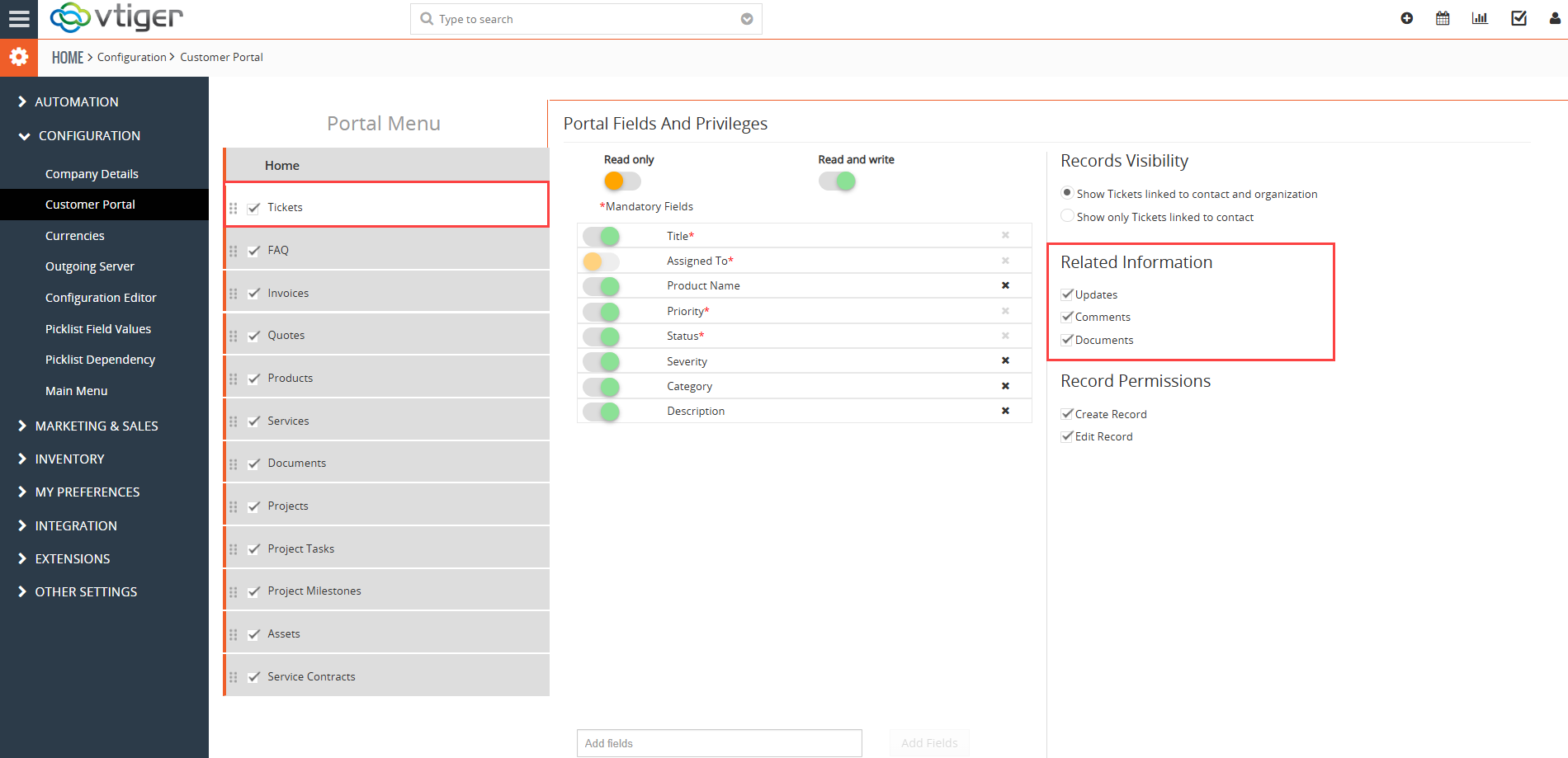
The default VTiger Customer Portal provides some related information, but the available related modules are limited.

For example, for Tickets, the default portal can show related information such as:

  • Updates
  • Comments
  • Documents

There is no option in the default portal to add another related module to this list.

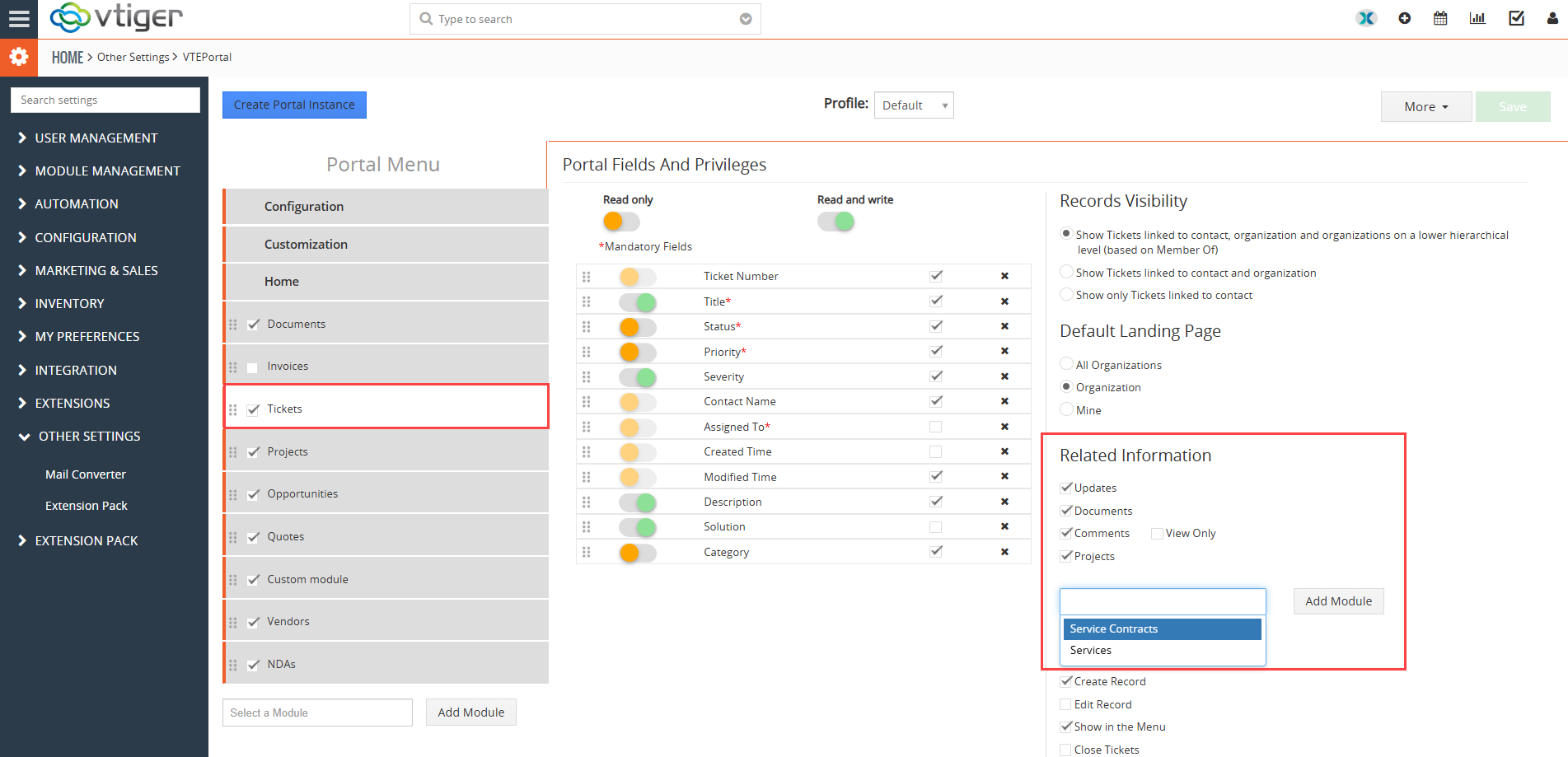
The Advanced Customer Portal provides an Add Module option, allowing administrators to add additional related modules.

For example, the Tickets module can be configured to show:

  • Updates
  • Documents
  • Comments
  • Projects
  • Other available related modules

The Advanced Portal also provides a View Only option for Comments. This lets customers view comments without adding their own comments.

This gives administrators more control over which related CRM information is available to customers.

  • Default vtiger portal
  • VTExperts advanced portal

Default vtiger portal

VTExperts advanced portal

5. Record Grouping

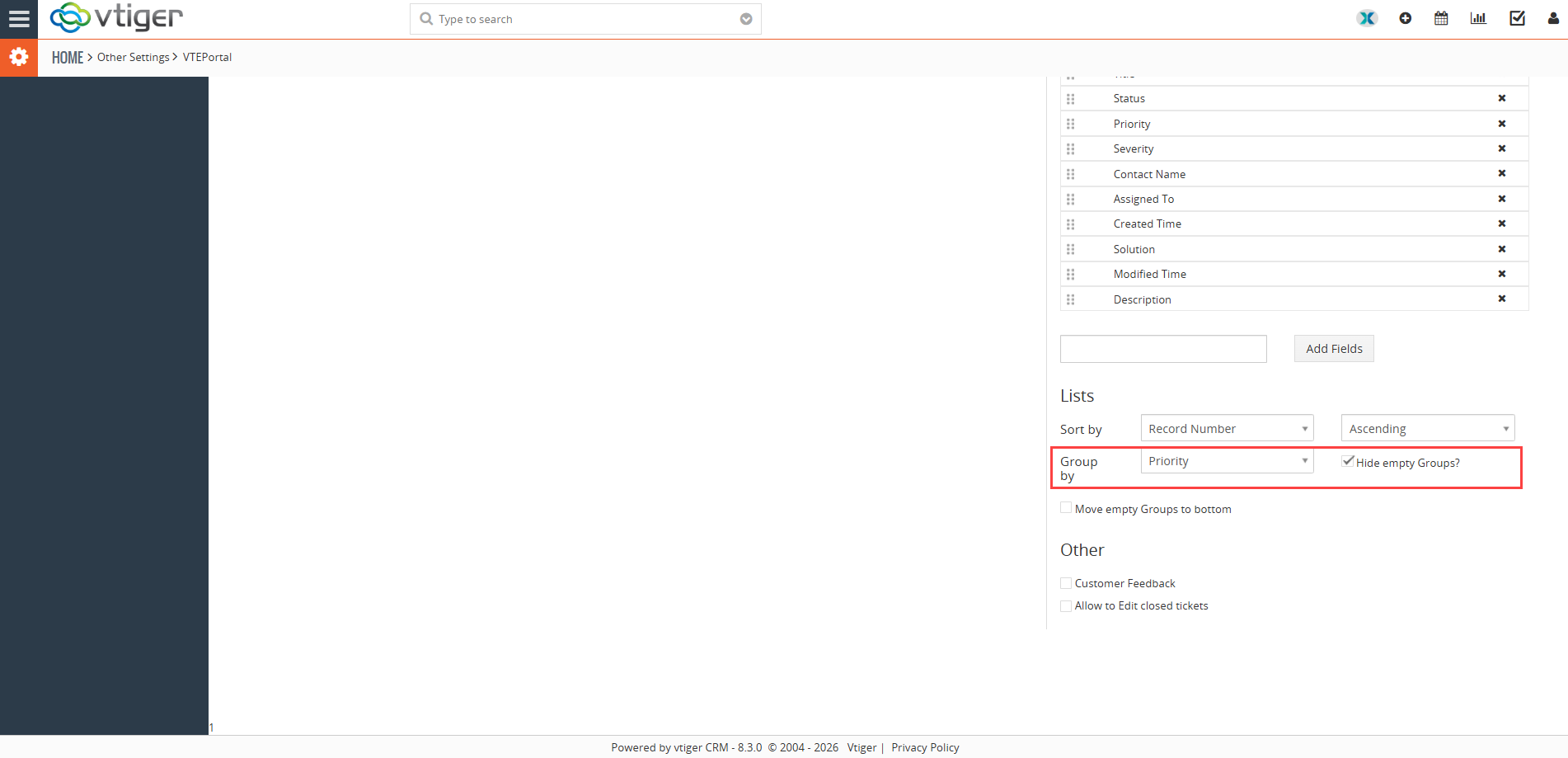
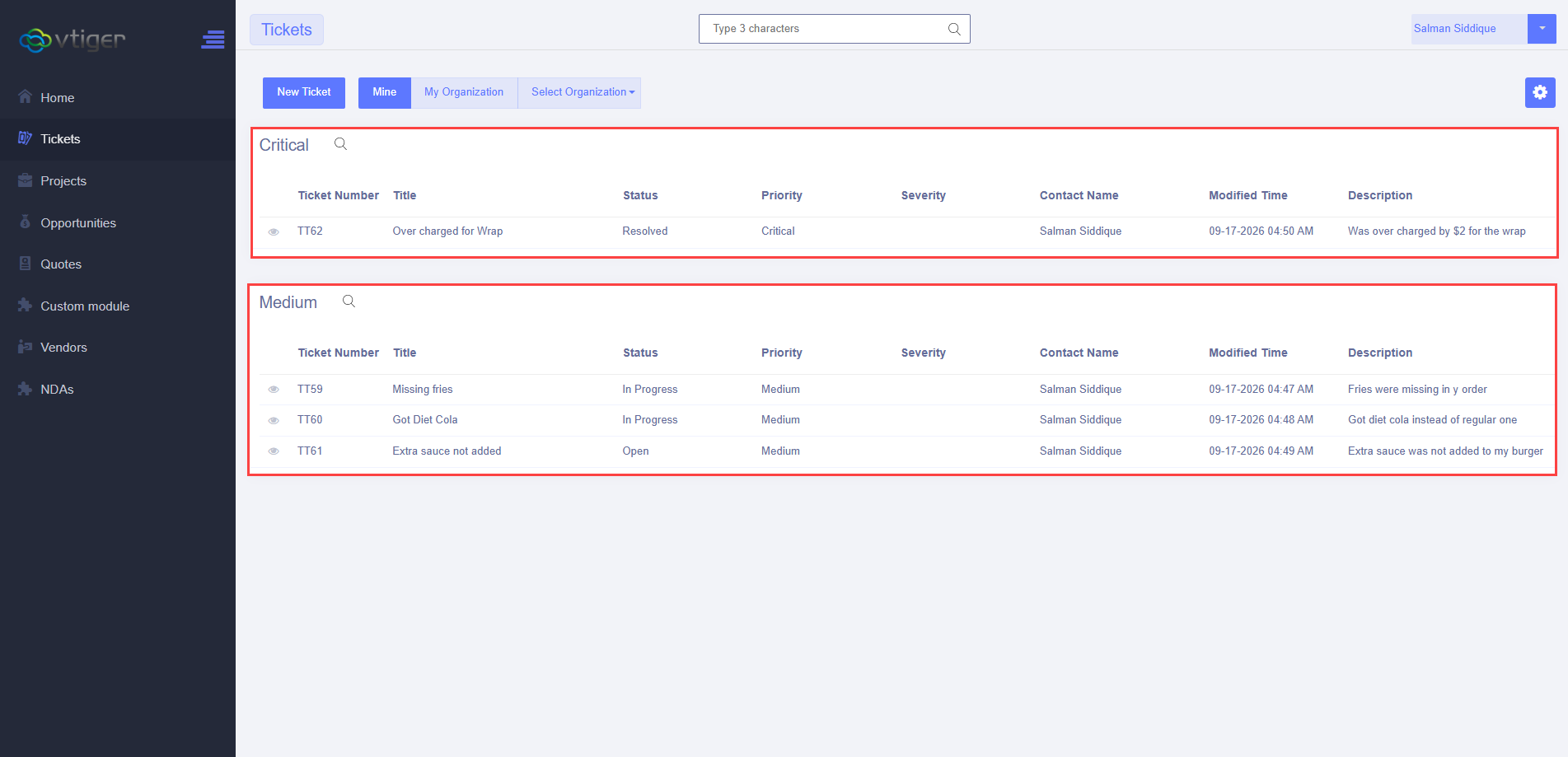
The Advanced Customer Portal allows records to be grouped using available picklist fields in the selected module.

Grouping is not limited to the Tickets module.

For example, records in the Opportunities module can be grouped by fields such as:

  • Type
  • Lead Source
  • Sales Stage

Tickets can also be grouped using applicable picklist fields such as Priority, Severity, Status, or Category.

This makes larger lists of records easier to organize and navigate.

  • Portal configuration
  • Portal output

Portal configuration

Portal output

6. Custom Lists and Sorting

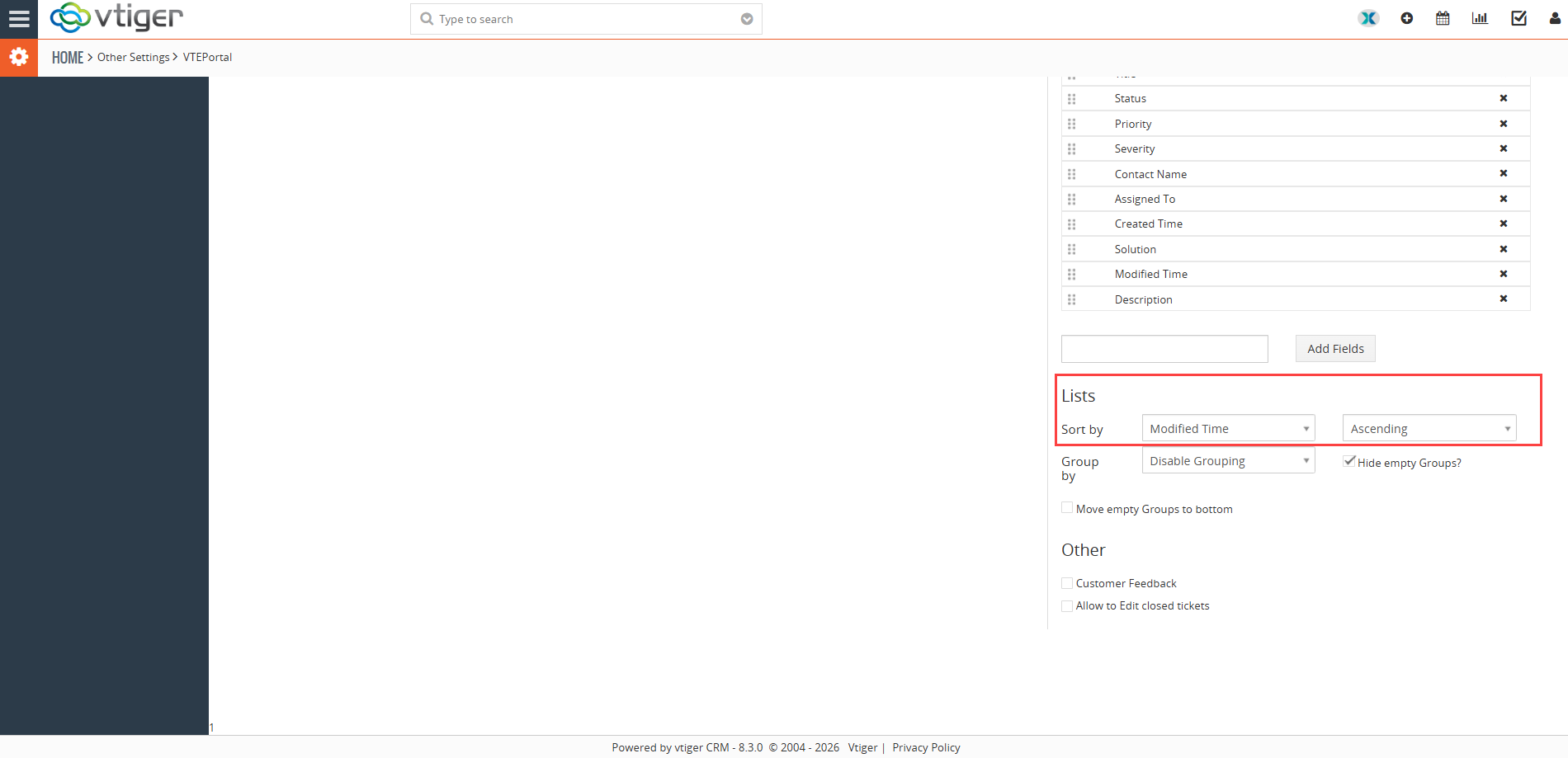
The Advanced Customer Portal includes a Lists function for creating more controlled record views.

Administrators can configure lists for a module and decide how records should be presented to portal users.

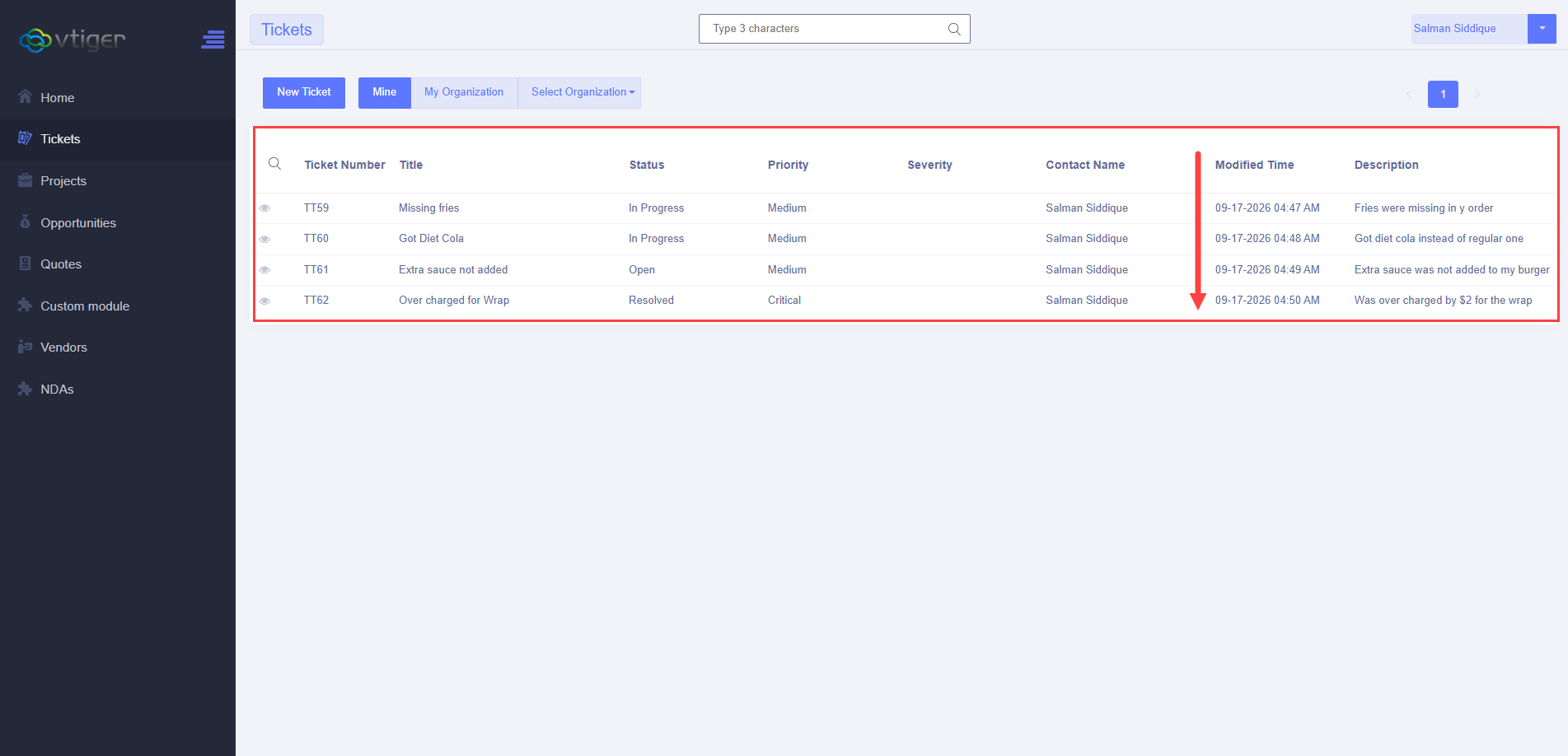
Records can be sorted in ascending or descending order, making it easier to put the most relevant records first.

For example, a list can be arranged so that the newest records appear at the top, or the oldest records appear first.

This gives businesses more control over how customers view and work with records in the portal.

  • Portal configuration
  • Portal output

Portal configuration

Portal output

7. Advanced Ticket Features

The Advanced Customer Portal includes additional options for the Tickets module.

Customer Feedback

Customer Feedback can be enabled for tickets.

The configuration includes Feedback and Feedback Comment fields, allowing customers to provide feedback through the portal.

This gives businesses a way to collect customer comments about their support experience as part of the ticket process.

Allow Customers to Edit Closed Tickets

The Advanced Portal also includes an Allow to Edit closed tickets option.

When enabled, customers can update tickets even after they have been marked as closed.

This can be useful when a customer needs to add information to an existing ticket instead of creating a new one.

8. Advanced Portal Recent Record Widgets

The Advanced Portal also provides more flexibility with Recent Record Widgets. The default portal has more limited recent-record functionality, while the Advanced Portal can display recent records from different CRM modules. This means the homepage can show the types of recent records that are most relevant to the customer instead of being limited to recent Documents.

9. Portal Branding and Configuration

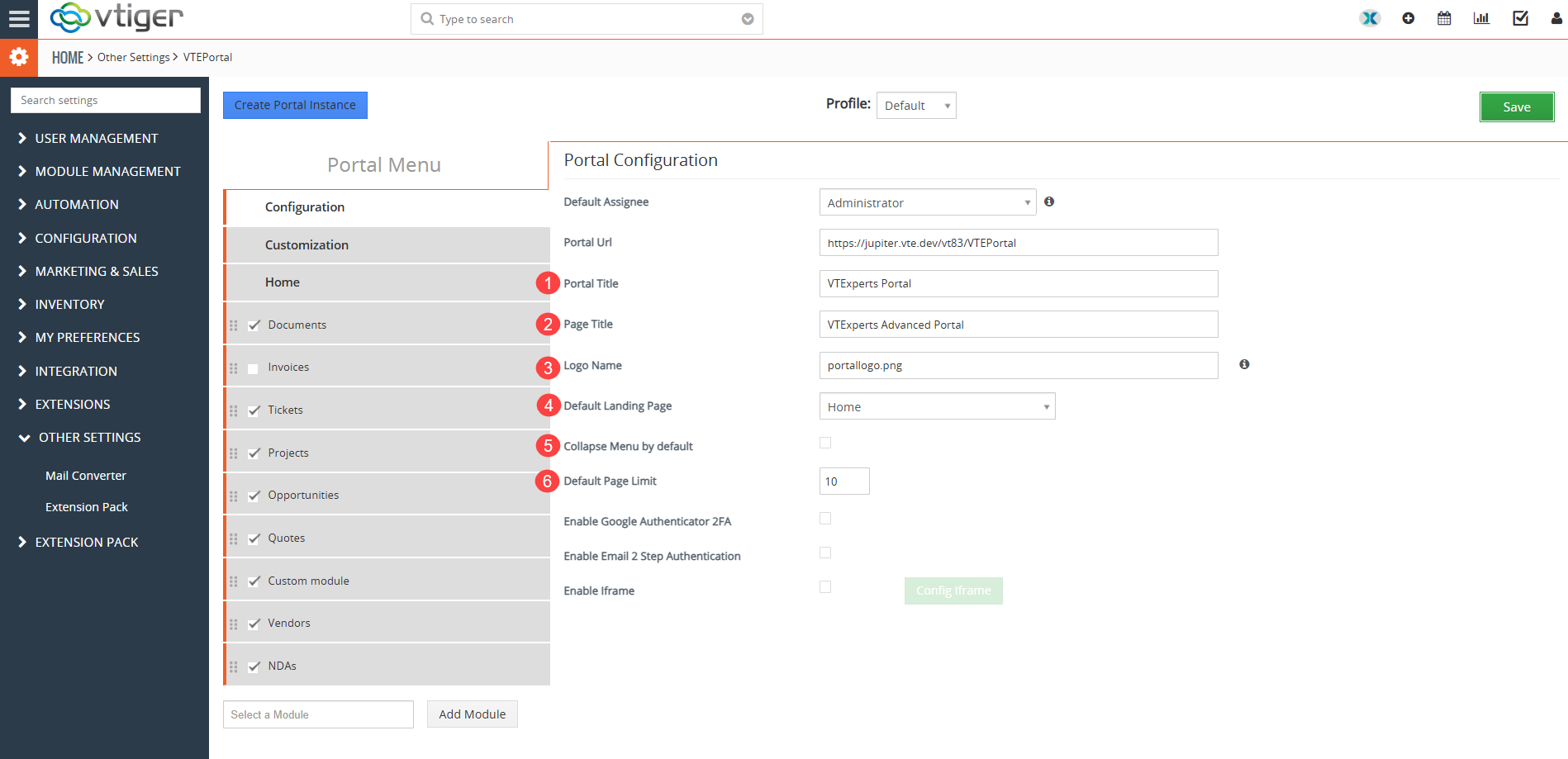
The Advanced Portal provides additional settings for configuring the portal and its appearance.

  1. Page Title
    Controls the title shown on the portal page.
  2. Home Page Title
    Defines the title displayed on the portal homepage.
  3. Logo
    Allows the business logo to be used in the portal.
  4. Default Landing Page
    Determines which page the customer reaches after logging in.
  5. Menu Behavior
    Controls how the portal navigation menu behaves, including whether it is collapsed by default.
  6. Default Page Limit
    Controls how many records are displayed on a page.

These settings give administrators more control over the way the portal looks and behaves.

10. Security Features

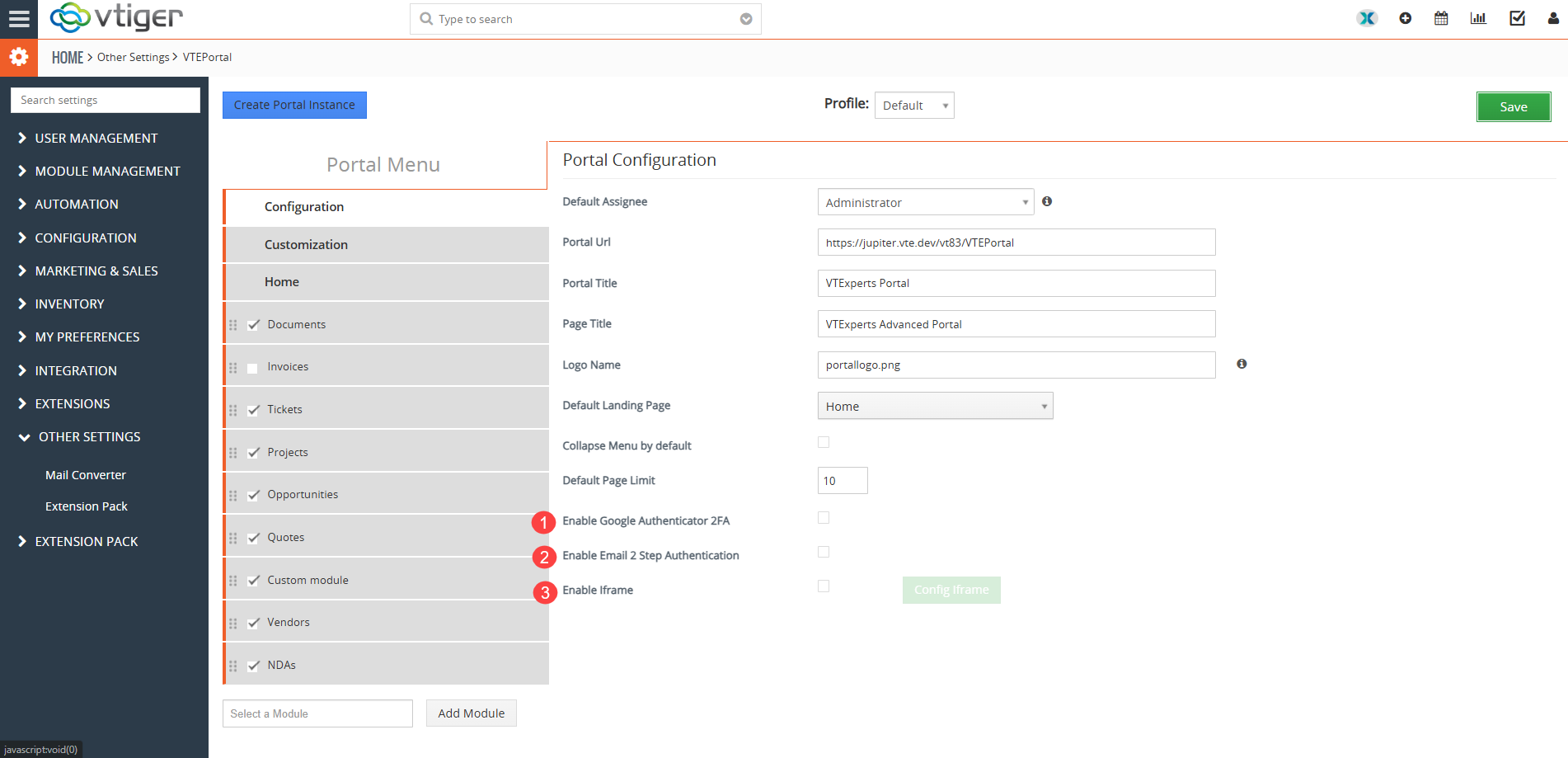
The Advanced Customer Portal also provides additional security options.

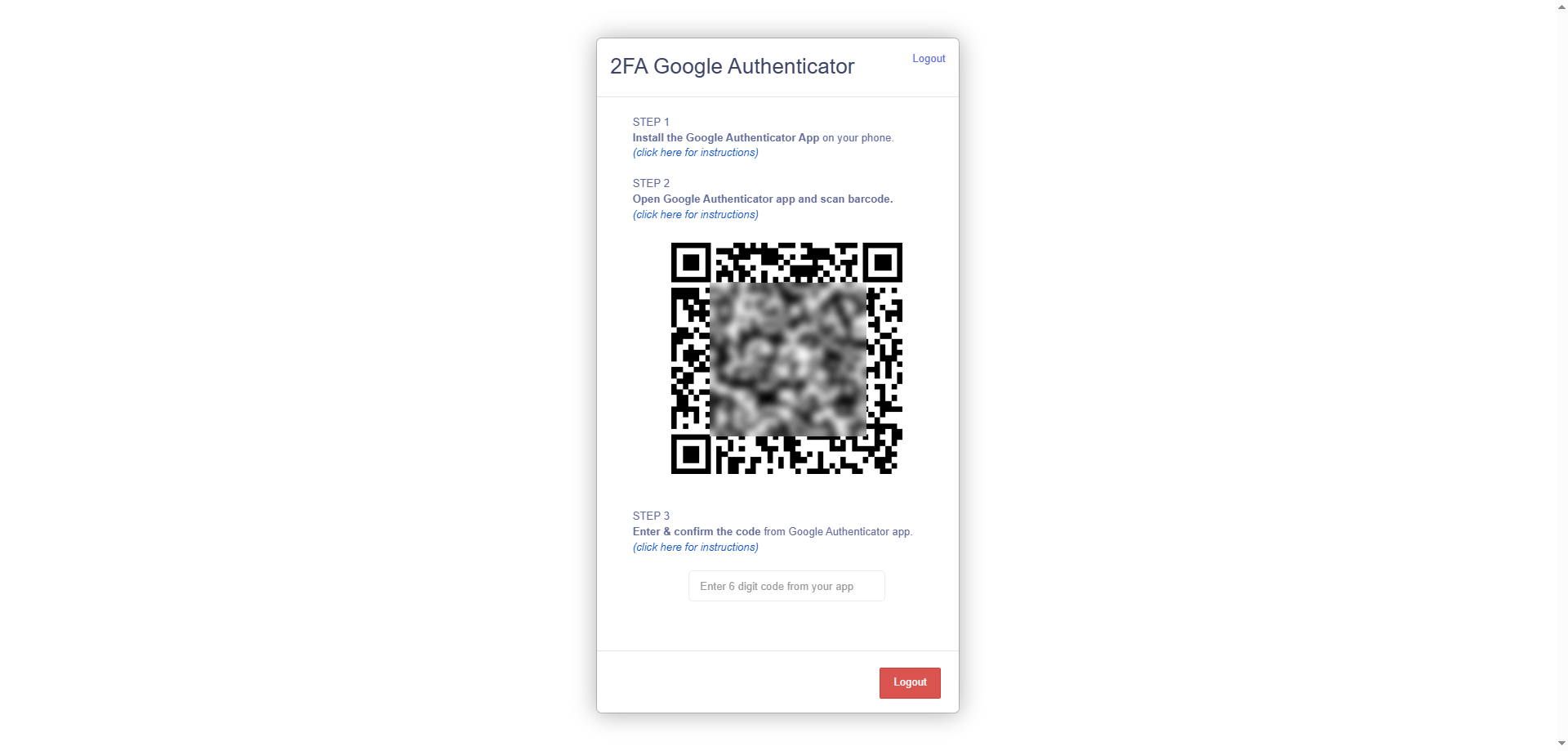
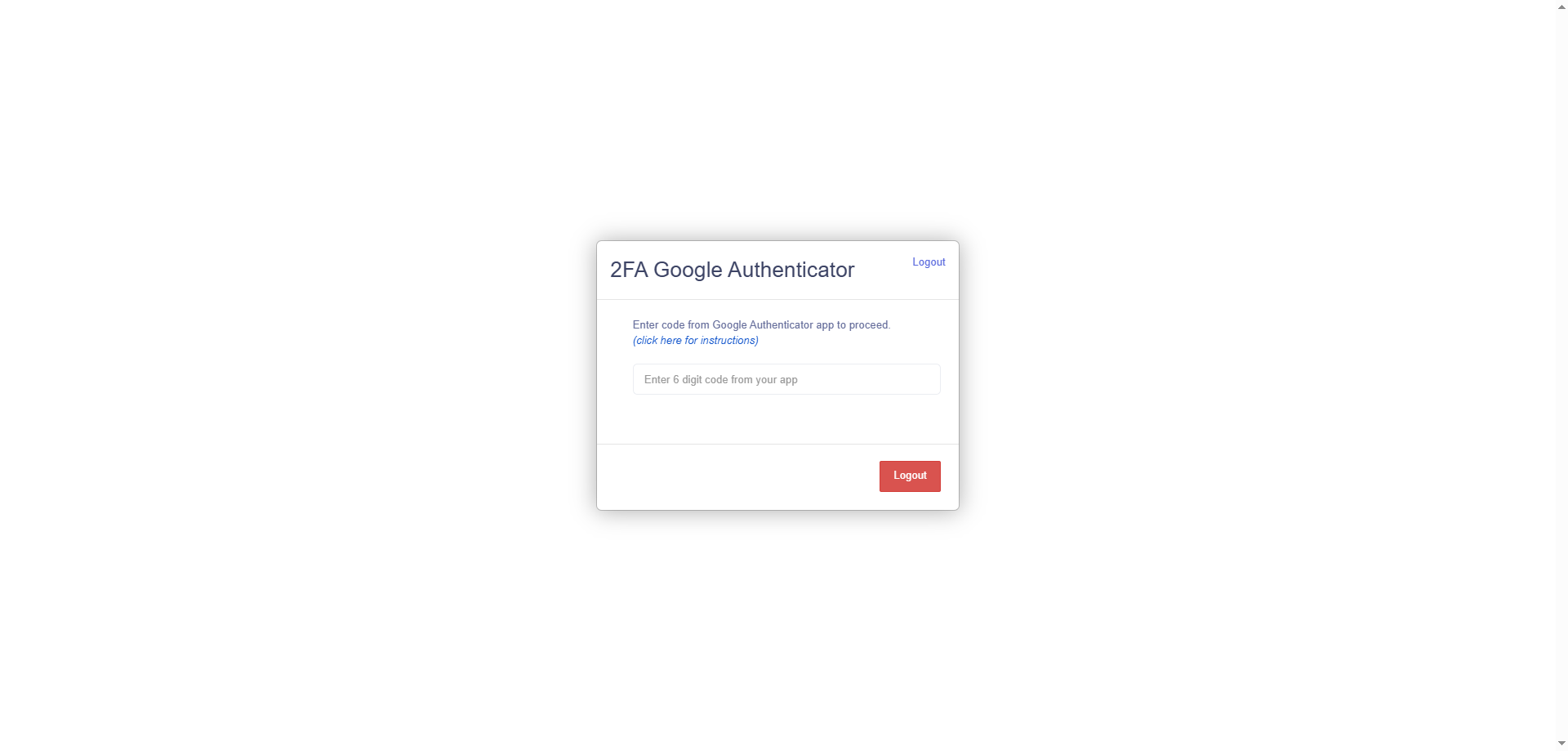
  • Google Authenticator 2FA
    Supports Google Authenticator two-factor authentication.
  • Email 2-Step Authentication
    Supports email-based two-step authentication.
  • Iframe
    Supports Iframe integration where required.
    These options provide additional choices for businesses that need specific authentication or integration capabilities in their portal.

11. Preview Fields

The Advanced Customer Portal also gives administrators more control over how records are previewed.

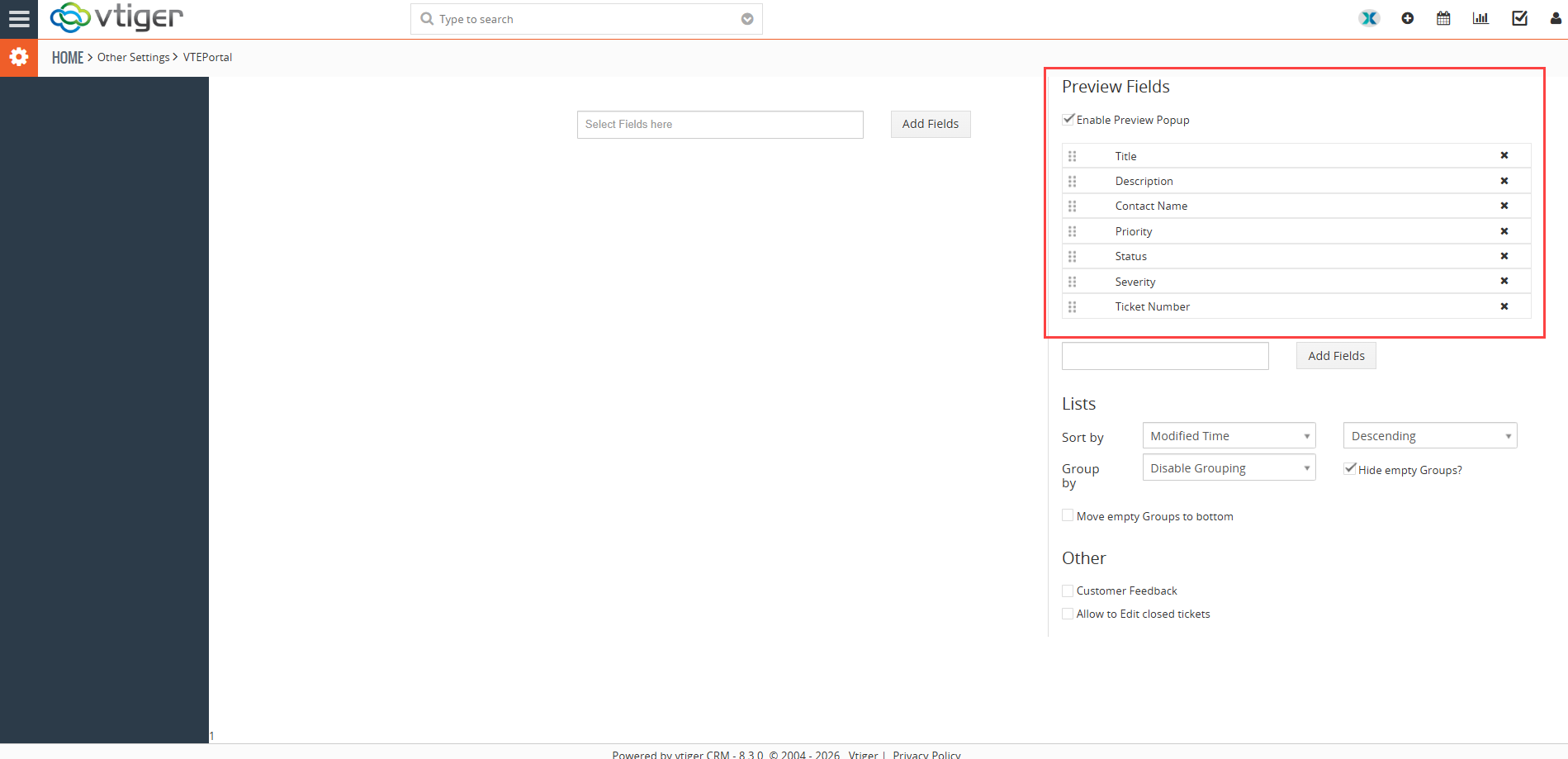
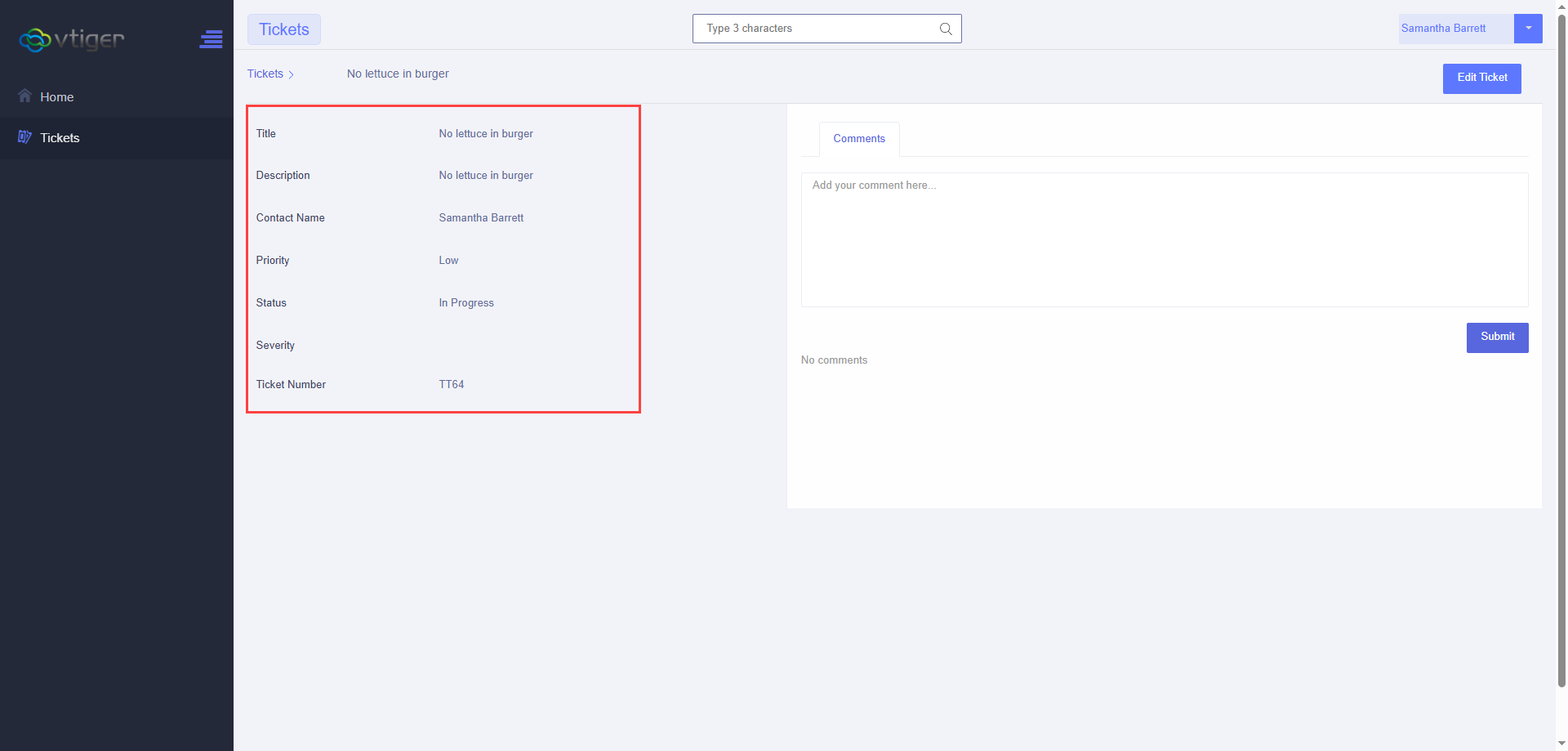
With Enable Preview Popup, users can view selected record information without opening the full record. Administrators can choose which fields appear in the preview and drag and drop them to change their order.

For example, in the Tickets module, the preview can include fields such as:

This makes it easier for portal users to see the most relevant ticket information at a glance without opening the complete record.

  • Portal configuration
  • Portal output

Portal configuration

Portal output

How Portal Profiles, Fields and Privileges Work Together

Portal Profiles become particularly useful when they are combined with field and privilege settings.

An administrator can create a profile, assign it to portal users, choose the modules available to that profile, and then configure the fields and permissions for those modules.

For example, a business may want a particular group of customers to access a custom VTiger module. The administrator can assign those users to the appropriate portal profile, enable the custom module, and configure which fields those customers can view or edit.

This makes it possible to configure portal access around different user requirements rather than applying the same setup to every portal user.

VTiger Customer Portal Customizations

The VTExperts Advanced Customer Portal can also be customized according to specific business requirements. While the Advanced Portal provides additional configuration options out of the box, some businesses need functionality that goes beyond the standard portal features.

Some of the portal customizations implemented for customers include:

Direct Login to Customer Portal

A Direct Login option allows an authorized administrator or support user to access a customer’s portal directly from VTiger.

For example, if a customer reports a problem with something they see in the portal, the support team can access the customer’s portal to investigate the issue without asking the customer to share their username and password.

Advertisement on the Portal

Advertisements can be added to the customer portal to display promotional content, offers, announcements, or other business information.

Reports and Charts on the Portal Dashboard

Reports and charts can be added to the portal dashboard to give customers a more visual view of relevant CRM information.

The dashboard can be customized according to the information the business wants to present to portal users.

Track Portal Logins

Portal login activity can be tracked to provide businesses with information about customer portal usage.

This can help administrators see when portal users are accessing the system.

Enforce Strong Passwords

Password requirements can be customized to enforce stronger passwords for portal users.

This gives businesses additional control over the password rules applied to customer portal accounts.

Additional Language Pack

Additional language support can be added to the portal when a business needs to provide the customer experience in a language that is not available in the existing portal setup.

These customizations can be implemented individually or combined with the Advanced Customer Portal features to match a business’s specific requirements.

Related posts

Multi-Currency Vtiger Quotes with VTExperts IDCA (Customziation)

Multi-Currency Vtiger Quotes with VTExperts IDCA (Customziation)

Vtiger Checklists by VTExperts Introduces Role-Based Sharing

Vtiger Checklists by VTExperts Introduces Role-Based Sharing

VTExperts Vtiger CRM AI Customer Portal Chat Assistant

VTExperts Vtiger CRM AI Job Description Generator

Comments are closed.

EXTENSION PACK

  • Extension List
  • Pricing
  • Extension Pack Details
  • Setup Instructions
  • Documentation

SERVICES

  • Support & Consulting
  • Hosting (Dedicated & Managed)
  • Customization & Development
  • Upgrade & Migration
  • Maintenance & Ongoing Support

LINKS

  • Gmail Plugin for VTiger
  • Outlook Plugin for VTiger
  • Blog (News & Tips)
  • Extension List
  • Contact Us Form

VTExperts

  • 341 W Scott Street
    Chicago, IL 60610
    United States
[email protected]
+1 (818) 495-5557
© 2009-2026 VTExperts.com All Rights Reserved
0
Cleantalk Pixel