• Company
  • Blog
  • Case Studies
  • Partners
  • Contact

vtexpertswplogovtexpertswplogotransp2-white-small-2transp2-white-small-2

Menu
  • Home
  • Services –
    • Services

      Maintenance & Support

      Plans provide guidance, phone support, and training to get the most out of CRM.

      Customization

      Streamline & automate your sales, marketing and operations.

      Integrations

      CRM integration with leading third-party service providers, websites and apps.

      Migration

      Vtiger Upgrade

      Stay up to date with the latest features & security patches.

      Data Migration

      Transfer your important data from any other CRM, ERP or custom solution.

      Packages

      Monthly Support Plans

      Essential for growing businesses

      Kickstarter Packages

      Optimal solution for small businesses

      Projects & Incidents

      Recommended for updates & fixes
  • Solutions
    • Sales

      Contact Management

      Close more deals with single-page contact management.

      Opportunities

      Track stages and milestones of your deals to keep the sales process on track.

      360 View

      Contact data from every angle, including conversations, call notes.

      More ....

      Appointments, Reporting, Proposals & more..
      Note: The links in this menu are not clickable. Please contact us for more details.

      HelpDesk

      Ticketing

      Resolve every issue in the shortest possible time with powerful ticketing features.

      Service Level Agreements

      Set up trigger campaigns to send alerts when the ticket resolution time exceeds the due date.

      Automation

      Leverage automation to define priorities, statuses & assignments for tickets.

      More ....

      Canned responses, feedback, customer portal...
      Note: The links in this menu are not clickable. Please contact us for more details.

      Marketing

      Marketing Automation

      Marketing workflows with an easy drag-and-drop designer.

      Email Marketing

      Get complete email marketing features with newsletters, analytics, and more.

      Email Tracking

      Track your email performance with metrics that matter and notifications.

      More ....

      Landing pages, SMS, Analytics & more..
      Note: The links in this menu are not clickable. Please contact us for more details.
  • Extensions
    • Extension Pack

      Get Started

      Details, screenshots and videos

      Pricing

      Affordable and cost effective

      FAQ

      Pricing, licensing and compatibility

      Documentation

      Installation Instructions

      Step by step guide

      Helpdesk

      Documentation & user guides

      Extensions

      Extensions for Vtiger 8.x

      70+ Plugins with screenshots, videos & live demos

      Extensions for Vtiger 7.x

      70+ Plugins with screenshots, videos & live demos

      Extensions for Vtiger 6.x

      65+ Plugins with screenshots, videos & live demos.
  • Managed Hosting
  • Resources
    • Documentation

      User Guide

      Best practices and tips to keep your user engaged.

      Administrator Guide

      Designed to help manage and configure the CRM for all the Vtiger users.

      Video Tutorials

      Learn how to use Vtiger features with guided video tours

      Extensions

      Helpdesk

      Admin & User guides for all our Extensions.

      Recent Updates

      New Extension releases & enhacements to Vtiger.

      Development

      Contributions

      Enhanced features, fixes and extensions.

      Github

      Access to upcoming releases, patches & more.

      Official Resources

      Developer forums, code repository & more.
  • Extension List
  • Home
  • Managed Hosting
  • Extensions
    • Get Started
    • Installation Instructions
    • Pricing
    • FAQs
    • Extension List
  • Services
    • Support
    • Custom Development
    • Integrations
    • Vtiger Upgrade
    • Data Migration
  • Support Plans
    • Monthly Plans
    • Support Plans
    • Startup Packages
  • Resources
    • Helpdesk
    • Blog
    • Contact Us
    • Partners

Advance Customer Portal by VTExperts

Categories
  • vTiger 7
  • vTiger Tweaks
Tags
  • Add-on
  • Advance Customer Portal
  • automation
  • CP
  • crm
  • customer
  • customer portal
  • customization
  • integration
  • Management
  • Portal
  • VTExperts
  • vTiger
  • vtiger CRM
  • vTiger features

Customer portal plays a vital role in engaging customers and providing them with a place, where they can find account specific information. Vtiger CRM also allows to establish a customer portal, through which companies can interact with the clients. Vtiger CRM default support portal provides a number of different features like viewing tickets, enabling charts, announcement etc. A good customer portal can yield great results. Hence we offer a great tool in the shape of, Advance Customer Portal by VTExperts.

We VTexperts believe on doing more for our customers. That is why we developed Advanced Customer Portal, in which we incorporated additional features that can do wonder for the businesses. Some of these features are setting the starting and ending date of portal support, setting privileges for the modules, adding customized modules etc.
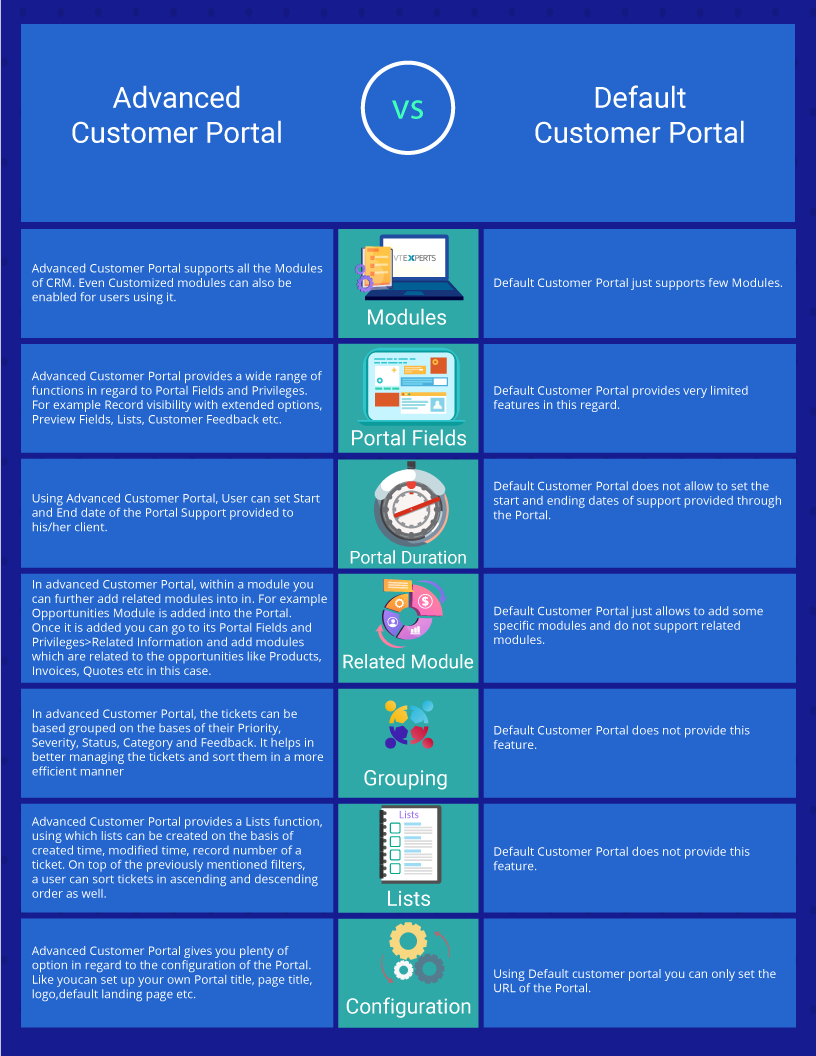


Glimpse of Customer Portal Configurations

Following image just provide the glimpse of Advance Customer Portal configurations Some of its features are described below
Advance Customer Portal by VTExperts

           Function                                        Description
 1 Default Assignee Assign the person who will handle the queries or tickets generated through the Portal
 2 Portal URL Provide the URL using which clients will access the Customer Portal
 3 Portal Title Specify the name of Portal here
 4 Page Title Specify the title of the page here
 5 Home Page Title Specify the Home page title here
 6 Logo Name This field is used to for logo name. To replace the image of your logo. Go to  your_portal_directory/test/ and paste  the file name in this directory. It will only support .png files.
 7 Default Landing Page User will land on the page which is selected in Default Landing Page option, once they logged in the Customer Portal
 8 Collapse Menu By Default If Collapse Menu field is checked then the Menu will be collapsed when logging in by default
 9 Default Page Limit Default page limit is used to limit the number of tickets, opportunities, headers etc. shown at a page

How Advance Customer Portal appears to the end user

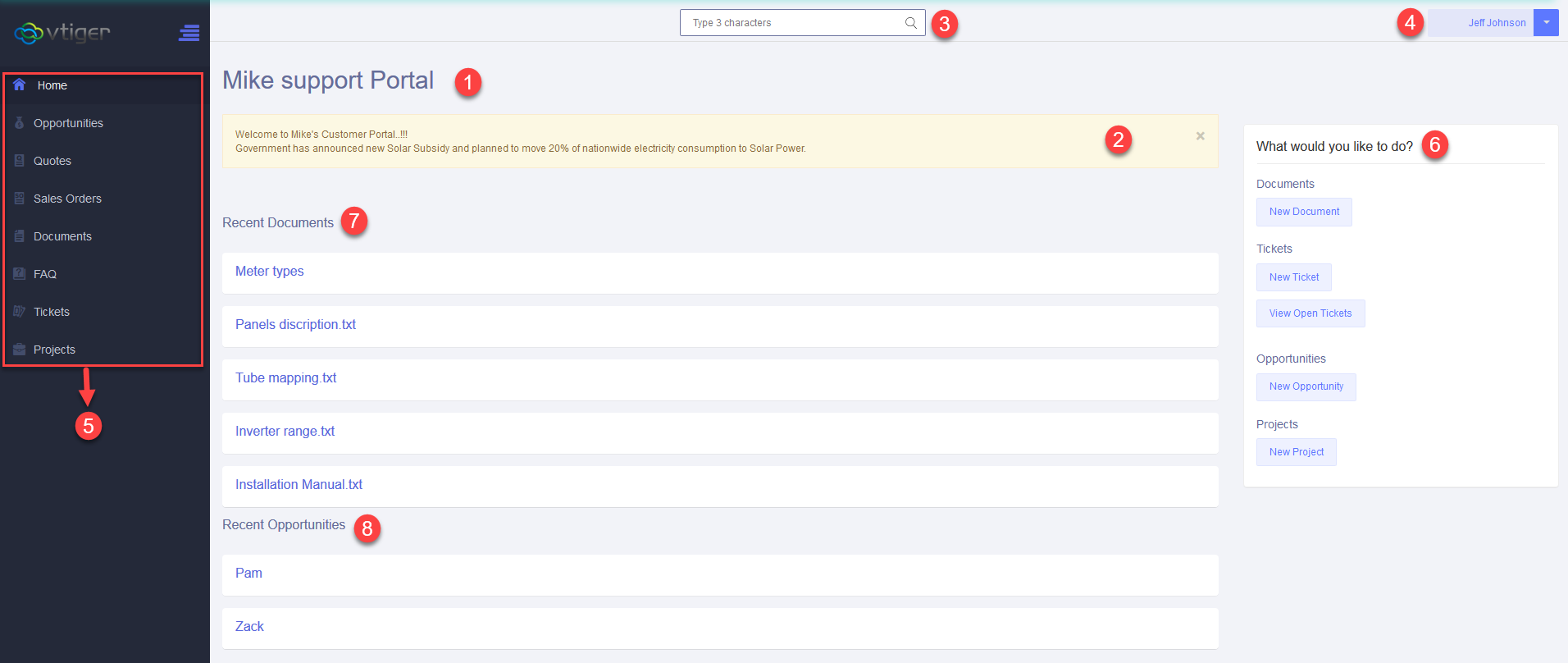
Once Logged in User will see the following screen (Home page of Portal)
Advance Customer Portal by VTExperts

           Function                                        Description
 1 Home Page title
This is the Home Page Title of the Portal. Which in this case is Mike Support Portal
 2 Announcement Any announcement made by the Portal owner will be shown here.
 3 Search bar Search bar helps user to find information within the Portal
 4 User Profile Using this link user can access his/her profile and make changes to it
 5 Modules All the modules, to which access is granted to the user by the Portal owner will be shown here
 6 Quick access links These are quick access links, designed for the convenience of the user. e.g. New document, New Ticket, New opportunity etc
 7 Recent Documents Recent documents will be shown here. This functions supports up-to 5 recent documents
 8 Recent Opportunities Recently made opportunities will be shown here.This functions supports up-to 5 recent entries.


Next Article: Create Custom Form in Vtiger
Related posts

VTiger Advanced Customer Portal vs Default Customer Portal: What’s the Difference?

VTExperts: Vtiger Employee Contract Management Customization

Multi-Currency Vtiger Quotes with VTExperts IDCA (Customziation)

Multi-Currency Vtiger Quotes with VTExperts IDCA (Customziation)

Vtiger Checklists by VTExperts Introduces Role-Based Sharing

Vtiger Checklists by VTExperts Introduces Role-Based Sharing

2 Comments

  1. Opo H says:
    August 1, 2022 at 4:28 pm

    How much is this advanced customer portal?

    Reply
  2. Souhail says:
    October 1, 2024 at 6:53 pm

    Hello how can i try this extension ?

    Reply

Leave a Reply Cancel reply

Your email address will not be published. Required fields are marked *

EXTENSION PACK

  • Extension List
  • Pricing
  • Extension Pack Details
  • Setup Instructions
  • Documentation

SERVICES

  • Support & Consulting
  • Hosting (Dedicated & Managed)
  • Customization & Development
  • Upgrade & Migration
  • Maintenance & Ongoing Support

LINKS

  • Gmail Plugin for VTiger
  • Outlook Plugin for VTiger
  • Blog (News & Tips)
  • Extension List
  • Contact Us Form

VTExperts

  • 341 W Scott Street
    Chicago, IL 60610
    United States
[email protected]
+1 (818) 495-5557
© 2009-2026 VTExperts.com All Rights Reserved
0
Cleantalk Pixel