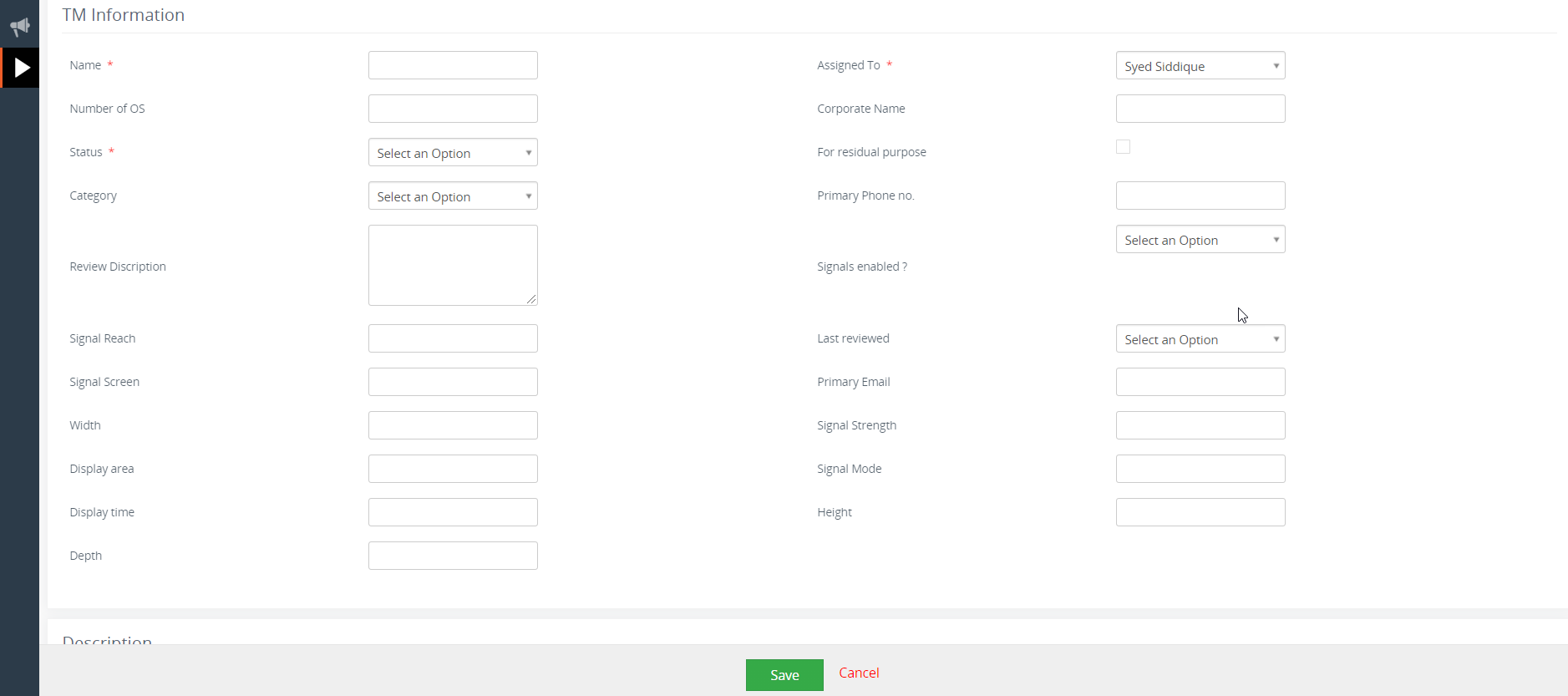
All of us have came across scenarios, where a VTiger CRM record is bombarded with a number of different fields. In such situations some of the fields are necessary and some of them are only to be filled if a specific condition is met. For example, in below provided screenshot, all the fields related to the signal will only be filled, if signals enabled is set to “yes”. It would be far much better if all the fields like Signal Reach, Signal screen, Signal Strength are kept hidden and only made visible to the user once the choose “yes” option for the Signals enabled. In this article, we will discsus a great tool for Vtiger named as Conditional layout extension developed by VTExperts.
 There are countless examples in which businesses have various field for a record, but in most cases not even half of them are being used. Such scenarios not only make record difficult to read and understand for the user but also looks messy and disorganized. To tackle this problem in vTiger, VTExperts provides the solution in the form of Conditional layout extension
Introduction to Conditional Layout extension for Vtiger
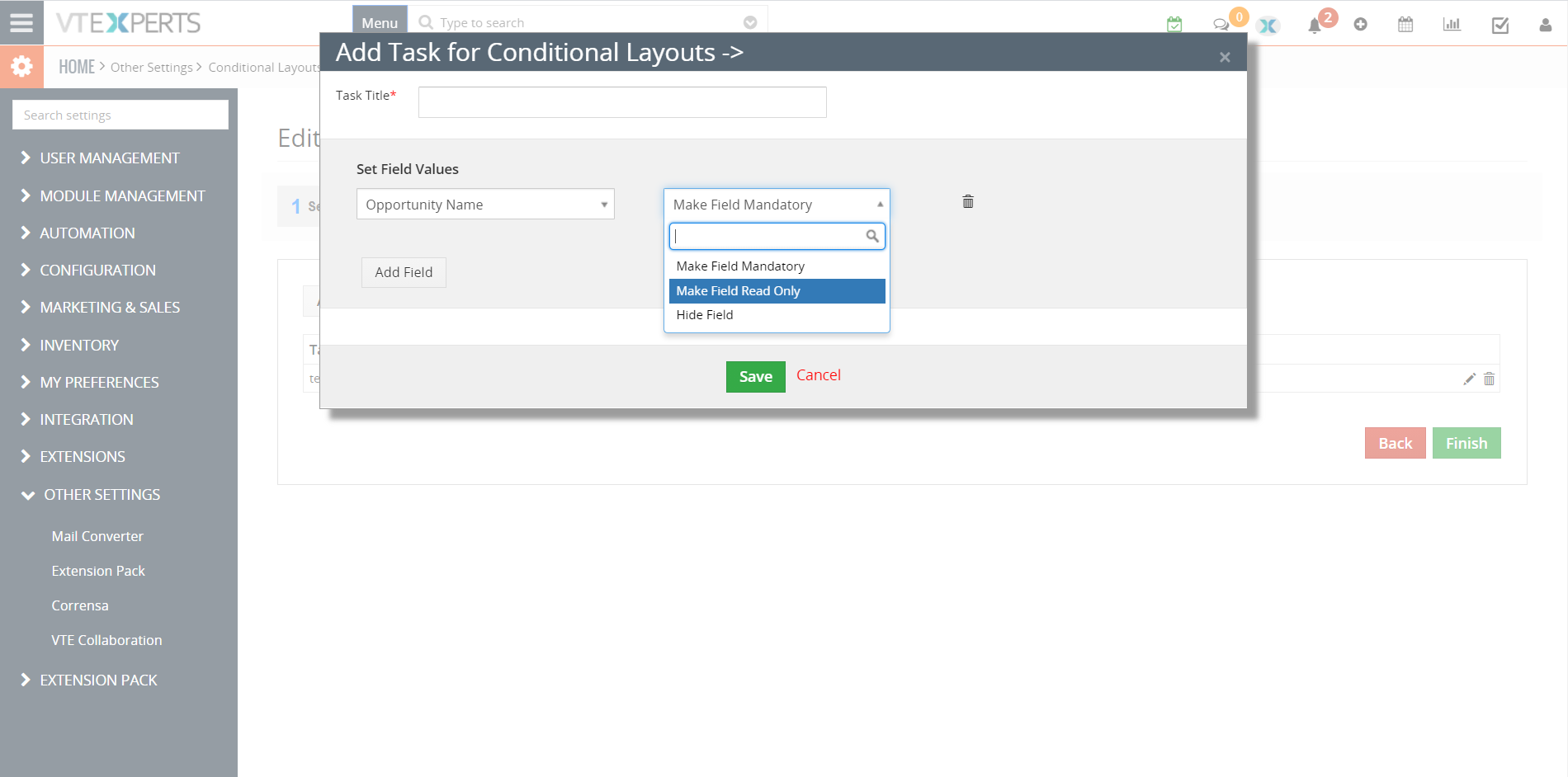
Conditional layout extension for Vtiger, provides functionality that enables to take three different kind of actions when a value of a field is changed. Following are the three different types of actions that can be taken
- Make a field hidden or visible (show/hide)
- Change a field to read only field
- Make a field mandatory
To elaborate all these functionalities in detail, let us take a look at a scenario where a flight booking agent is in contact with the customer
1. Make a field hidden or visible (when parent field is changed, show or hide the children’s fields)
Suppose a clients walk to you to make a flight booking from Beijing, China to the Sydney, Australia. When you started searching for the flights for the customer, two options appear one is a direct flight from Beijing to Sydney and other is a transit flight via Bangkok, Thailand. You provide both the options to the customer and they choose the transit via Bangkok flight. So, you checked field you “Flight via transit” field. When you checked “flight via transit”, additional fields became visible like do “Do client require hotel stay?”, “Do client possess transit visa?” etc. At start these field were hidden and only became visible when the option of transit flight was checked. In this scenario, “Flight via transit” is a parent field and “Do client require hotel stay?”, “Do client possess transit visa?” are children fields\
2. Make a field mandatory
Once you finalized the detail of the booking with a customer, you finally change the booking status from “In progress” to “Booked”, but it showed you a message that “Passport number is missing, please enter the correct passport number to make the booking”. As the “Passport number” is mandatory field and without it booking cannot be made.
3. Change A field to read only field
Once the booking is confirmed and the status is changed to the “Booked”, fields like Name, last name, Passport number etc. became read only as they cannot be changed now. The reason behind making them read only is to save them from any kind of data loss or accidental data changes.
Conditional layout feature makes VTiger records much more precise, smart looking and easy to comprehend. If your requirements are not met using conditional layout and you want more enhanced usage of the fields, or even if you want to make data blocks show and hide, then VTExperts Dynamic blocks is the extension for you.
What is VTExperts Dynamic Blocks?
Using this extension user can show/hide whole blocks in a record. It is extremely helpful in differentiating various types of data in a block. Example, for personal details you can make a separate block, for corporate information you can use another block etc. Use Dynamic blocks, to make a whole block show or hide depending upon a Picklist field value
Here are some of the key features that make our extension unique:
- Works with all Standard & Custom VTiger Modules
- Configurable with Standard & Custom VTiger Picklist Fields
- Intuitive Configuration panel allowing multiple setups
- Shows & Hides Blocks based on Picklist values
- 100% Modular (Does not modify VTiger core files)
Next Article: VTiger Providing Telephony Solutions