• Company
  • Blog
  • Case Studies
  • Partners
  • Contact

vtexpertswplogovtexpertswplogotransp2-white-small-2transp2-white-small-2

  • Home
  • Services
    • Services [custom]
  • Solutions
    • Solutions [custom]
  • Extensions
    • Extensions [custom]
  • Managed Hosting
  • Resources
    • Resouces [custom]
  • Extension List
  • Home
  • Managed Hosting
  • Extensions
    • Get Started
    • Installation Instructions
    • Pricing
    • FAQs
    • Extension List
  • Services
    • Support
    • Custom Development
    • Integrations
    • Vtiger Upgrade
    • Data Migration
  • Support Plans
    • Monthly Plans
    • Support Plans
    • Startup Packages
  • Resources
    • Helpdesk
    • Blog
    • Contact Us
    • Partners

VTiger 7 Standard Relationships Between Different Modules

Categories
  • vTiger 7
  • vTiger Tweaks
Tags
  • Add-on
  • automation
  • crm
  • customization
  • integration
  • Management
  • many-to many
  • Modules
  • One way
  • One-to-many
  • Relationships
  • VTExperts
  • vTiger
  • vtiger CRM
  • vTiger features

VTiger 7 standard relationships between different modules are shown in this article

Relationships connect different modules and the working of the modules depends on the quality and quantity of these relationships. Like other CRM systems, VTiger also use different relations to connect the modules. Standard VTiger most commonly use three types of relationships which are as following

One to One (1:1) : One record of a module is associated with only one object of other module

One to Many (1:M) : One record of a module is associated with multiple records of another module

Many to Many (M:M) : Multiple records of a module are related to multiple records of another module and vice versa

Moreover, you can add custom relationships between two modules using Custom Module Builder extrension

How to read the relationships from the table

The first value in the relation is related to the module listed in column at left side, the second value in the relationship is related to the module listed in the horizontal row at the top.

E.g. Campaign’s relationship with Contacts is (1:M), this means 1 campaign can be connected with multiple contacts
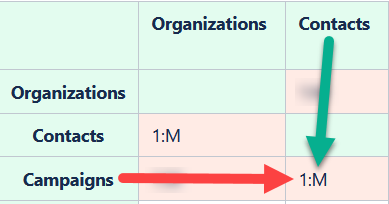
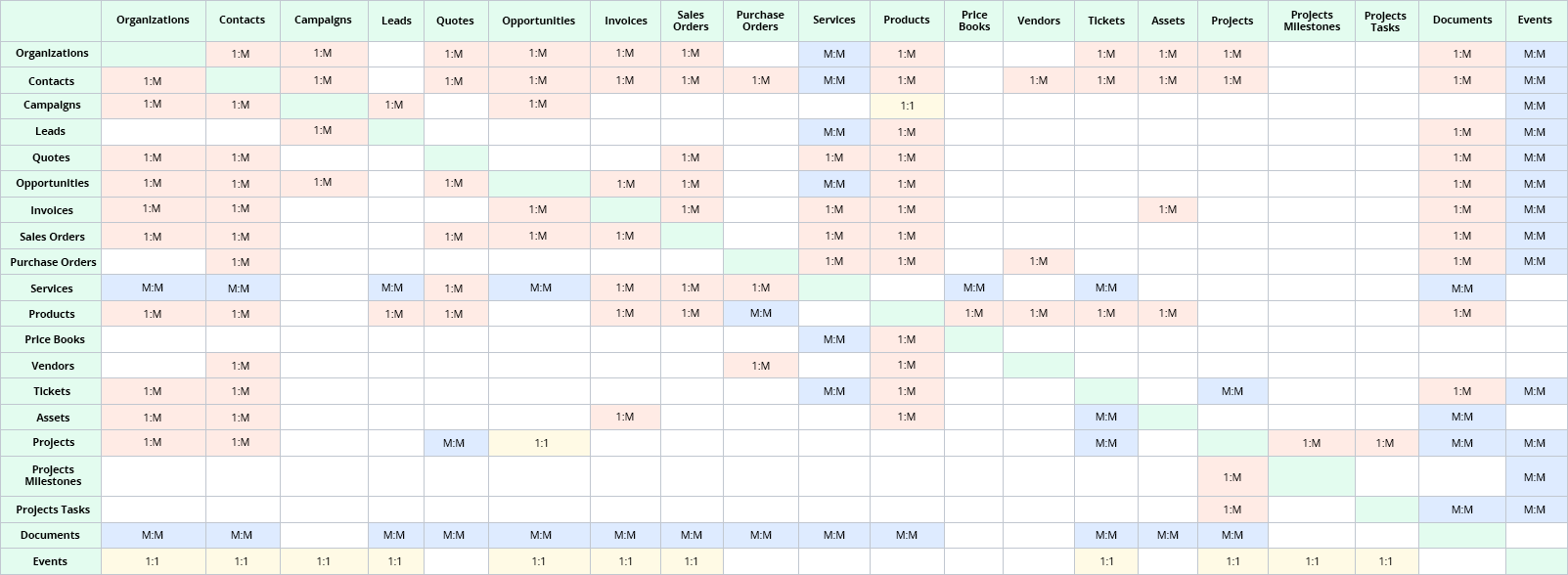
 

VTiger 7 Standard Relationships between different Modules


There exists some special relationships among some modules. Some of them are mentioned below

  • Reports to module is not present. (Reports to contacts have special relation (i.e. 1:1 relation)
  • Quotes have a special 1:1 relationship with Users
  • Products have special 1:M relationship with Products Bundle and Parent Products
  • Tickets have special M:M relationship with service contracts
  • Documents have a special M: M relationship with service contracts

Next article: Adding Upcoming Activities Widget to the Dashboard
Related posts

VTExperts VTiger Customer Portal Direct Login – Customization

VTiger Advanced Customer Portal vs Default Customer Portal: What’s the Difference?

VTExperts: Vtiger Employee Contract Management Customization

Multi-Currency Vtiger Quotes with VTExperts IDCA (Customziation)

Multi-Currency Vtiger Quotes with VTExperts IDCA (Customziation)

Comments are closed.

EXTENSION PACK

  • Extension List
  • Pricing
  • Extension Pack Details
  • Setup Instructions
  • Documentation

SERVICES

  • Support & Consulting
  • Hosting (Dedicated & Managed)
  • Customization & Development
  • Upgrade & Migration
  • Maintenance & Ongoing Support

LINKS

  • Gmail Plugin for VTiger
  • Outlook Plugin for VTiger
  • Blog (News & Tips)
  • Extension List
  • Contact Us Form

VTExperts

  • 341 W Scott Street
    Chicago, IL 60610
    United States
[email protected]
+1 (818) 495-5557
© 2009-2026 VTExperts.com All Rights Reserved
0
Cleantalk Pixel