• Company
  • Blog
  • Case Studies
  • Partners
  • Contact

vtexpertswplogovtexpertswplogotransp2-white-small-2transp2-white-small-2

Menu
  • Home
  • Services –
    • Services

      Maintenance & Support

      Plans provide guidance, phone support, and training to get the most out of CRM.

      Customization

      Streamline & automate your sales, marketing and operations.

      Integrations

      CRM integration with leading third-party service providers, websites and apps.

      Migration

      Vtiger Upgrade

      Stay up to date with the latest features & security patches.

      Data Migration

      Transfer your important data from any other CRM, ERP or custom solution.

      Packages

      Monthly Support Plans

      Essential for growing businesses

      Kickstarter Packages

      Optimal solution for small businesses

      Projects & Incidents

      Recommended for updates & fixes
  • Solutions
    • Sales

      Contact Management

      Close more deals with single-page contact management.

      Opportunities

      Track stages and milestones of your deals to keep the sales process on track.

      360 View

      Contact data from every angle, including conversations, call notes.

      More ....

      Appointments, Reporting, Proposals & more..
      Note: The links in this menu are not clickable. Please contact us for more details.

      HelpDesk

      Ticketing

      Resolve every issue in the shortest possible time with powerful ticketing features.

      Service Level Agreements

      Set up trigger campaigns to send alerts when the ticket resolution time exceeds the due date.

      Automation

      Leverage automation to define priorities, statuses & assignments for tickets.

      More ....

      Canned responses, feedback, customer portal...
      Note: The links in this menu are not clickable. Please contact us for more details.

      Marketing

      Marketing Automation

      Marketing workflows with an easy drag-and-drop designer.

      Email Marketing

      Get complete email marketing features with newsletters, analytics, and more.

      Email Tracking

      Track your email performance with metrics that matter and notifications.

      More ....

      Landing pages, SMS, Analytics & more..
      Note: The links in this menu are not clickable. Please contact us for more details.
  • Extensions
    • Extension Pack

      Get Started

      Details, screenshots and videos

      Pricing

      Affordable and cost effective

      FAQ

      Pricing, licensing and compatibility

      Documentation

      Installation Instructions

      Step by step guide

      Helpdesk

      Documentation & user guides

      Extensions

      Extensions for Vtiger 8.x

      70+ Plugins with screenshots, videos & live demos

      Extensions for Vtiger 7.x

      70+ Plugins with screenshots, videos & live demos

      Extensions for Vtiger 6.x

      65+ Plugins with screenshots, videos & live demos.
  • Managed Hosting
  • Resources
    • Documentation

      User Guide

      Best practices and tips to keep your user engaged.

      Administrator Guide

      Designed to help manage and configure the CRM for all the Vtiger users.

      Video Tutorials

      Learn how to use Vtiger features with guided video tours

      Extensions

      Helpdesk

      Admin & User guides for all our Extensions.

      Recent Updates

      New Extension releases & enhacements to Vtiger.

      Development

      Contributions

      Enhanced features, fixes and extensions.

      Github

      Access to upcoming releases, patches & more.

      Official Resources

      Developer forums, code repository & more.
  • Extension List
  • Home
  • Managed Hosting
  • Extensions
    • Get Started
    • Installation Instructions
    • Pricing
    • FAQs
    • Extension List
  • Services
    • Support
    • Custom Development
    • Integrations
    • Vtiger Upgrade
    • Data Migration
  • Support Plans
    • Monthly Plans
    • Support Plans
    • Startup Packages
  • Resources
    • Helpdesk
    • Blog
    • Contact Us
    • Partners

Configuring ShareX to take screenshots & screen recording

Categories
  • vTiger 6.x
  • vTiger 7
  • VTiger Extensions (Tips)
  • vTiger News
  • vTiger Tips
  • vTiger Tweaks
Tags
  • Add-on
  • automation
  • crm
  • Management
  • Screen-recording
  • Screenshot
  • ShareX
  • vTiger
  • vtiger 7
  • vtiger tips
  • vtiger tricks
  • vtiger tweaks

Using screenshots and short videos you can better communicate the issue to us and it is much easier for us to understand the issue in this manner.
You can take screenshots and record videos using ShareX and then send it to us via email
Download link: ShareX

Downloading and installing ShareX

1. Download the ShareX from the link provided above, once done install it
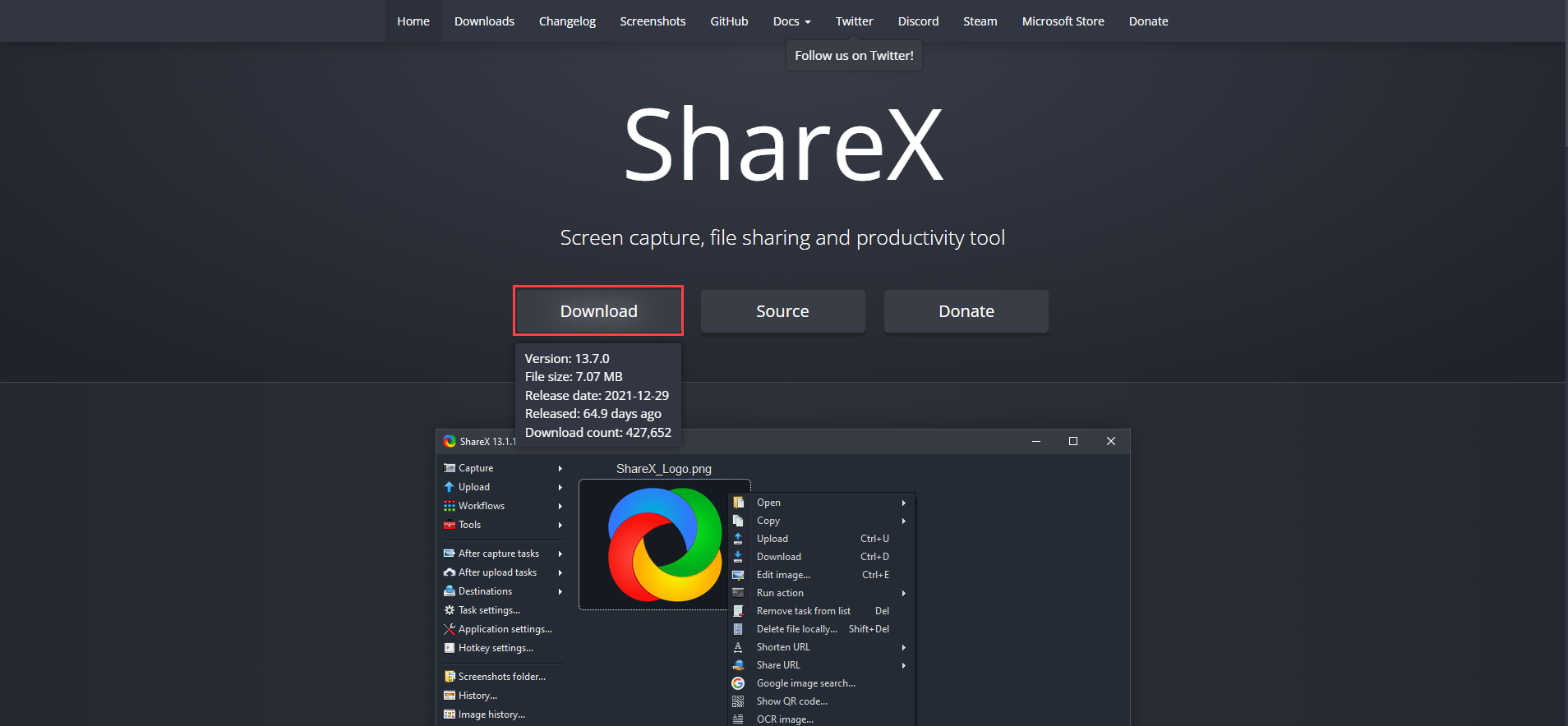
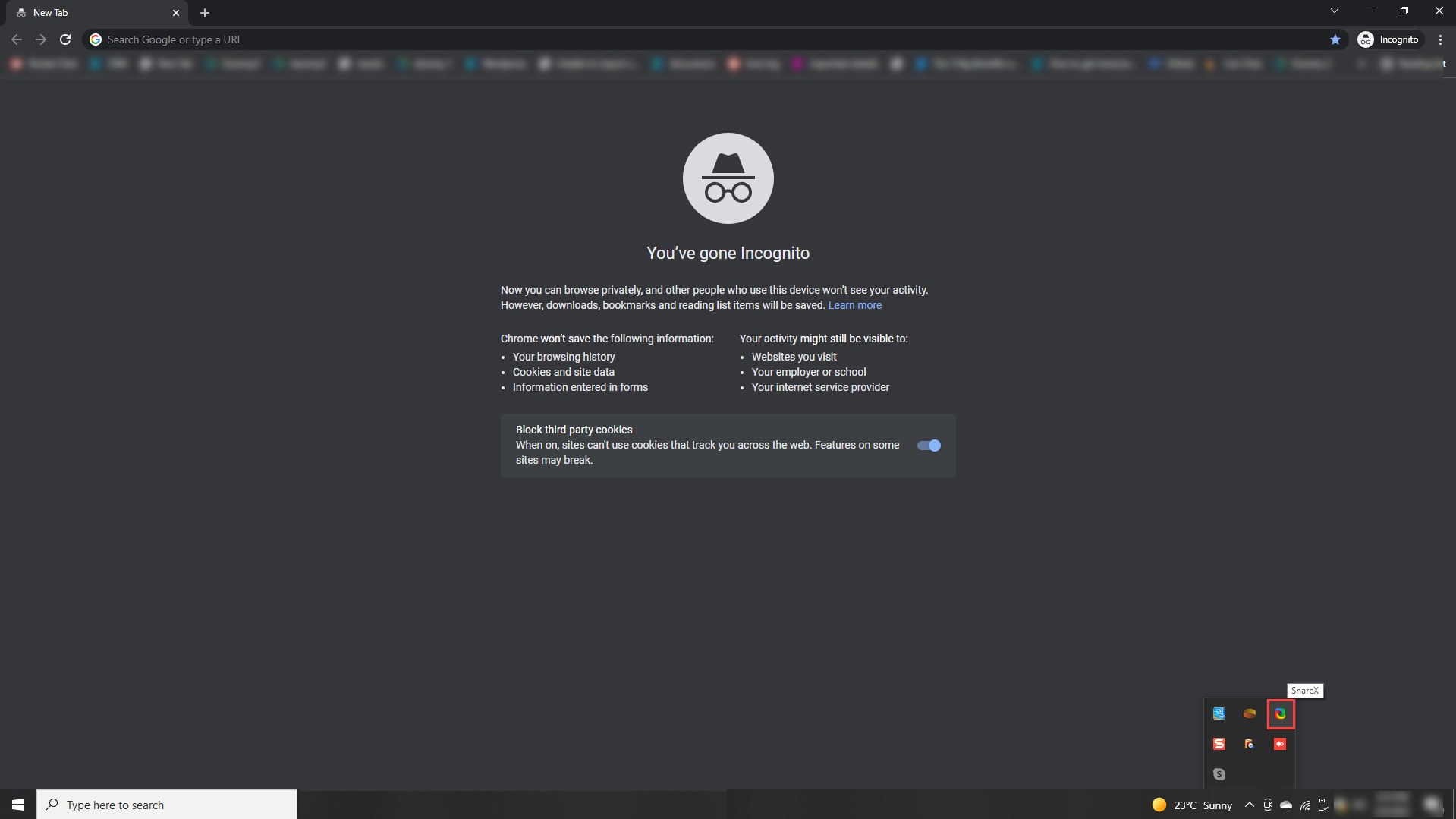
2. Once installed, you can access the ShareX from the taskbar. Right click on the ShareX icon to open the ShareX control panel
Taking Screenshots using ShareX

Kindly check the following procedure using which you can take the screenshots

Go to ShareX > Capture
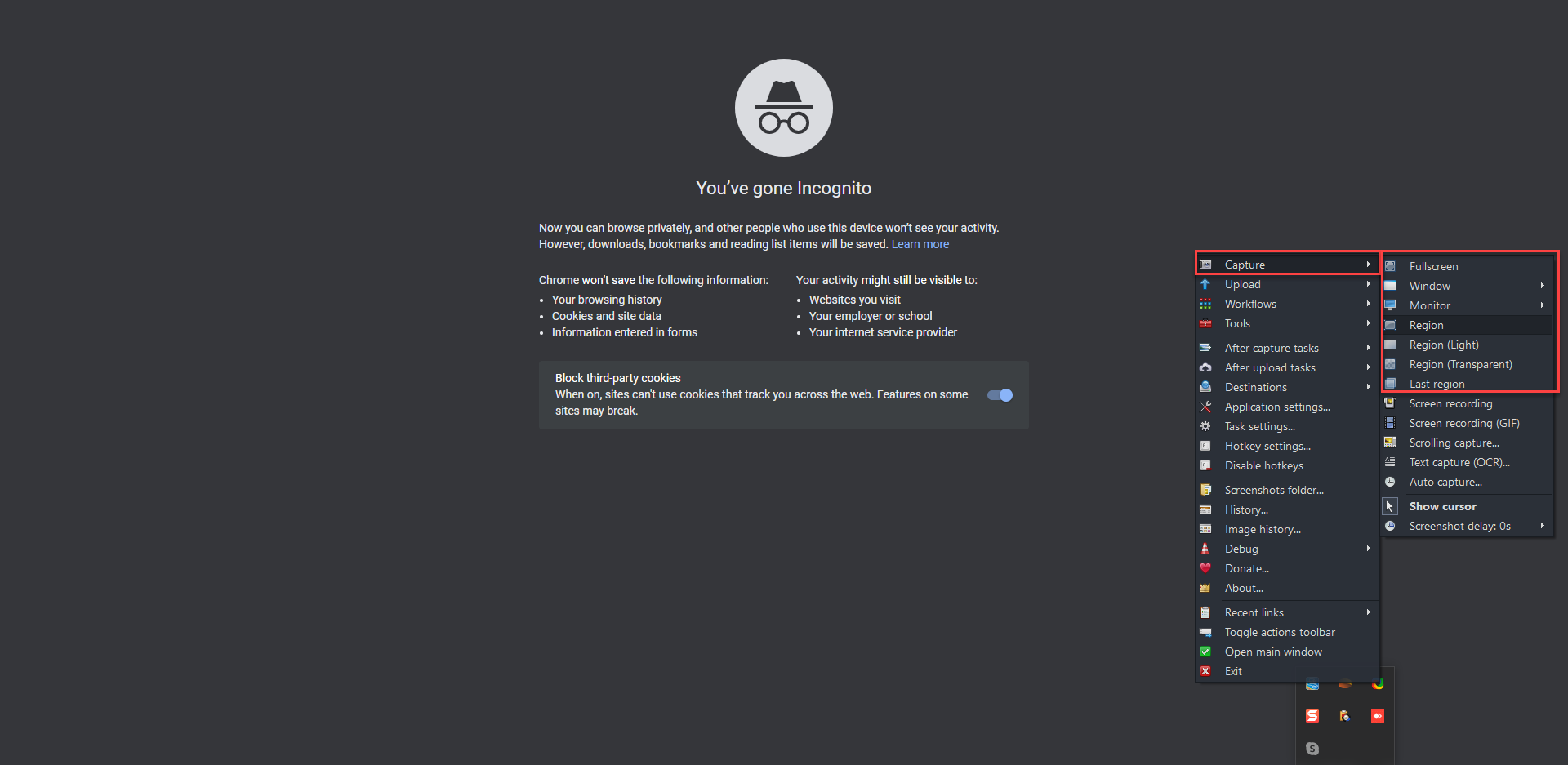
Choose the appropriate option according to you needs (e.g. if you want to take the full window screenshot then select Fullscreen)
Once you take the screenshot it will start appearing in the ShareX control panel and using it you can access the image folder. Right click on the image and it will show you the action related to image
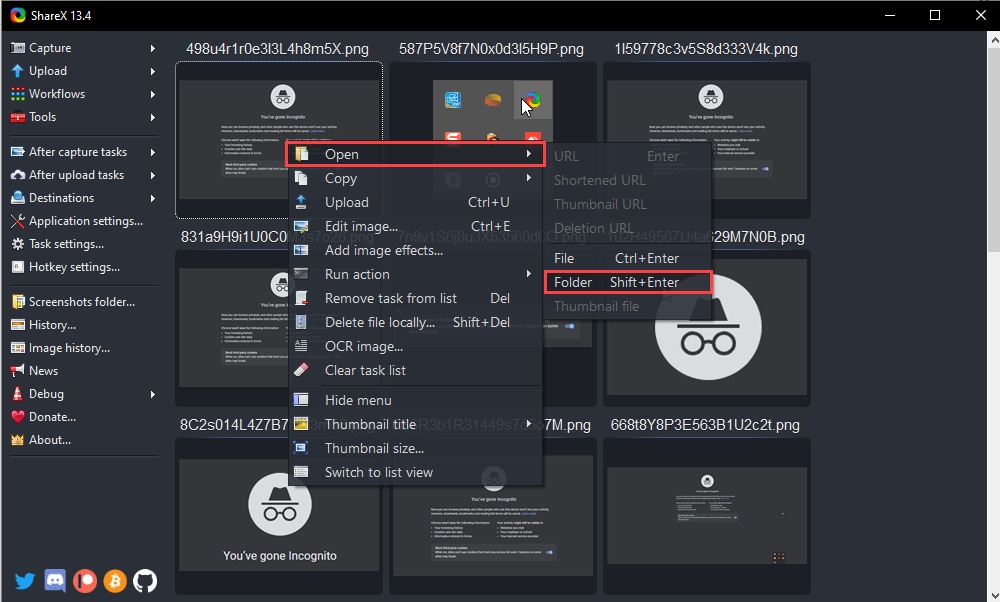
From here you can add the screenshot into the email and send it to us

Recording a video using ShareX

Kindly check the following procedure using which you can carry out the screen-recording and then send the video to us

Go to ShareX > Capture
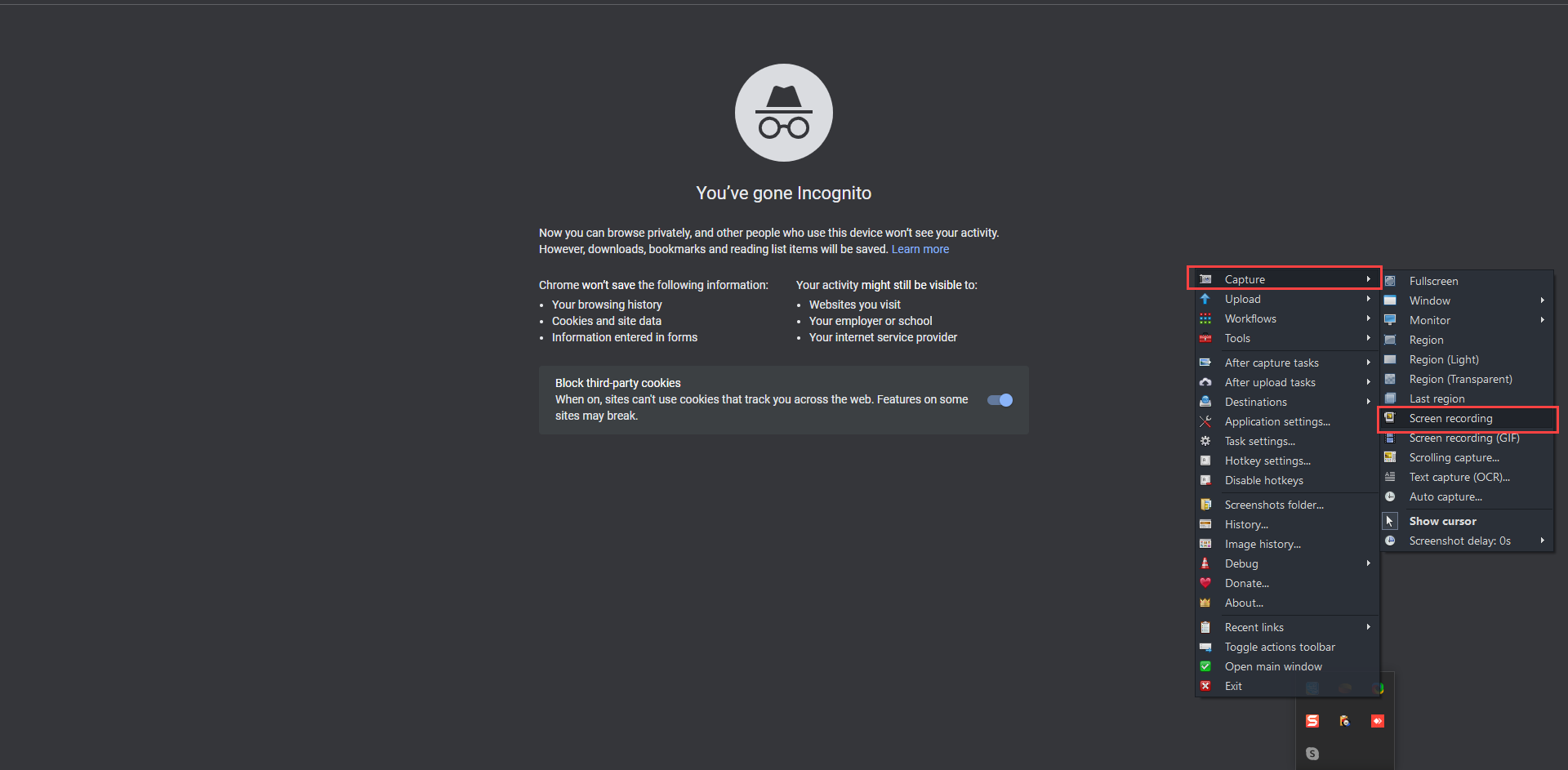
Choose screen-recording
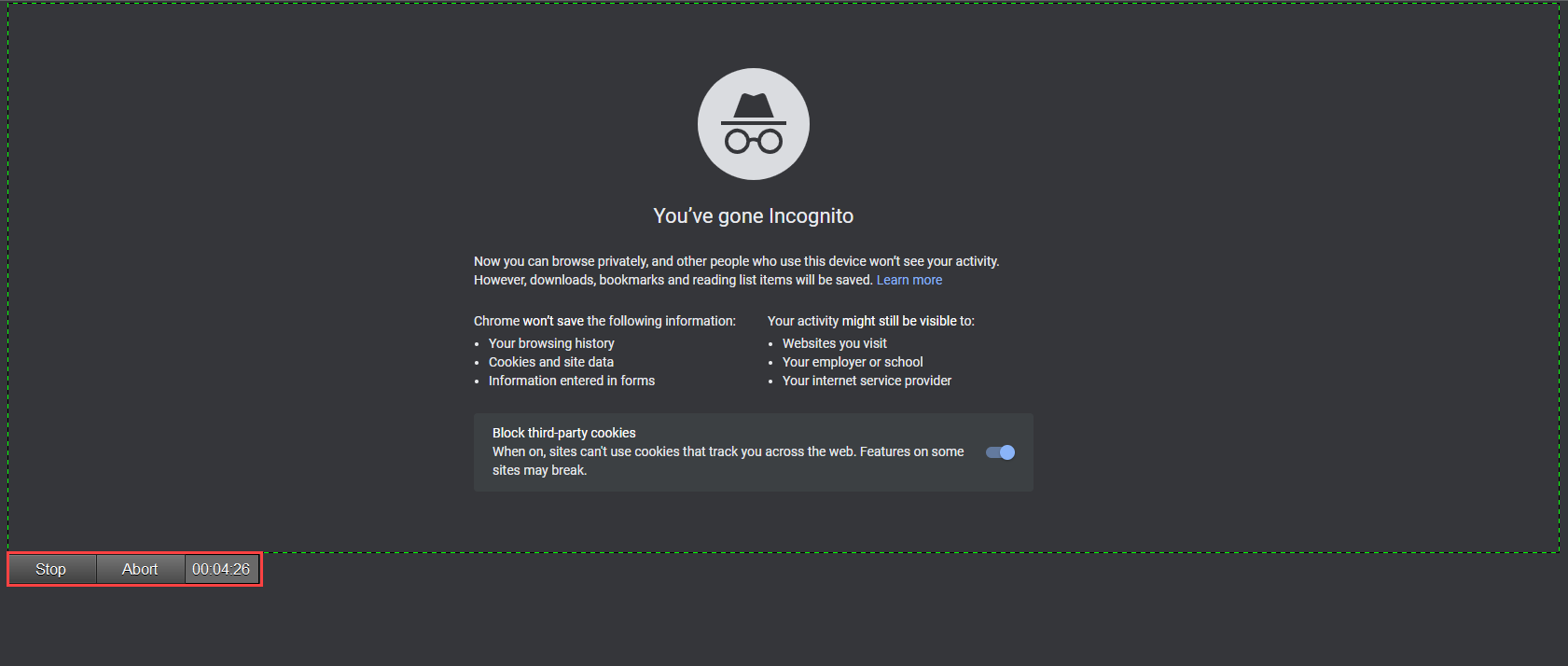
You have to choose the region that you want to record. Once you choose the region, the recording will be started.  You can abort and stop the recording from the button that will appear below the screen-recording region
Once you stop the screen-recording. it will start showing in to the ShareX control panel. Right click on the video to access the folder of the video
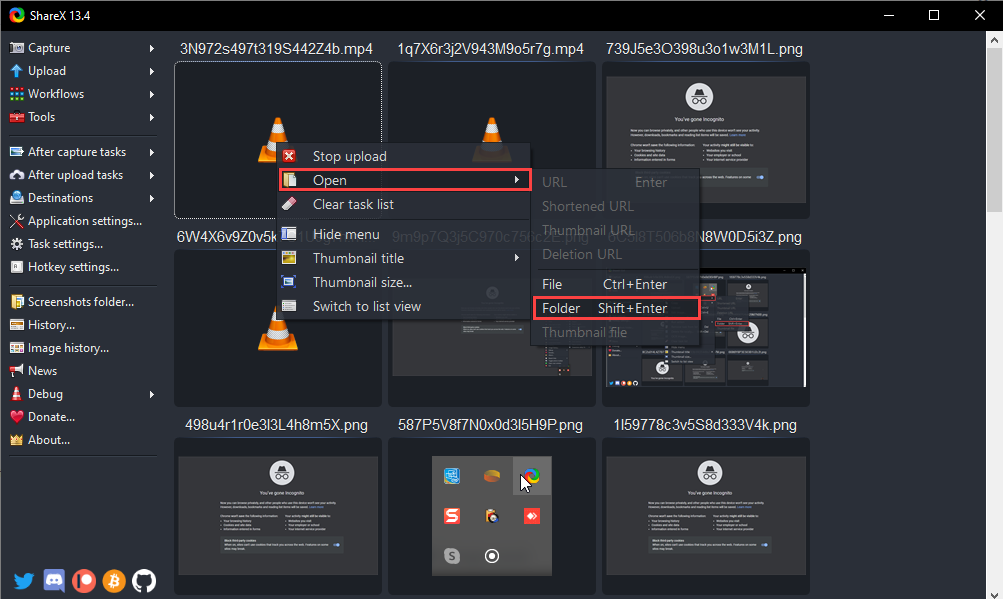
From here you can add the video into the email and send it to us
Note: If its larger than 25mb, you can upload it to something like Google drive/dropbox/weshare, and share the link in an email

In this manner you can take the screenshots and record short videos of the issues that you are facing and send it to us for diagnostic and resolution
Feel free to contact us if you need any help Here


Related posts

VTExperts: Vtiger Employee Contract Management Customization

Multi-Currency Vtiger Quotes with VTExperts IDCA (Customziation)

Multi-Currency Vtiger Quotes with VTExperts IDCA (Customziation)

Vtiger Checklists by VTExperts Introduces Role-Based Sharing

Vtiger Checklists by VTExperts Introduces Role-Based Sharing

VTExperts Vtiger CRM AI Customer Portal Chat Assistant

Leave a Reply Cancel reply

Your email address will not be published. Required fields are marked *

EXTENSION PACK

  • Extension List
  • Pricing
  • Extension Pack Details
  • Setup Instructions
  • Documentation

SERVICES

  • Support & Consulting
  • Hosting (Dedicated & Managed)
  • Customization & Development
  • Upgrade & Migration
  • Maintenance & Ongoing Support

LINKS

  • Gmail Plugin for VTiger
  • Outlook Plugin for VTiger
  • Blog (News & Tips)
  • Extension List
  • Contact Us Form

VTExperts

  • 341 W Scott Street
    Chicago, IL 60610
    United States
[email protected]
+1 (818) 495-5557
© 2009-2026 VTExperts.com All Rights Reserved
0
Cleantalk Pixel