


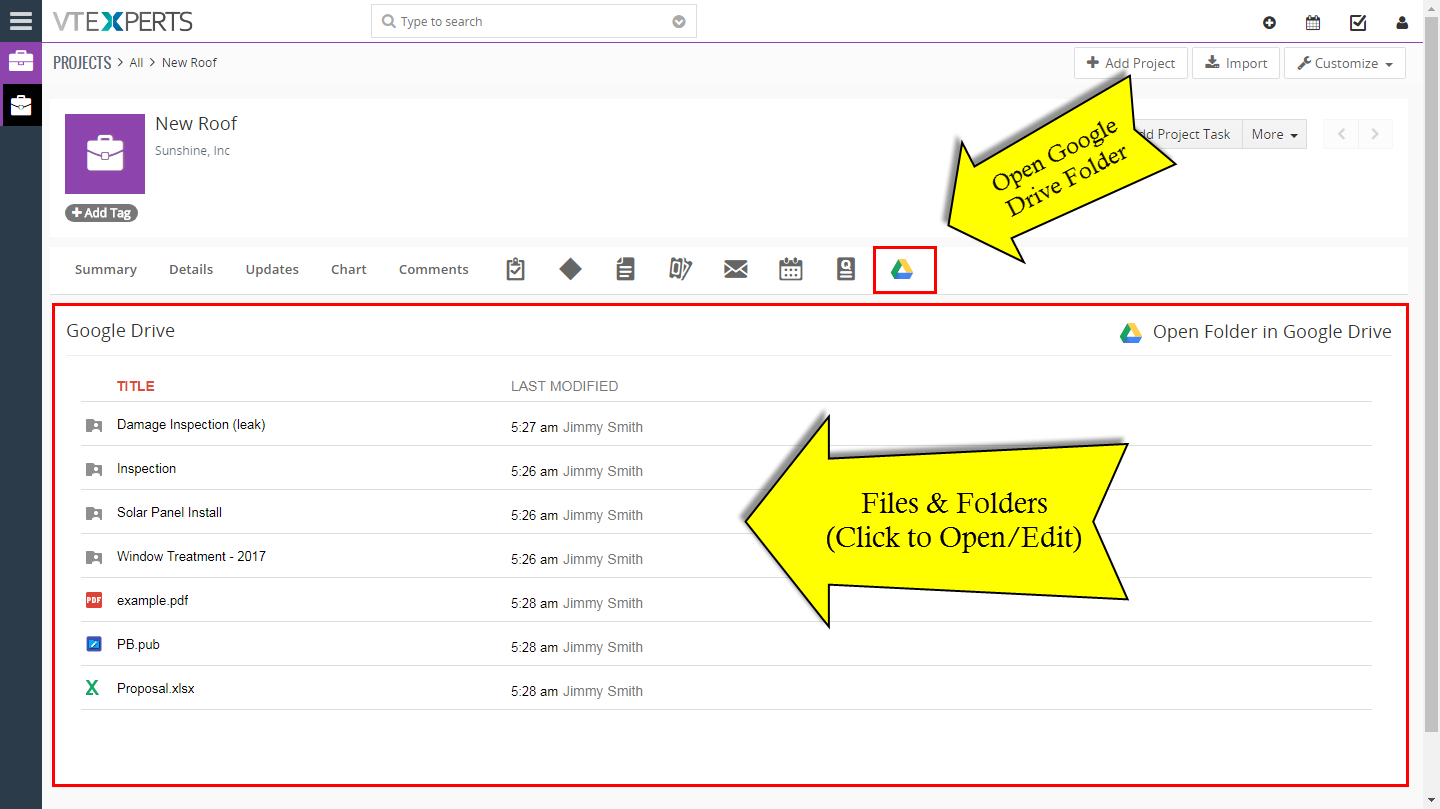
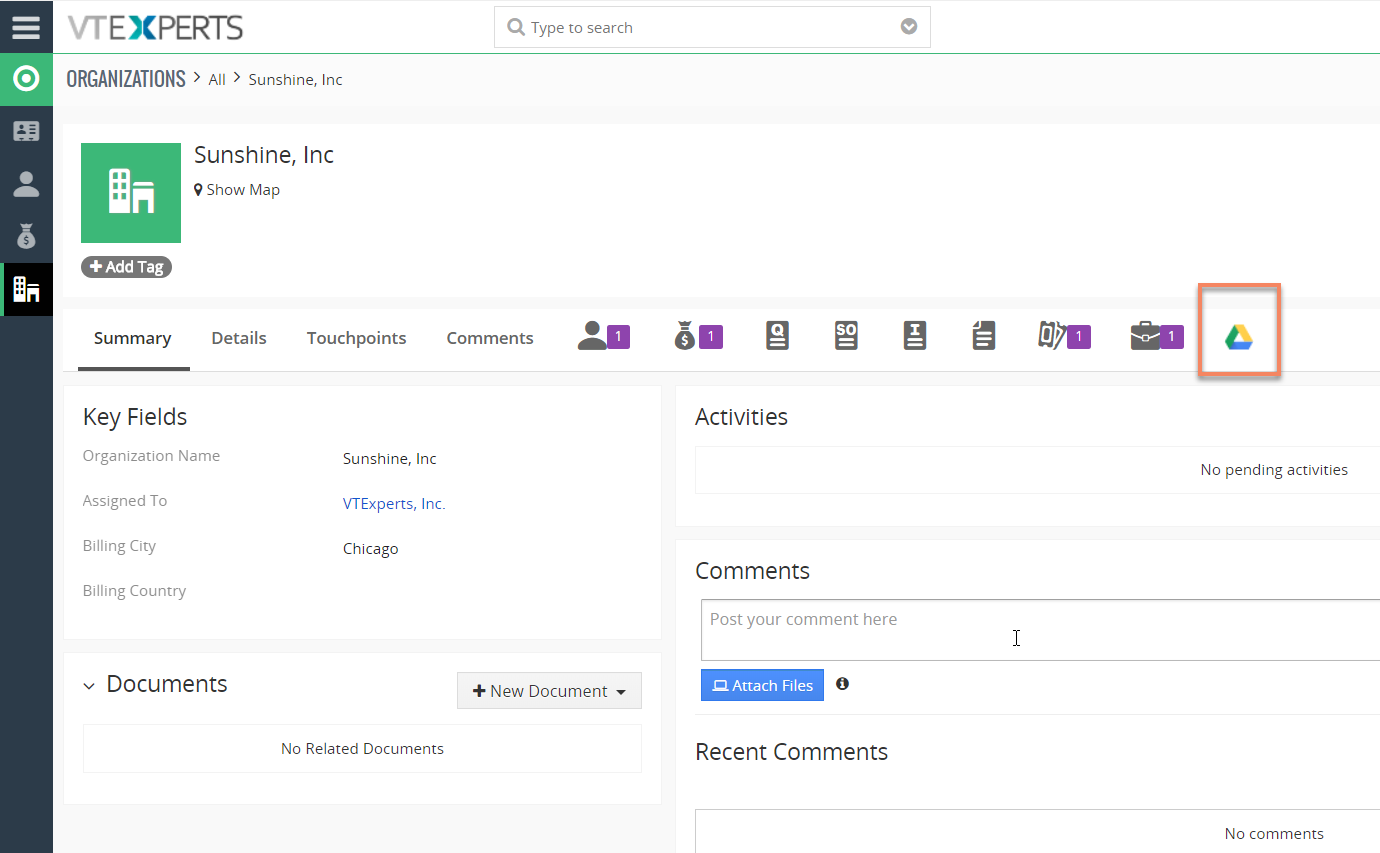
Google Drive Integration for VTiger makes it very easy to access documents stored on Google Drive without leaving from the VTiger CRM. It fully integrates the two applications, by assigning Google Drive folders to VTiger records. Folders/Files are then accessible directly from VTiger, where you can view them in a “list” or “Gallery” view. In addition, when you click on the document/folder/file – it will open Google file viewer/editor which allows to edit files without downloading to your computer. (Files supported include Word, Excel, Text & much more).
Integration supports all modules, meaning that you can assign folders to any record e.g project, opportunity, order and access the folder while in VTiger.

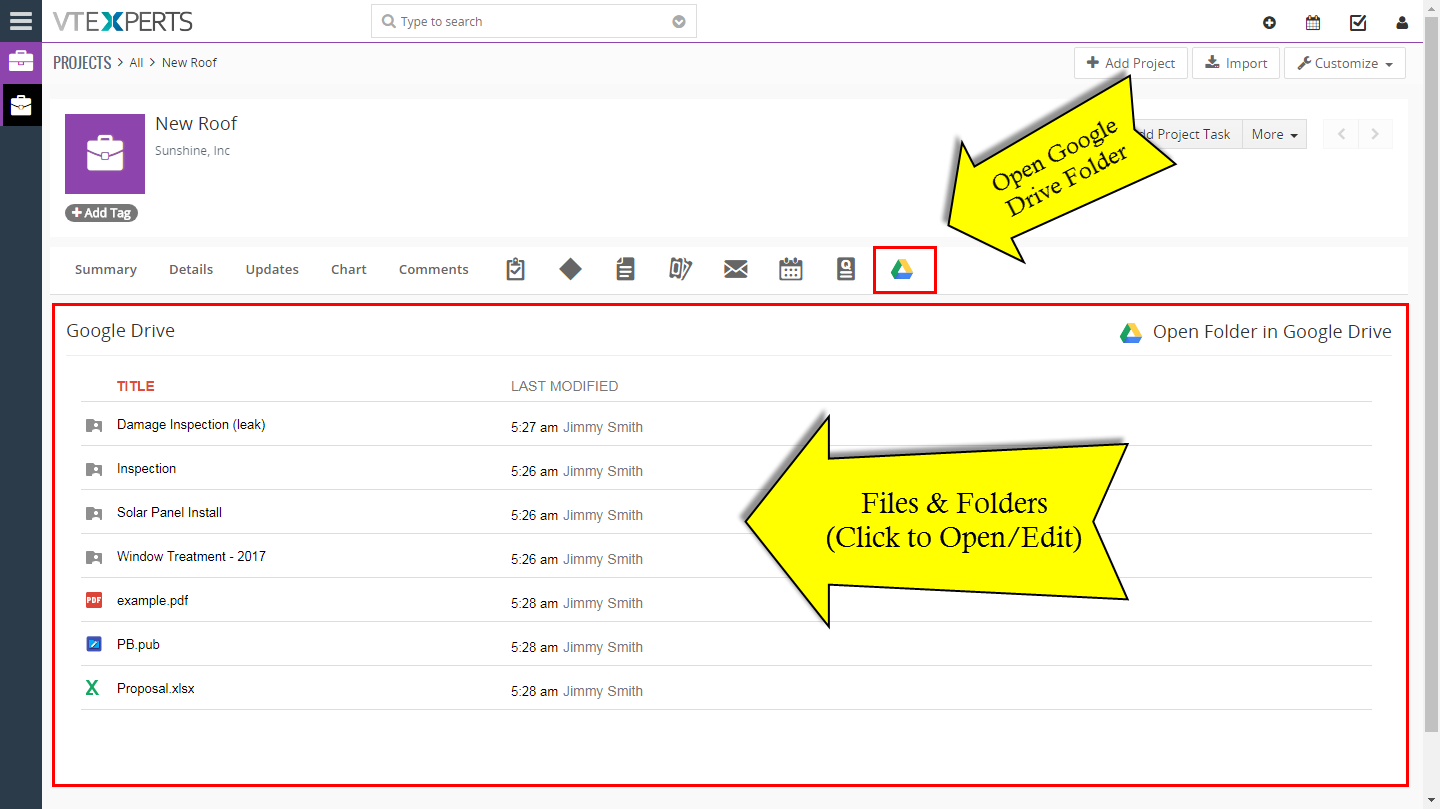
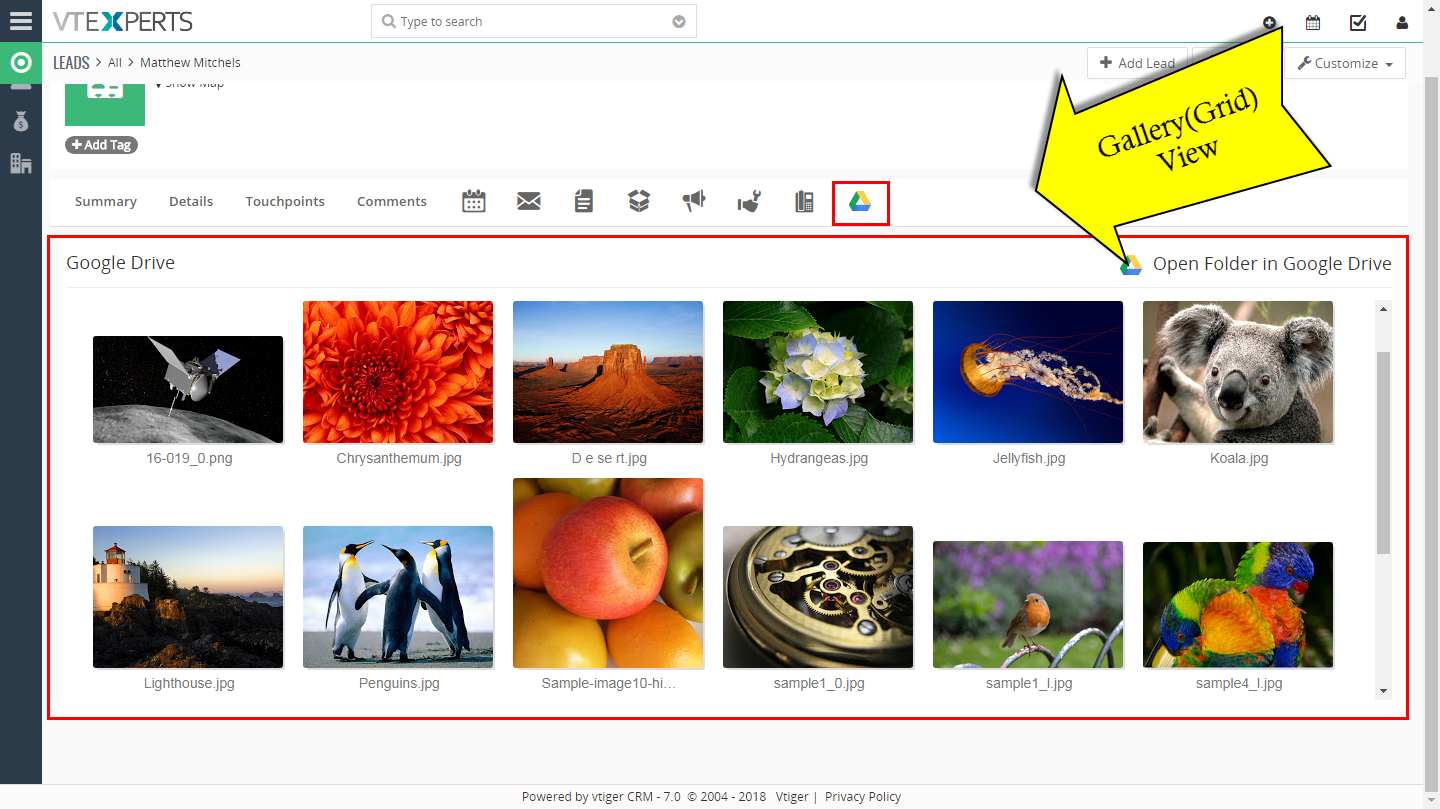
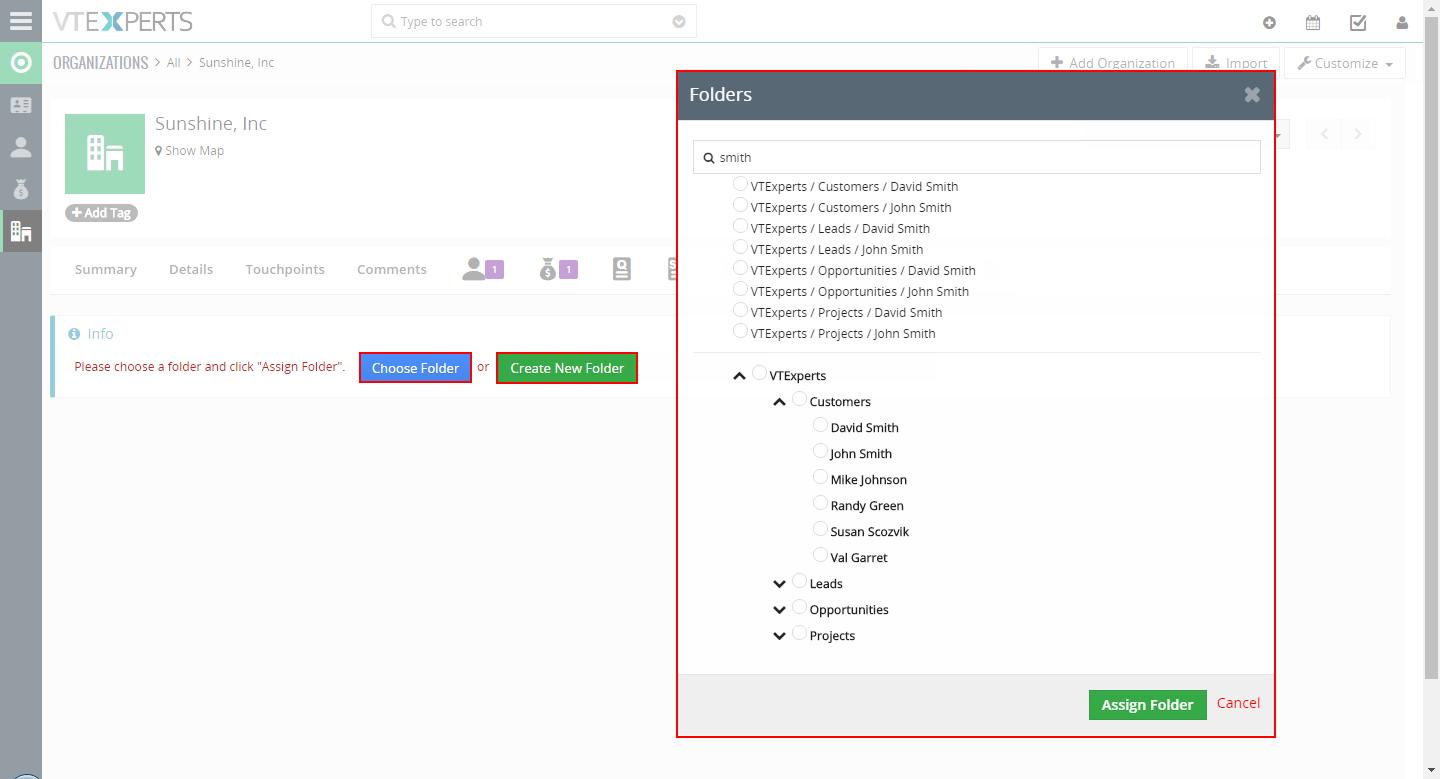
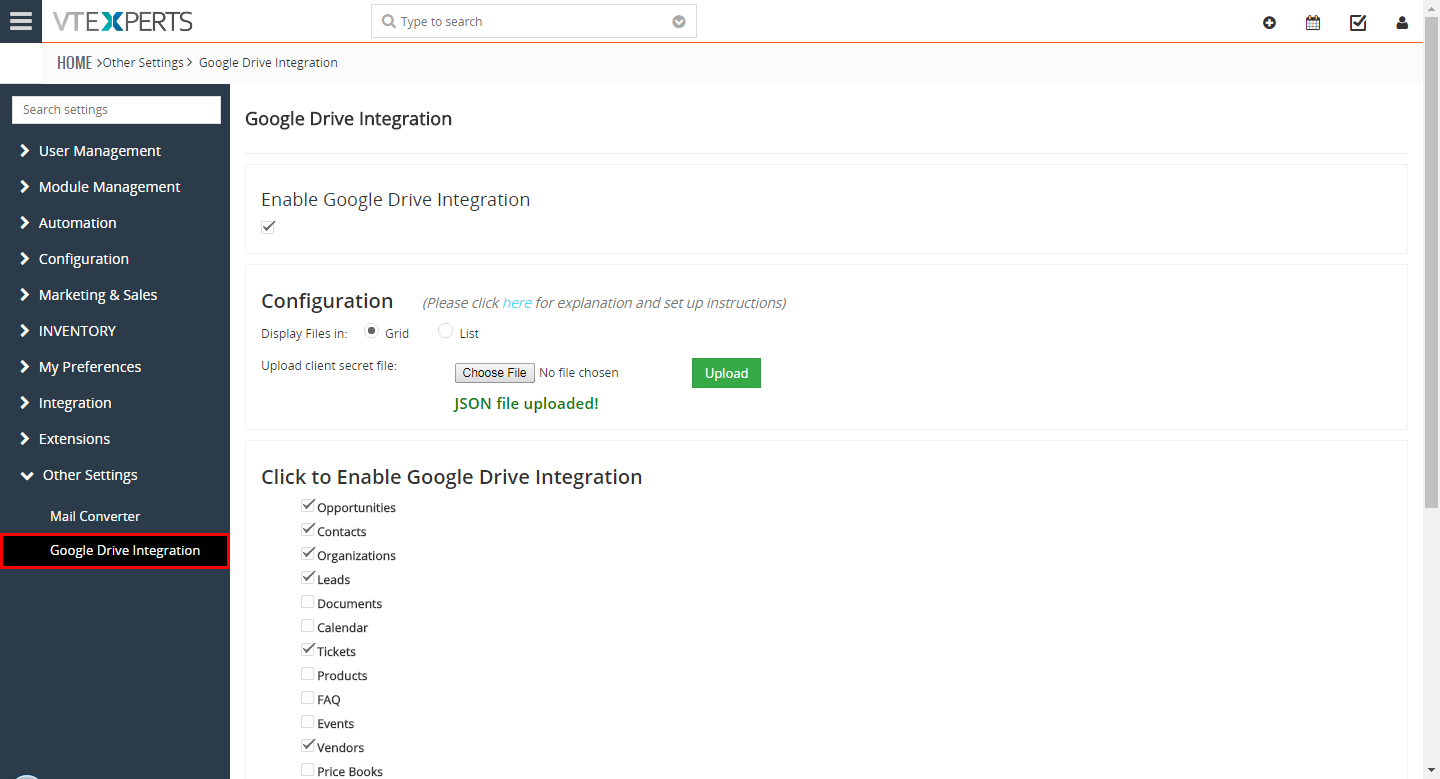


Here are some of the key features that make our extension unique.
- Seamlessly Integrates with Google Drive (Gmail/Google Apps)
- Supports unique folders per record & module
- Built-in “Folder Selector” (assign folders from Google Drive)
- Two Supported Views: Grid (Gallery) and List
- Module Manager Compatible
- Available on vTiger Marketplace
We provide a unique demo instance for all our extensions. Each demo instance is pre-configured to only show features available for the specific extension. It is likely that some of the standard vTiger modules have been disabled to make the demo more user friendly.
VTiger 7 Demo
Please use credentials below to access the demo.
- Link: https://demo7.vtexperts.com/googledrive/index.php (Will open in new window)
- User: demo
- Pass: demo
If you are not able to access the demo or find an issue - please send us an email at support@vtexperts.com or via contact form.
All extensions come with an extensive user guide, which includes setup instructions, suggestions as well as usability tips. Please click the link below to access user guide for this extension.
User Guide: https://www.vtexperts.com/helpdesk/google-drive-integration (Will open in new window)
For assistance or any questions - please contact us via help@vtexperts.com.
 Introducing the Google Drive Integration with VTiger May 18, 2018 - Google Drive is one of our recently added extensions that seamlessly integrates Google Drive with VTiger. Not only the Documents /Files/Folders in Google drive can be accessed from VTiger but they can be edited without downloading to your computer (supported files include Word, Excel, Text & images etc) by the Google File Viewer/ Editor. You can assign unique folders from Google Drive to the individual records and modules using a Built-in Folder Selector. It also shows the assigned Files/ Documents in two supported views that is Grid and List view. This integration also supports all modules, meaning that you can assign folders to any record e.g project, opportunity, order and access the folder while in VTiger. It is very user-friendly, Module-manager compatible and got a rather straight forward Configuration Panel. After the configuration you can choose, create or assign folders from Google Drive to the records. For that, open a… Read More
 Integrate VTiger 7 With Google Drive April 25, 2018 - Google Drive Integration for VTiger makes it very easy to access documents stored on Google Drive without leaving from the VTiger CRM. It fully integrates the two applications, by assigning Google Drive folders to VTiger records. How to Integrate VTiger 7 with Google Drive Links to be Used during Configuration URL: https://console.developers.google.com/apis/credentials/Authorized JavaScript origins: – your_vtiger_url — https://demo7.vtexperts.comAuthorized redirect URIs: – your_vtiger_url + google drive api link — https://demo7.vtexperts.com/modules/VTEGoogleDrive/oauth2callback.php Go to Main Menu >> Settings >> CRM Settings >> Extensions List >> Google Drive Integration. After the install and first visit, you’ll be asked to download and install the “Google Api PHP Client”. Simply hit the “Download” button and it will automatically download and place the file at the required path. Enable Google Drive Integration, Click to Enable Google Drive Integration, Upload Client Secret File. Open the google console for developers – link: https://console.developers.google.com/apis/credentials/ It will prompt to login with an… Read More
Related products
Google Drive Integration for VTiger makes it very easy to access documents stored on Google Drive without leaving from the VTiger CRM. It fully integrates the two applications, by assigning Google Drive folders to VTiger records. Folders/Files are then accessible directly from VTiger, where you can view them in a “list” or “Gallery” view. In addition, when you click on the document/folder/file – it will open Google file viewer/editor which allows to edit files without downloading to your computer. (Files supported include Word, Excel, Text & much more).
Integration supports all modules, meaning that you can assign folders to any record e.g project, opportunity, order and access the folder while in VTiger.
Here are some of the key features that make our extension unique.
- Seamlessly Integrates with Google Drive (Gmail/Google Apps)
- Supports unique folders per record & module
- Built-in “Folder Selector” (assign folders from Google Drive)
- Two Supported Views: Grid (Gallery) and List
- Module Manager Compatible
- Available on vTiger Marketplace
We provide a unique demo instance for all our extensions. Each demo instance is pre-configured to only show features available for the specific extension. It is likely that some of the standard vTiger modules have been disabled to make the demo more user friendly.
VTiger 7 Demo
Please use credentials below to access the demo.
- Link: https://demo7.vtexperts.com/googledrive/index.php (Will open in new window)
- User: demo
- Pass: demo
If you are not able to access the demo or find an issue - please send us an email at support@vtexperts.com or via contact form.
All extensions come with an extensive user guide, which includes setup instructions, suggestions as well as usability tips. Please click the link below to access user guide for this extension.
User Guide: https://www.vtexperts.com/helpdesk/google-drive-integration (Will open in new window)
For assistance or any questions - please contact us via help@vtexperts.com.
Reviews
There are no reviews yet.
Introducing the Google Drive Integration with VTiger May 18, 2018 - Google Drive is one of our recently added extensions that seamlessly integrates Google Drive with VTiger. Not only the Documents /Files/Folders in Google drive can be accessed from VTiger but they can be edited without downloading to your computer (supported files include Word, Excel, Text & images etc) by the Google File Viewer/ Editor. You can assign unique folders from Google Drive to the individual records and modules using a Built-in Folder Selector. It also shows the assigned Files/ Documents in two supported views that is Grid and List view. This integration also supports all modules, meaning that you can assign folders to any record e.g project, opportunity, order and access the folder while in VTiger. It is very user-friendly, Module-manager compatible and got a rather straight forward Configuration Panel. After the configuration you can choose, create or assign folders from Google Drive to the records. For that, open a… Read More Integrate VTiger 7 With Google Drive April 25, 2018 - Google Drive Integration for VTiger makes it very easy to access documents stored on Google Drive without leaving from the VTiger CRM. It fully integrates the two applications, by assigning Google Drive folders to VTiger records. How to Integrate VTiger 7 with Google Drive Links to be Used during Configuration URL: https://console.developers.google.com/apis/credentials/Authorized JavaScript origins: – your_vtiger_url — https://demo7.vtexperts.comAuthorized redirect URIs: – your_vtiger_url + google drive api link — https://demo7.vtexperts.com/modules/VTEGoogleDrive/oauth2callback.php Go to Main Menu >> Settings >> CRM Settings >> Extensions List >> Google Drive Integration. After the install and first visit, you’ll be asked to download and install the “Google Api PHP Client”. Simply hit the “Download” button and it will automatically download and place the file at the required path. Enable Google Drive Integration, Click to Enable Google Drive Integration, Upload Client Secret File. Open the google console for developers – link: https://console.developers.google.com/apis/credentials/ It will prompt to login with an… Read MoreInformation
- Vtiger 8.x
- Vtiger 7.x
- Vtiger 6.x
- Ioncube & PHP SOAP (hands-on)
- Install & Setup (hands-on)
- Meeting Server Requirements
- Assisting with any issues related to plugins
Reviews
There are no reviews yet.