

kanban
Change Tile Colors On Kanban View In VTiger 7
October 1, 2018
Article
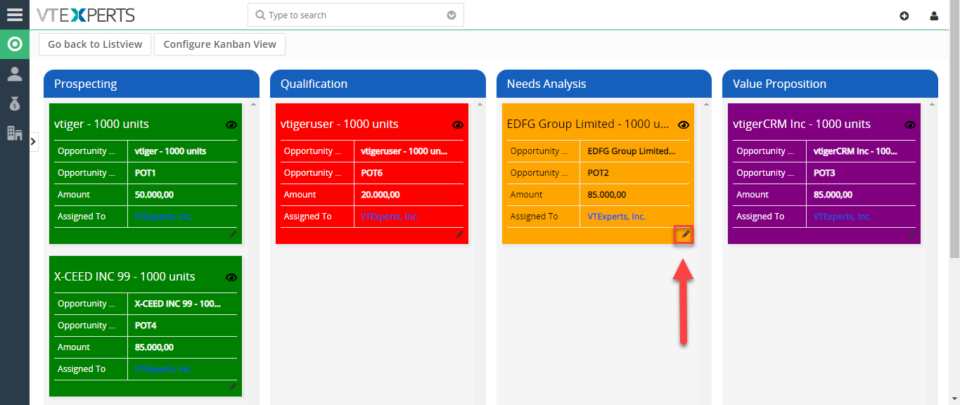
Kanban View is an extension with which you can easily create dynamic “cards” to visualize your workflow. Each module, e.g. Opportunities, Tickets, Tasks, Projects can be configured to have different sets of fields on the card as well as the “grouping/primary field“. Kanban view is mostly used to collaborate with team and manage sales opportunities, tickets, projects, tasks or any other list of records. How to Change Tile Colors For switching to Kanban View in Opportunities click on the Blue Button on the upper right corner of the screen.. Click on the “Edit” icon on the tile. Select the new color. The color is changed. For further help, contact us on [email protected]. We’ll be glad to be of service.
Turn On Kanban View In Opportunities In VTiger 7
May 14, 2018
Article
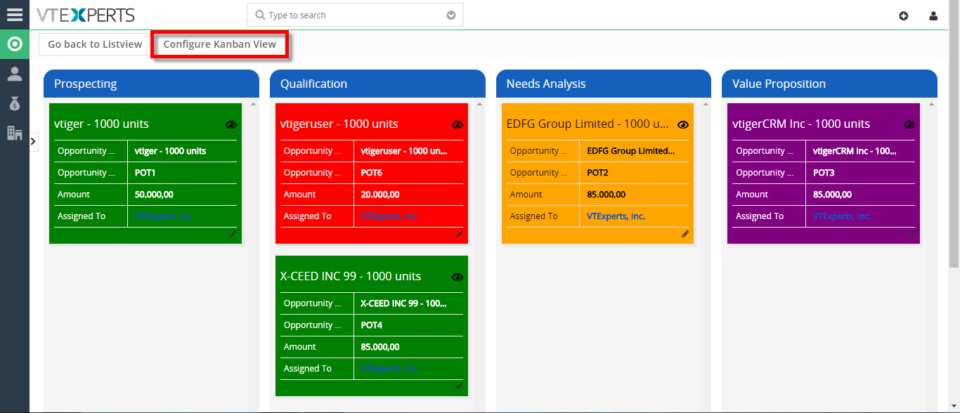
Kanban View is an extension with which you can easily create dynamic “cards” to visualize your workflow. Each module, e.g. Opportunities, Tickets, Tasks, Projects can be configured to have different sets of fields on the card as well as the “grouping/primary field“. Kanban view is mostly used to collaborate with team and manage sales opportunities, tickets, projects, tasks or any other list of records. How to Turn on Kanban View For switching to Kanban View in Opportunities click on the Blue Button on the upper right corner of the screen. You can Drag and Drop Opportunities from one stage to another. To Configure Kanban View Click on the the button on the upper left corner of the screen. Here you can Add new columns and Tile Fields. For further help, contact us on [email protected]. We’ll be glad to be of service.
For Sales Pipeline Management, Vtiger 7’s Kanban View Is The New Black
May 27, 2016

Article
Are you missing updates on a crucial deal just because there is no proper sales visibility? Are there any deals stuck in the sales pipe and you are not sure about the cause? Your sales pipe needs to be healthy in order to keep the flow streamline and hurdle-less. But with the classic systems, keeping tabs on deals in sales pipe is not so easy as pie. Moreover, there are several developmental stages of a deal that are needed to be observed. To ensure the perfect vision over the sales pipe and the health of it, Vtiger has developed and released several tools, all of their own kind, latest of those was Smart Reminders. Now, Vtiger 7 is pleased to be on the spot to announce yet another gizmo which doesn’t only offer X-ray vision of the sales pipeline, but also keep the sales reps updated and allow them to


