


SLA Policy Extension for VTiger was designed to improve response times, accountability, when dealing with time sensitive matters. It’s mostly used in support/helpdesk department, where each ticket/case has to be assigned and worked on/resolved by certain date and time. It allows administrator to create custom SLA Policy rules, which then get automatically applied to a record. For example, if a new critical gets created and does not get claimed/assigned by a user, a policy can be setup to notify the available users every 10 minutes since the ticket has been created. In addition, you can notify supervisor via email or text (workflow) 20.. 30..40.. minutes after if the ticket has not yet been worked on.
Other possible use cases are:
- New HOT Lead comes in, if after 10 minutes the lead is still unassigned, you can automatically assign it to a sales rep or notify users/managers + trigger any workflow.
- Invoice has been open (unpaid) for more than 14 days, you can create a policy that will notify you/accounting that the invoice has not been yet paid + you can trigger automated emails to the customer, account rep and much more.
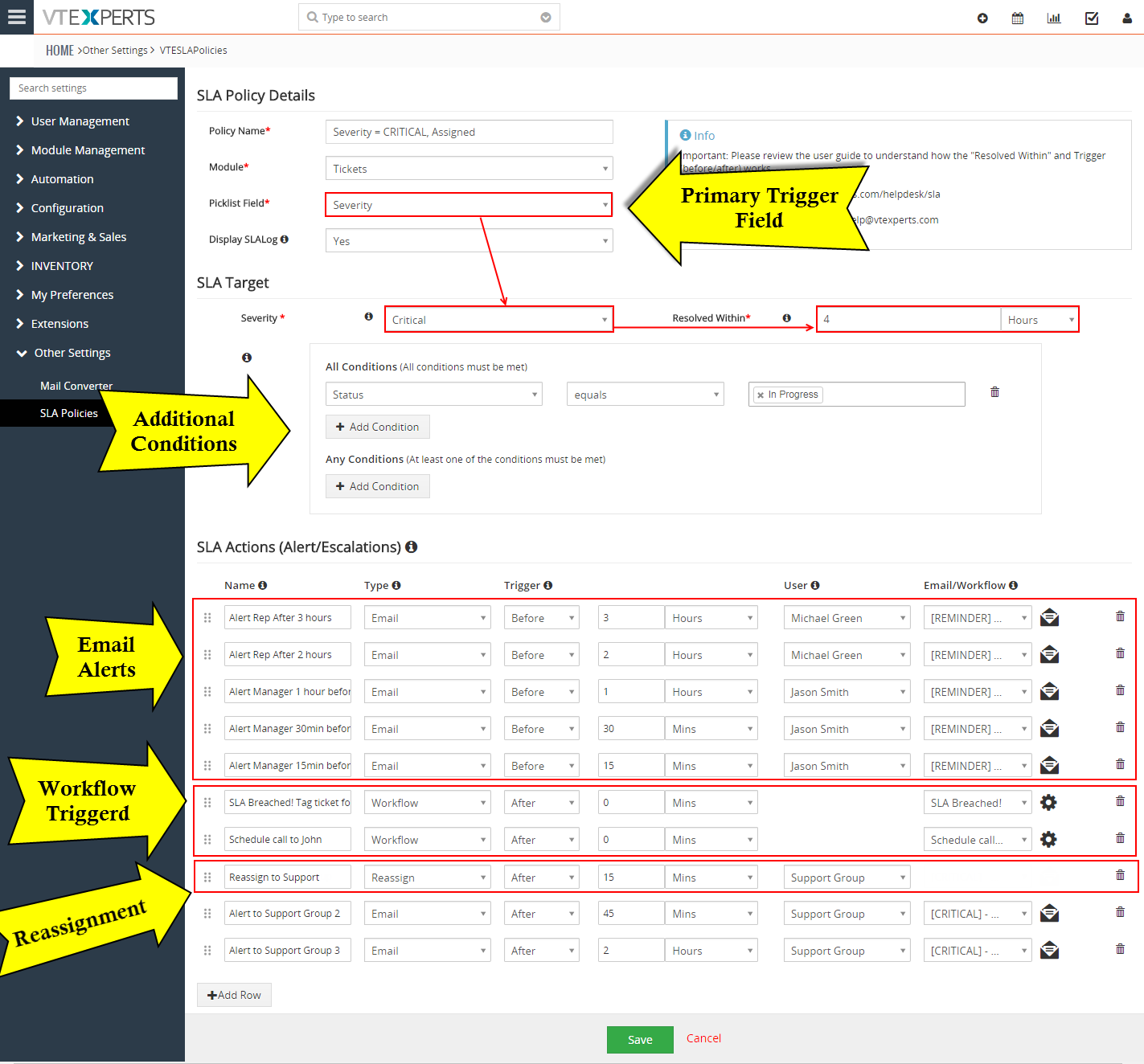
The extension is extremely flexible, meaning that it supports simple actions such as email, reassign as well as workflow, which essentially allows you to trigger any action before or after SLA has been breached.
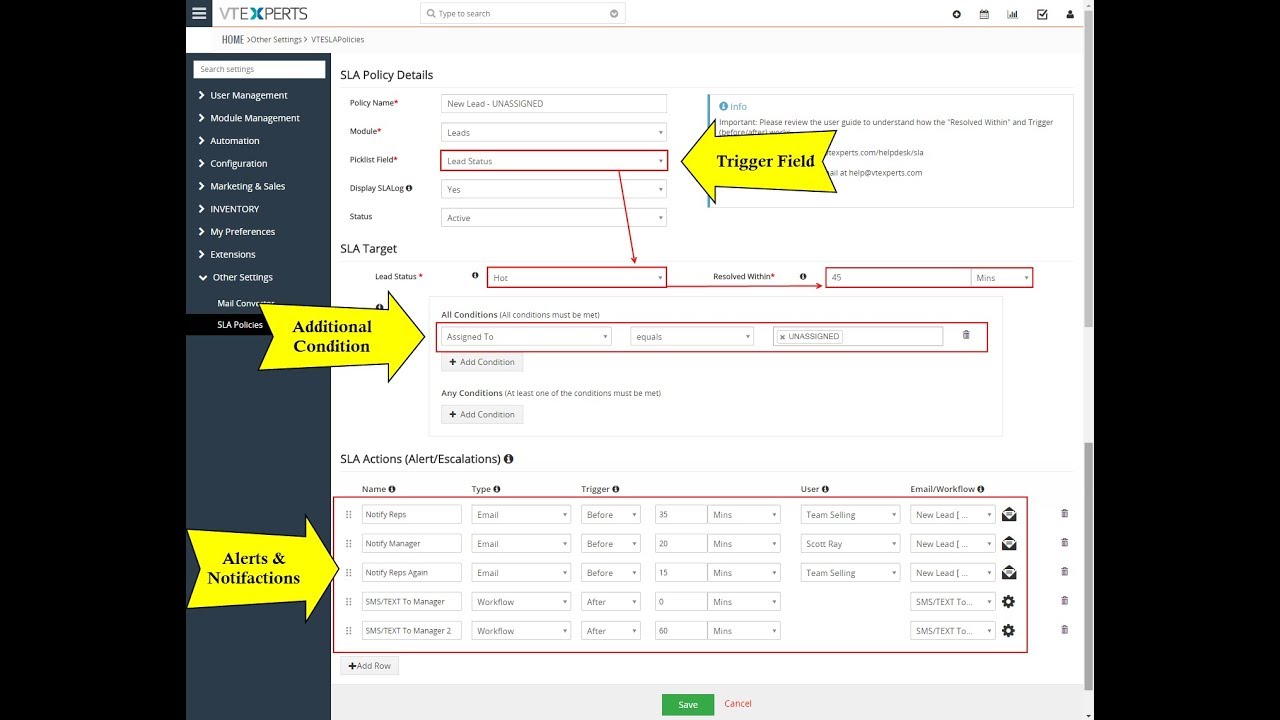
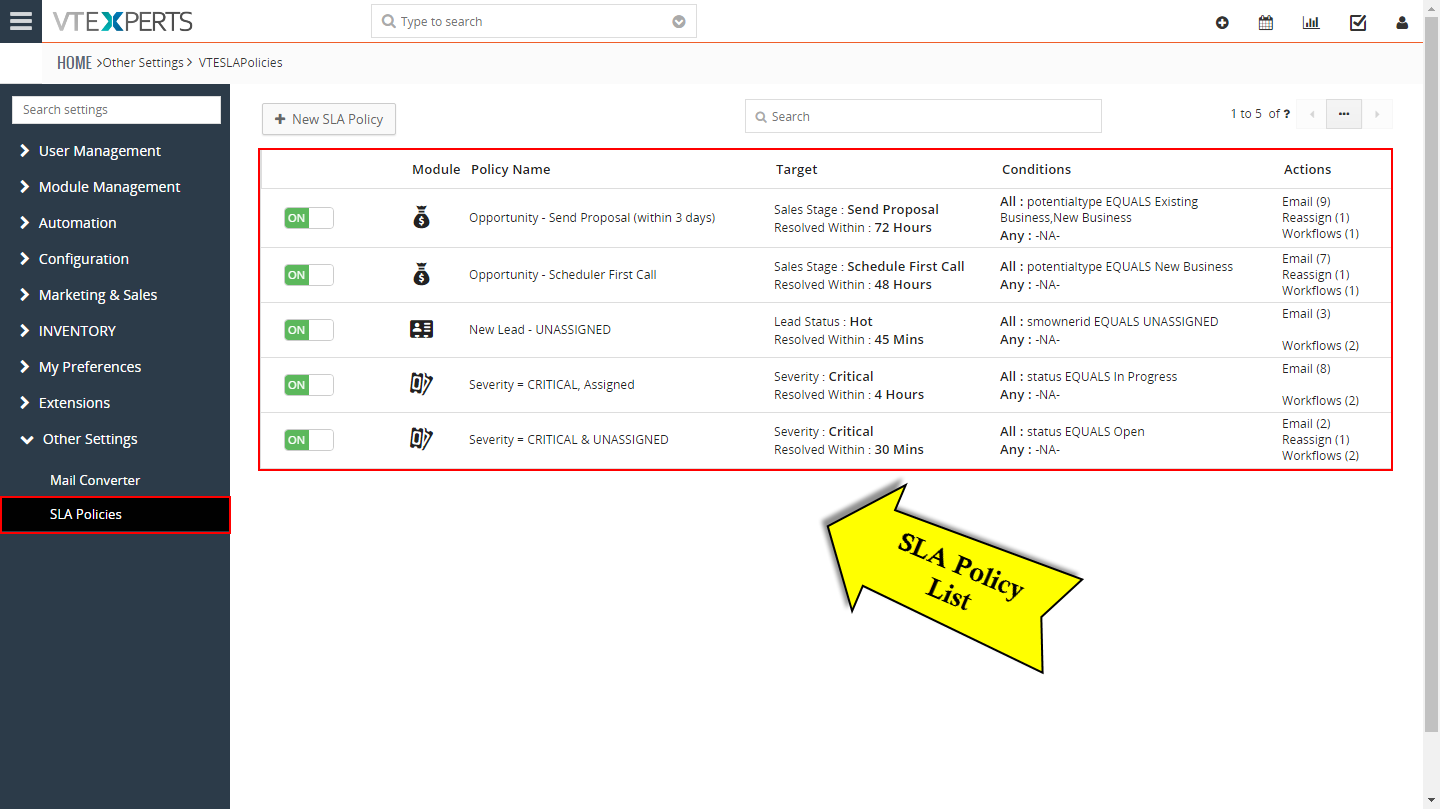
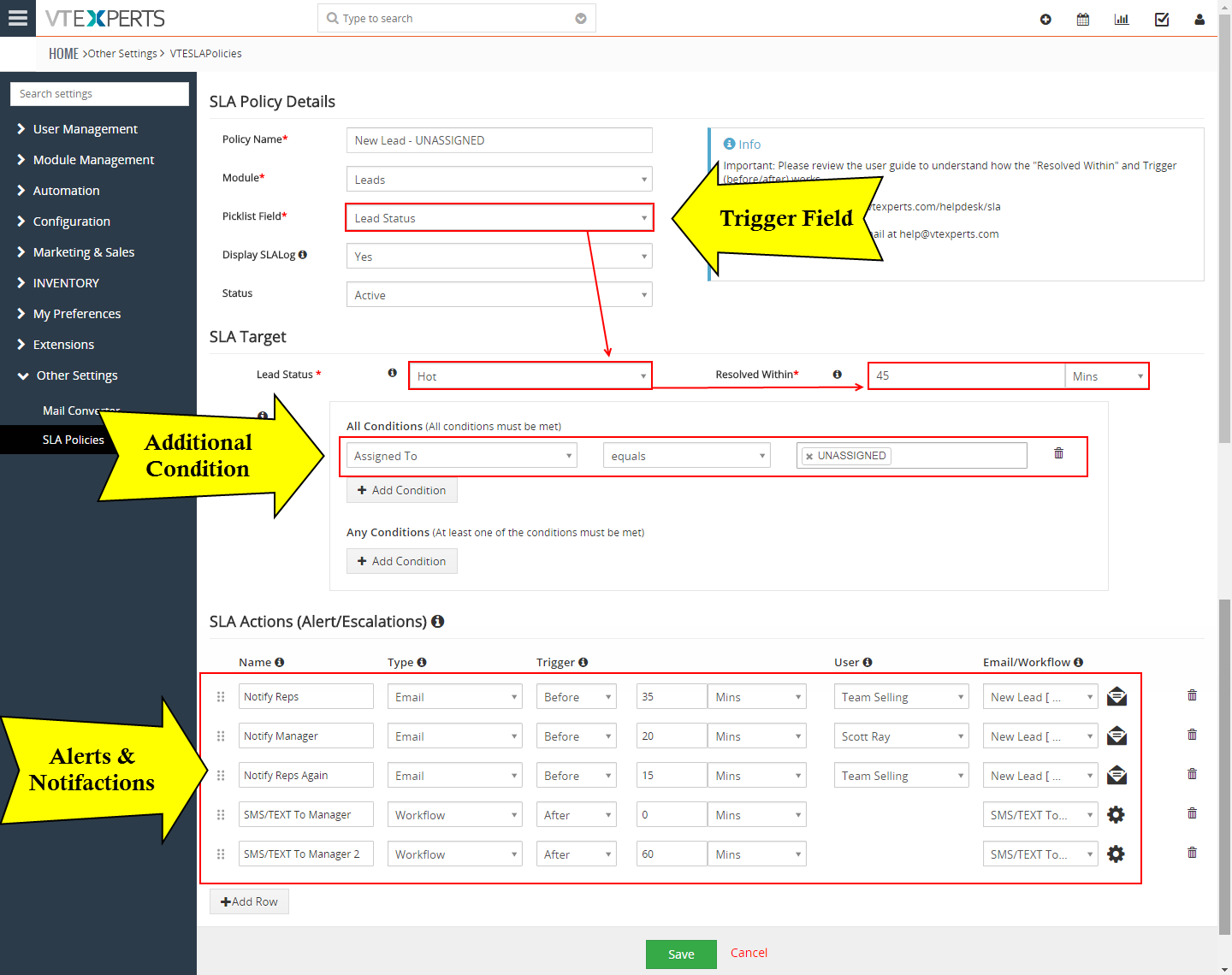
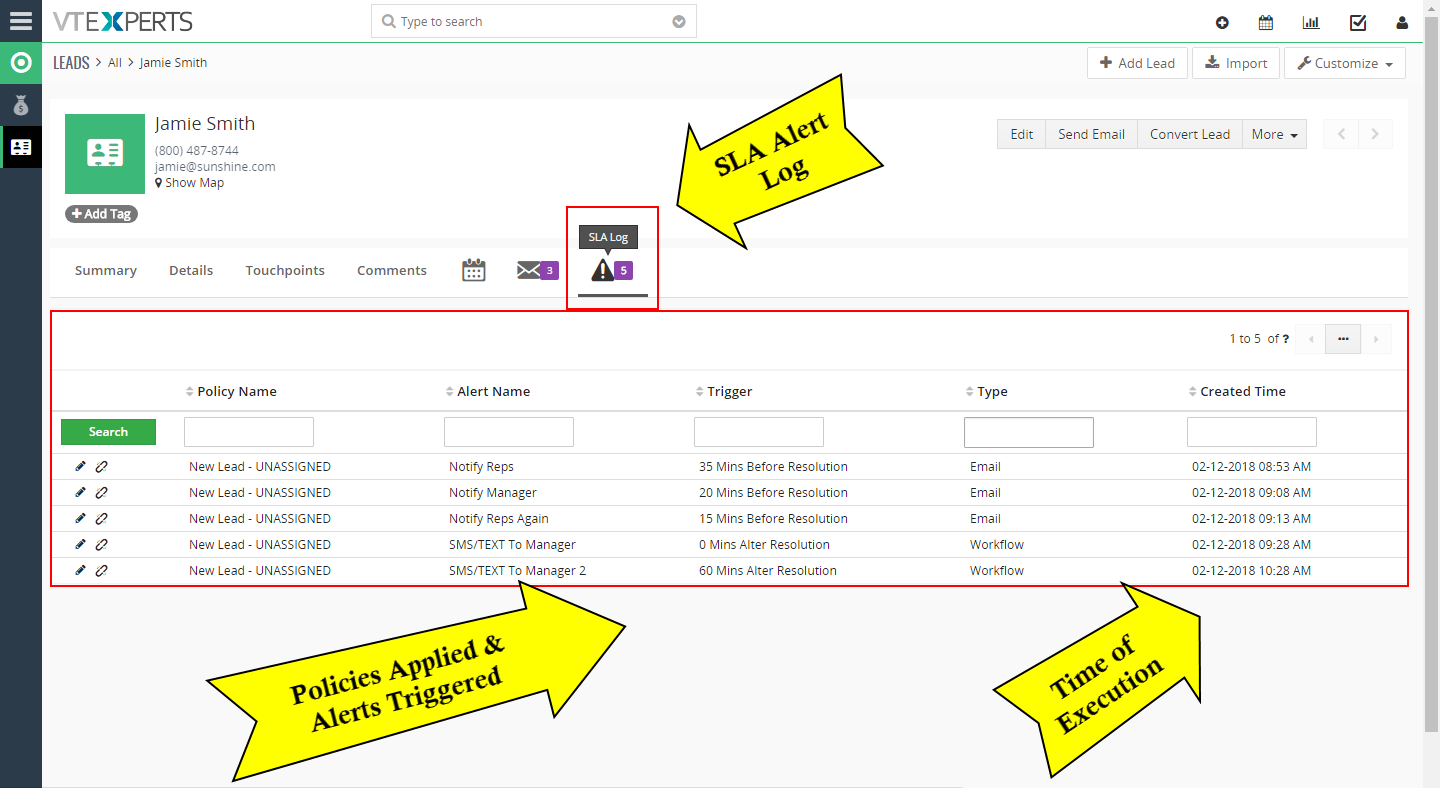
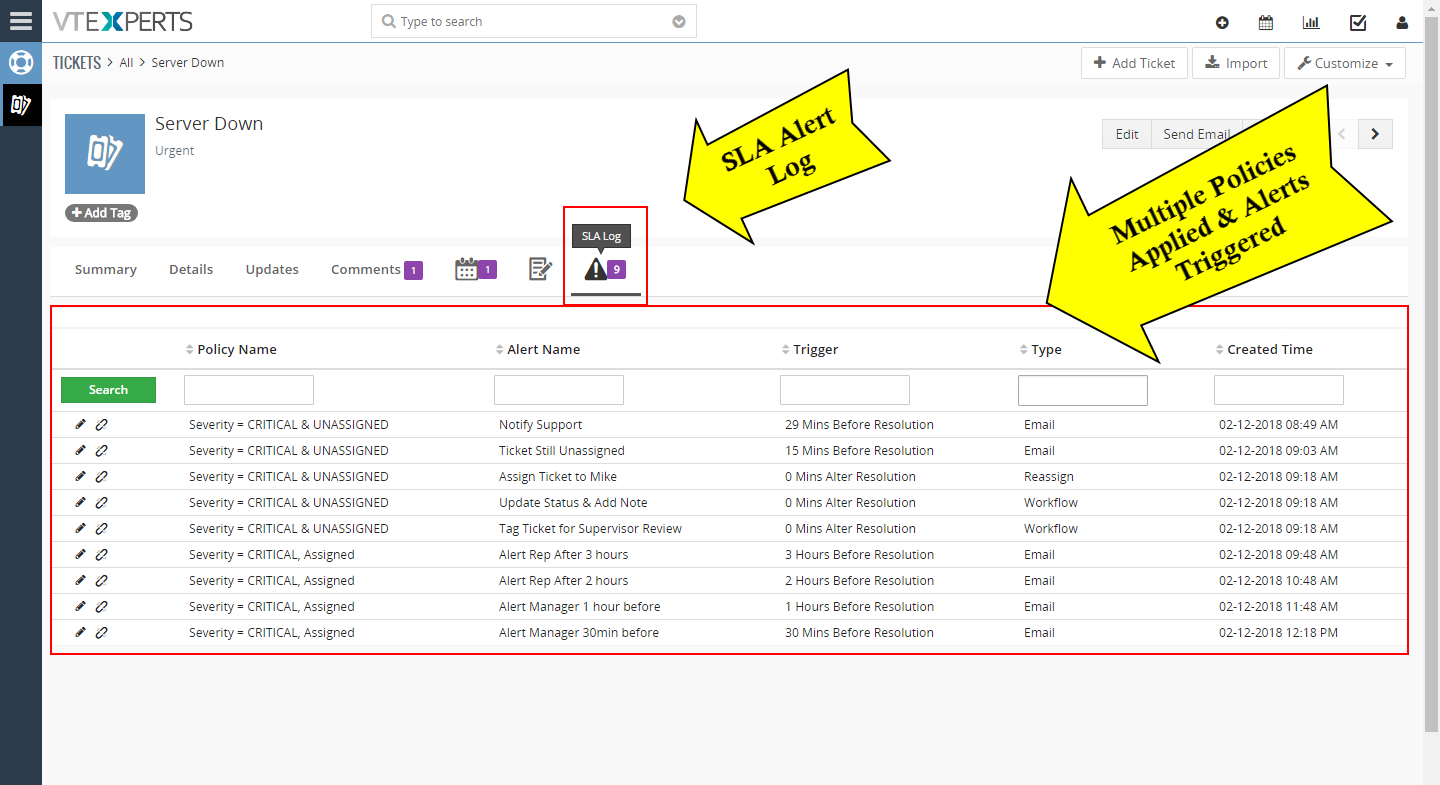
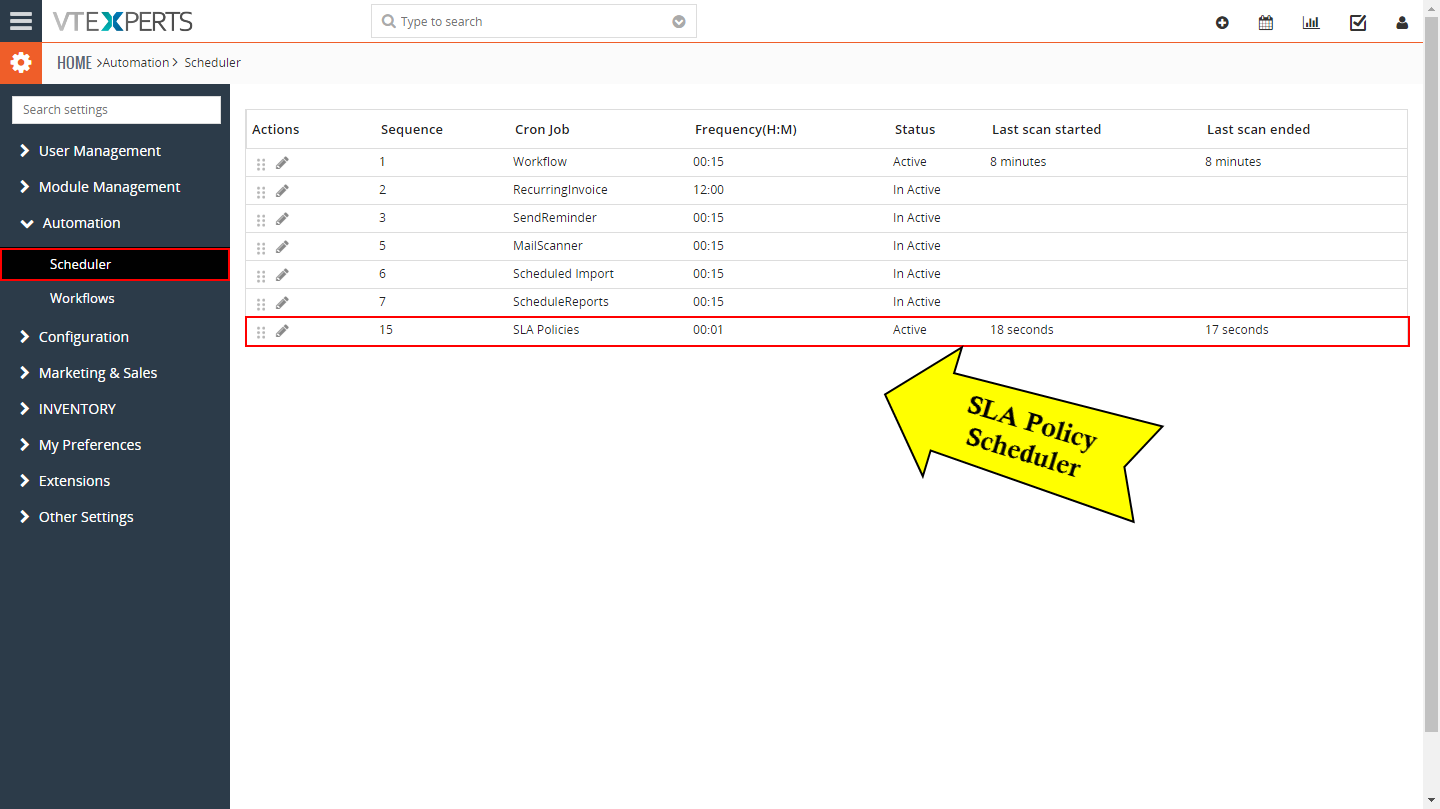


Here are some of the key features that make our extension unique.
- Interactive & easy to use interface
- Supports All Standard & Custom VTiger Modules
- Automatically applies SLA Policies based on predefined conditions
- Supported SLA Actions: Email, Reassign, Workflow (executes any task)
- Actions can be triggered BEFORE or AFTER sla has been breached.
- Displays SLA Log on each record (if enabled)
- Module Manager Compatible
- Available on VTiger Marketplace
We provide a unique demo instance for all our extensions. Each demo instance is pre-configured to only show features available for the specific extension. It is likely that some of the standard vTiger modules have been disabled to make the demo more user friendly.
VTiger 7 Demo
Please use credentials below to access the demo.
- Link: https://demo7.vtexperts.com/sla/index.php (Will open in new window)
- User: demo
- Pass: demo
If you are not able to access the demo or find an issue - please send us an email at support@vtexperts.com or via contact form.
All extensions come with an extensive user guide, which includes setup instructions, suggestions as well as usability tips. Please click the link below to access user guide for this extension.
User Guide: https://www.vtexperts.com/helpdesk/sla (Will open in new window)
For assistance or any questions - please contact us via help@vtexperts.com.
 VTExpert’s advanced automation tools. January 16, 2023 - CRM automation is the process of automating the manual processes that are necessary but repetitive in nature. It helps in streamlining and increasing productivity. Furthermore, automation helps to track the activities and engagement efforts of the different team members. Users can automate every aspect of a CRM system. For example, the sales team can use process automation to nurture leads, convert them, and simplify the sales process. On the other hand, support teams can use automation for quick responses. In short CRM automation means automating the redundant process of sales and customer service which are time-consuming otherwise. Vtiger CRM also provides different automation tools, like workflows, contact management, lead creation, etc, but sometimes users need more powerful tools to tackle complex process automation. Keeping this in mind VTExperts developed power full automation tools in the form of extensions. Let’s check some basic automation features of vTiger CRM and VTExpert’s advanced… Read More
 New Release – SLA Policies Extension For VTiger September 21, 2018 - There’s no denying of the importance of SLA in any business, specially where the opportunities are closed or won within the nick of a minute, or where the clients do not tend to wait if appropriate support is not provided within the reasonable amount of time. Multi-billionaire companies tend to get back to their customers and listen and complete their demands. They use the SLA systems in order to get abrupt sales and support responses. We understand the importance of SLA for your company. We also understand that VTiger’s out-of-box system does not support any kind of such functionality – even something you can use as a peripheral alternative. That’s why we came up with the SLA extension for VTiger, which covers all the needs of a company to configure SLA + does more. SLA Policy Extension for VTiger was designed to improve response times, accountability, when dealing… Read More
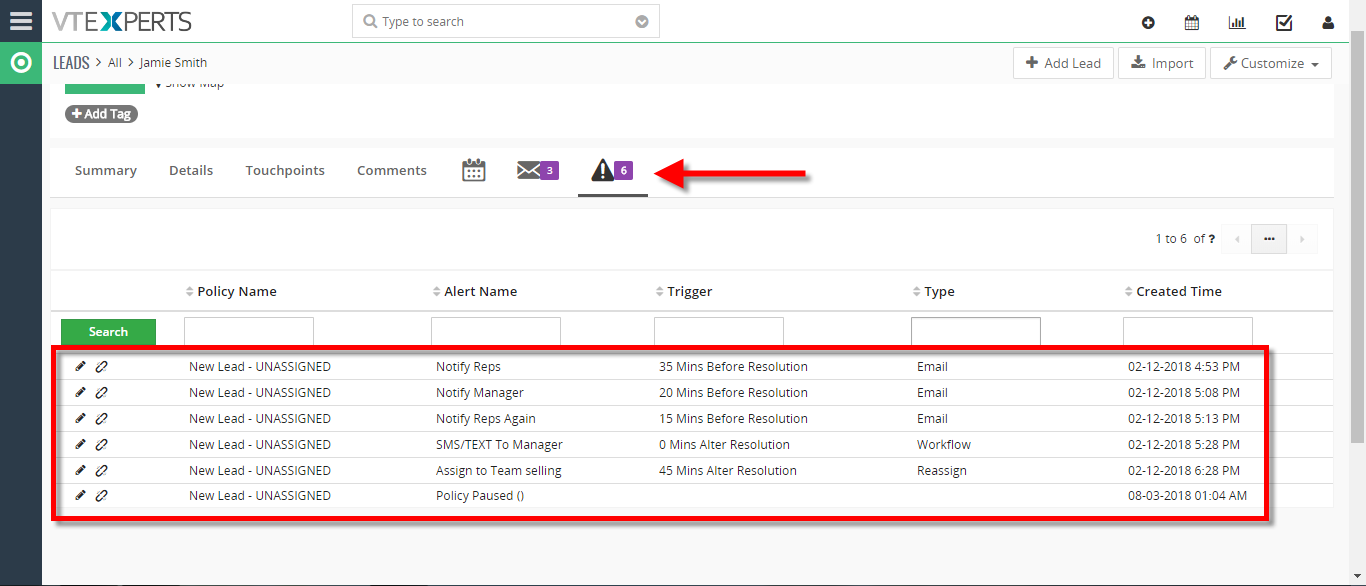 Configuring SLA With A Use Case In VTiger 7 August 3, 2018 - SLA Policy Extension for VTiger was designed to improve response times, accountability, when dealing with time sensitive matters. It’s mostly used in support/helpdesk department, where each ticket/case has to be assigned and worked on/resolved by certain date and time. It allows administrator to create custom SLA Policy rules, which then get automatically applied to a record. Use Case New HOT Lead comes in, if after 45 minutes the lead is still unassigned, you can automatically assign it to a sales rep or notify users/managers + trigger any workflow. How to Configuring SLA With a Use Case Go to Menu > Settings > CRM Settings > Extension Pack > SLA Policies. Click on the "New SLA Policy" button to configure a new policy. Add a Name for the new policy. Select the module you want to apply this policy to. Select the picklist you want to configure for the SLA responses. This will mark the… Read More
Related products
SLA Policy Extension for VTiger was designed to improve response times, accountability, when dealing with time sensitive matters. It’s mostly used in support/helpdesk department, where each ticket/case has to be assigned and worked on/resolved by certain date and time. It allows administrator to create custom SLA Policy rules, which then get automatically applied to a record. For example, if a new critical gets created and does not get claimed/assigned by a user, a policy can be setup to notify the available users every 10 minutes since the ticket has been created. In addition, you can notify supervisor via email or text (workflow) 20.. 30..40.. minutes after if the ticket has not yet been worked on.
Other possible use cases are:
- New HOT Lead comes in, if after 10 minutes the lead is still unassigned, you can automatically assign it to a sales rep or notify users/managers + trigger any workflow.
- Invoice has been open (unpaid) for more than 14 days, you can create a policy that will notify you/accounting that the invoice has not been yet paid + you can trigger automated emails to the customer, account rep and much more.
The extension is extremely flexible, meaning that it supports simple actions such as email, reassign as well as workflow, which essentially allows you to trigger any action before or after SLA has been breached.
Here are some of the key features that make our extension unique.
- Interactive & easy to use interface
- Supports All Standard & Custom VTiger Modules
- Automatically applies SLA Policies based on predefined conditions
- Supported SLA Actions: Email, Reassign, Workflow (executes any task)
- Actions can be triggered BEFORE or AFTER sla has been breached.
- Displays SLA Log on each record (if enabled)
- Module Manager Compatible
- Available on VTiger Marketplace
We provide a unique demo instance for all our extensions. Each demo instance is pre-configured to only show features available for the specific extension. It is likely that some of the standard vTiger modules have been disabled to make the demo more user friendly.
VTiger 7 Demo
Please use credentials below to access the demo.
- Link: https://demo7.vtexperts.com/sla/index.php (Will open in new window)
- User: demo
- Pass: demo
If you are not able to access the demo or find an issue - please send us an email at support@vtexperts.com or via contact form.
All extensions come with an extensive user guide, which includes setup instructions, suggestions as well as usability tips. Please click the link below to access user guide for this extension.
User Guide: https://www.vtexperts.com/helpdesk/sla (Will open in new window)
For assistance or any questions - please contact us via help@vtexperts.com.
Reviews
There are no reviews yet.
VTExpert’s advanced automation tools. January 16, 2023 - CRM automation is the process of automating the manual processes that are necessary but repetitive in nature. It helps in streamlining and increasing productivity. Furthermore, automation helps to track the activities and engagement efforts of the different team members. Users can automate every aspect of a CRM system. For example, the sales team can use process automation to nurture leads, convert them, and simplify the sales process. On the other hand, support teams can use automation for quick responses. In short CRM automation means automating the redundant process of sales and customer service which are time-consuming otherwise. Vtiger CRM also provides different automation tools, like workflows, contact management, lead creation, etc, but sometimes users need more powerful tools to tackle complex process automation. Keeping this in mind VTExperts developed power full automation tools in the form of extensions. Let’s check some basic automation features of vTiger CRM and VTExpert’s advanced… Read More New Release – SLA Policies Extension For VTiger September 21, 2018 - There’s no denying of the importance of SLA in any business, specially where the opportunities are closed or won within the nick of a minute, or where the clients do not tend to wait if appropriate support is not provided within the reasonable amount of time. Multi-billionaire companies tend to get back to their customers and listen and complete their demands. They use the SLA systems in order to get abrupt sales and support responses. We understand the importance of SLA for your company. We also understand that VTiger’s out-of-box system does not support any kind of such functionality – even something you can use as a peripheral alternative. That’s why we came up with the SLA extension for VTiger, which covers all the needs of a company to configure SLA + does more. SLA Policy Extension for VTiger was designed to improve response times, accountability, when dealing… Read More Configuring SLA With A Use Case In VTiger 7 August 3, 2018 - SLA Policy Extension for VTiger was designed to improve response times, accountability, when dealing with time sensitive matters. It’s mostly used in support/helpdesk department, where each ticket/case has to be assigned and worked on/resolved by certain date and time. It allows administrator to create custom SLA Policy rules, which then get automatically applied to a record. Use Case New HOT Lead comes in, if after 45 minutes the lead is still unassigned, you can automatically assign it to a sales rep or notify users/managers + trigger any workflow. How to Configuring SLA With a Use Case Go to Menu > Settings > CRM Settings > Extension Pack > SLA Policies. Click on the "New SLA Policy" button to configure a new policy. Add a Name for the new policy. Select the module you want to apply this policy to. Select the picklist you want to configure for the SLA responses. This will mark the… Read MoreInformation
- Vtiger 8.x
- Vtiger 7.x
- Vtiger 6.x
- Ioncube & PHP SOAP (hands-on)
- Install & Setup (hands-on)
- Meeting Server Requirements
- Assisting with any issues related to plugins
Reviews
There are no reviews yet.