


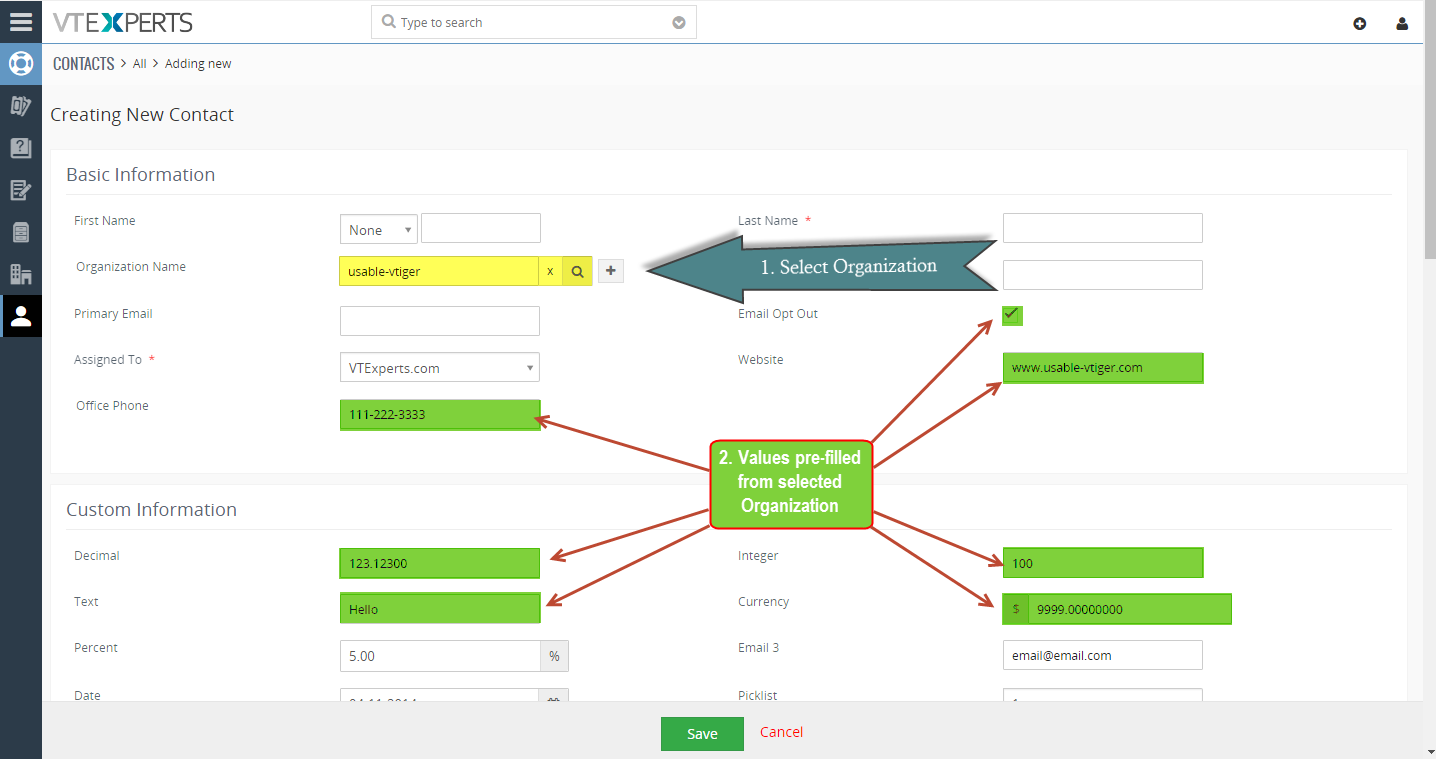
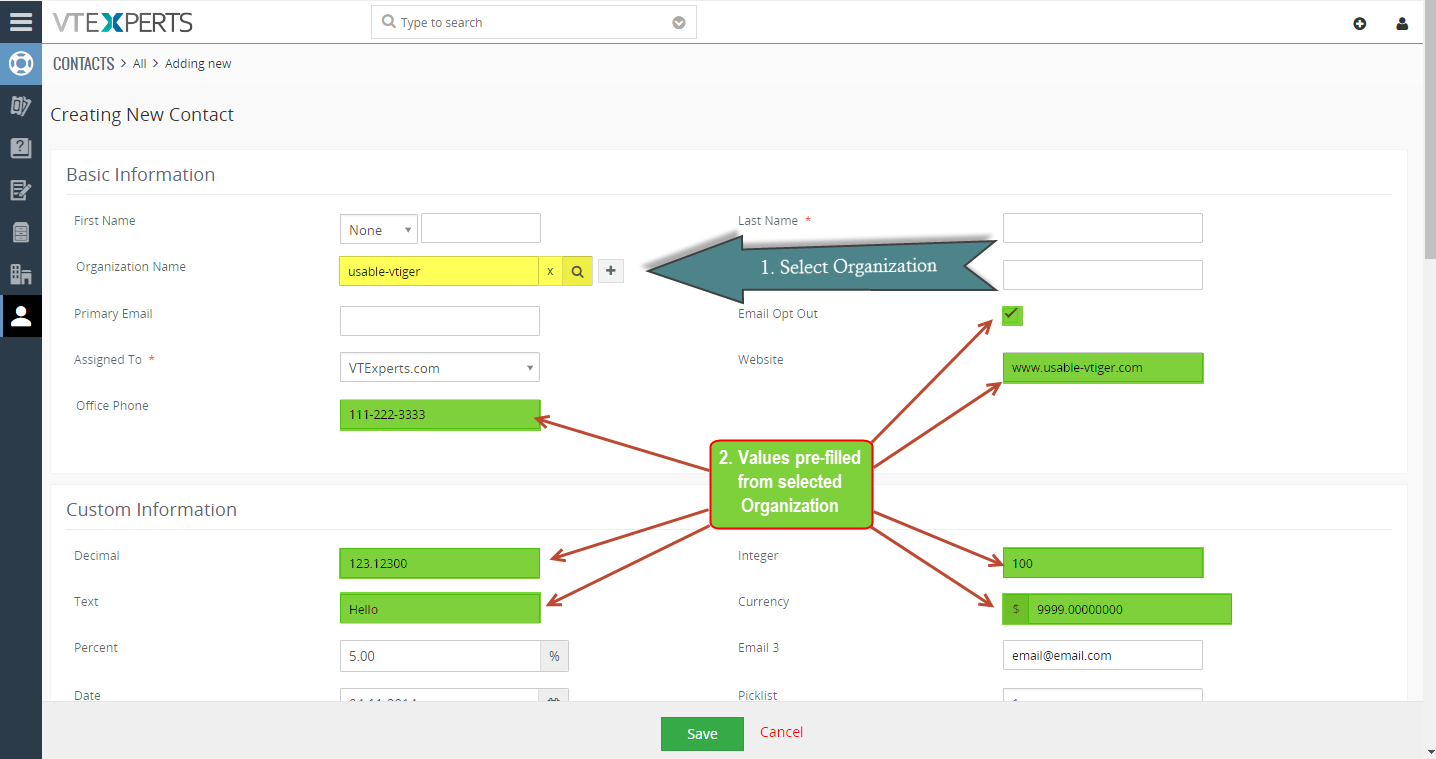
Field Autofill for VTiger is yet another amazing productivity tool. The extension is designed to eliminate repetitive data entry when creating related records. Wouldn’t it be nice to create a contact from within Organization and not have to re-enter Office Phone, Fax, Address, etc.?
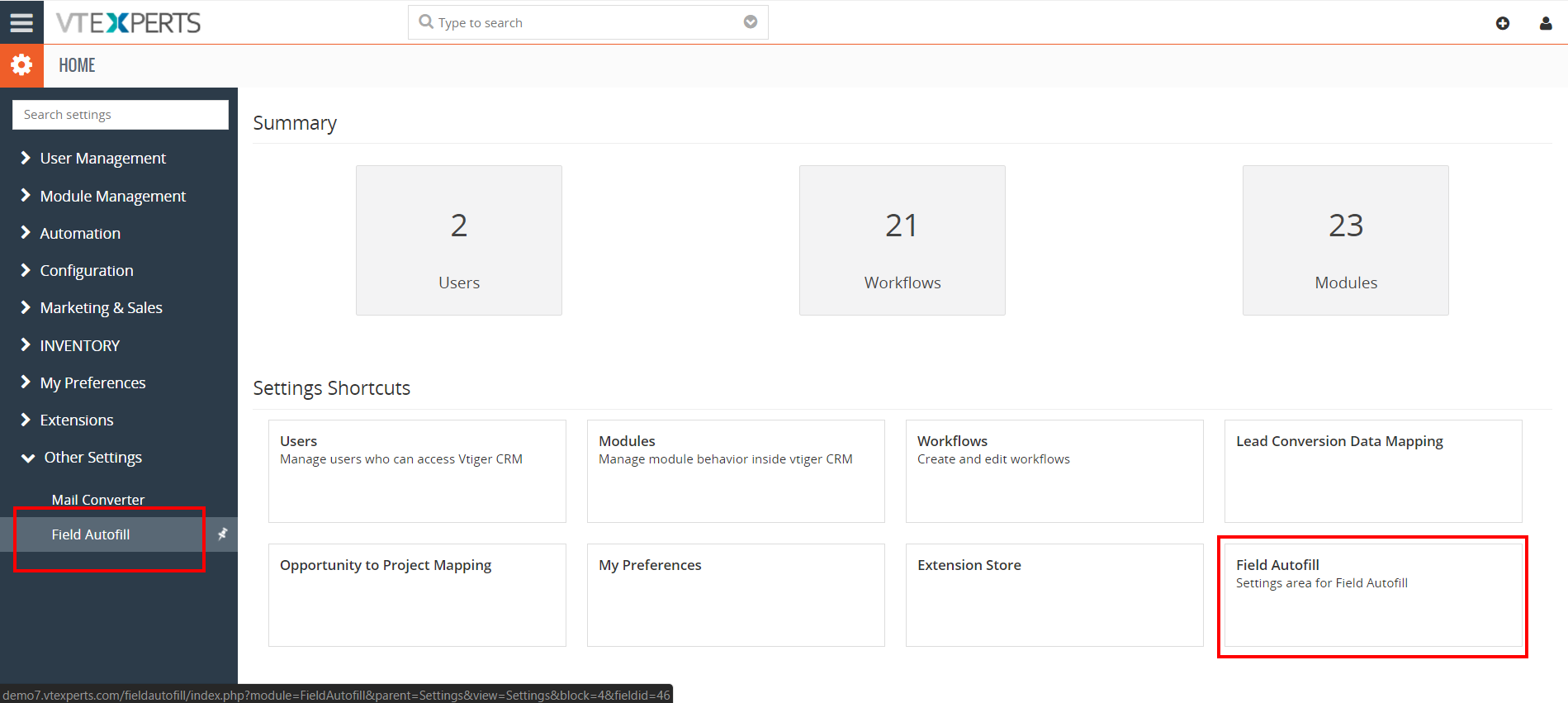
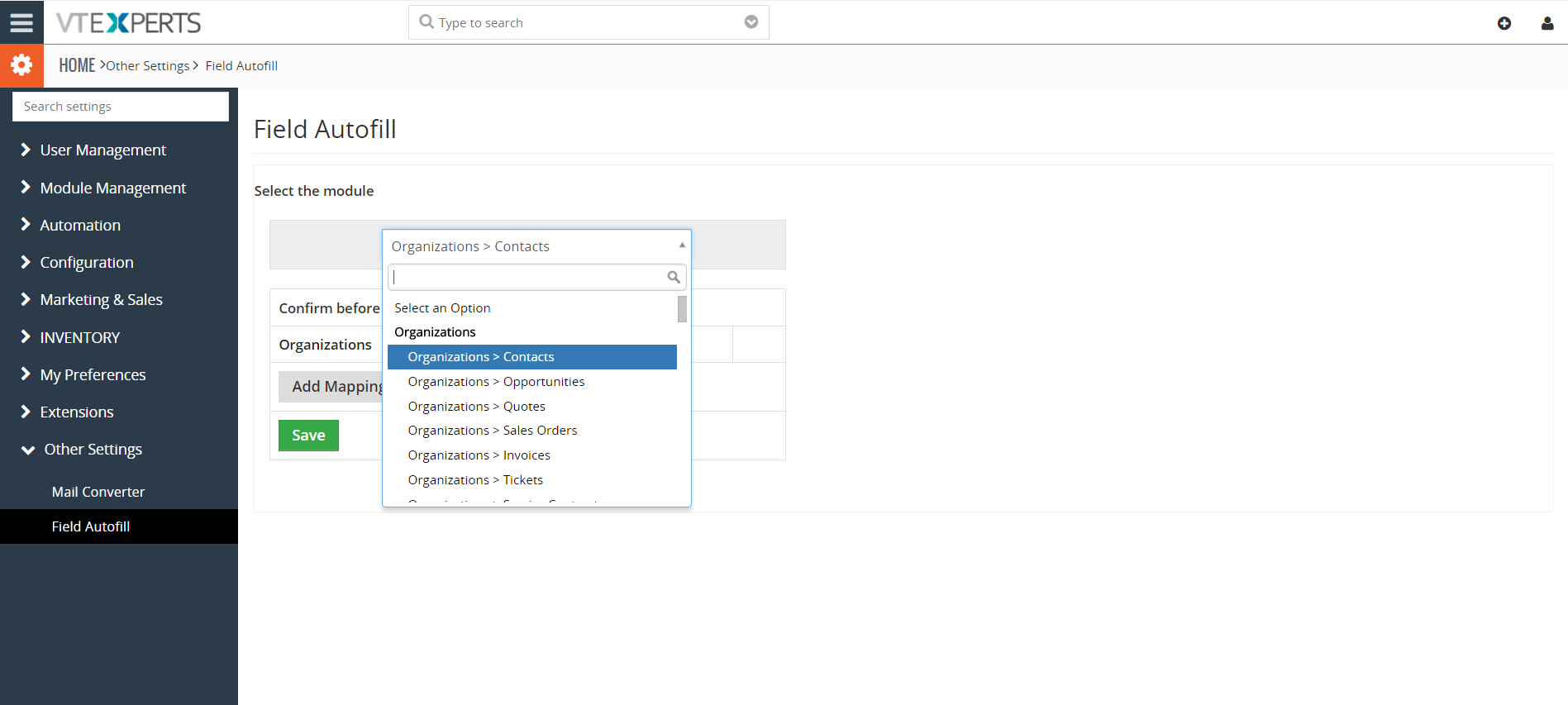
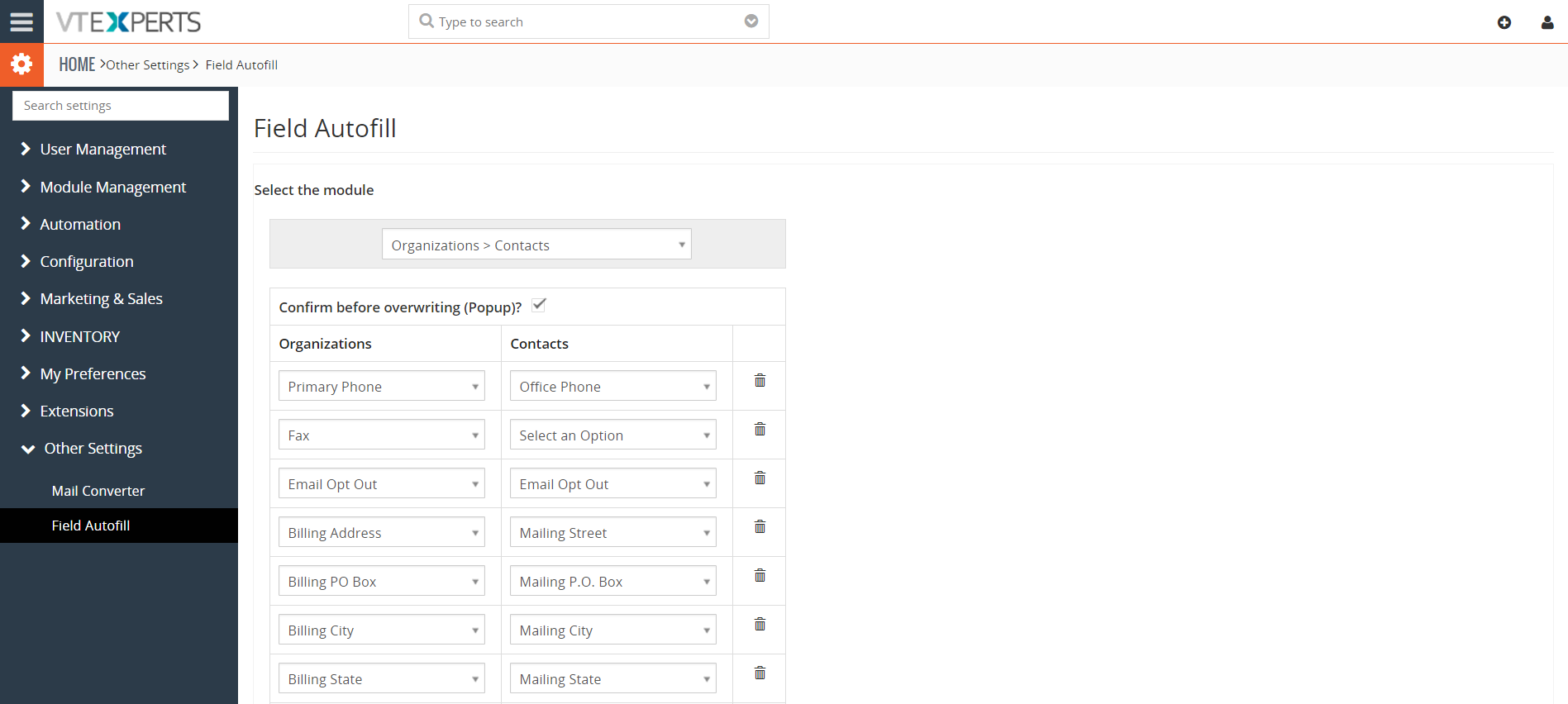
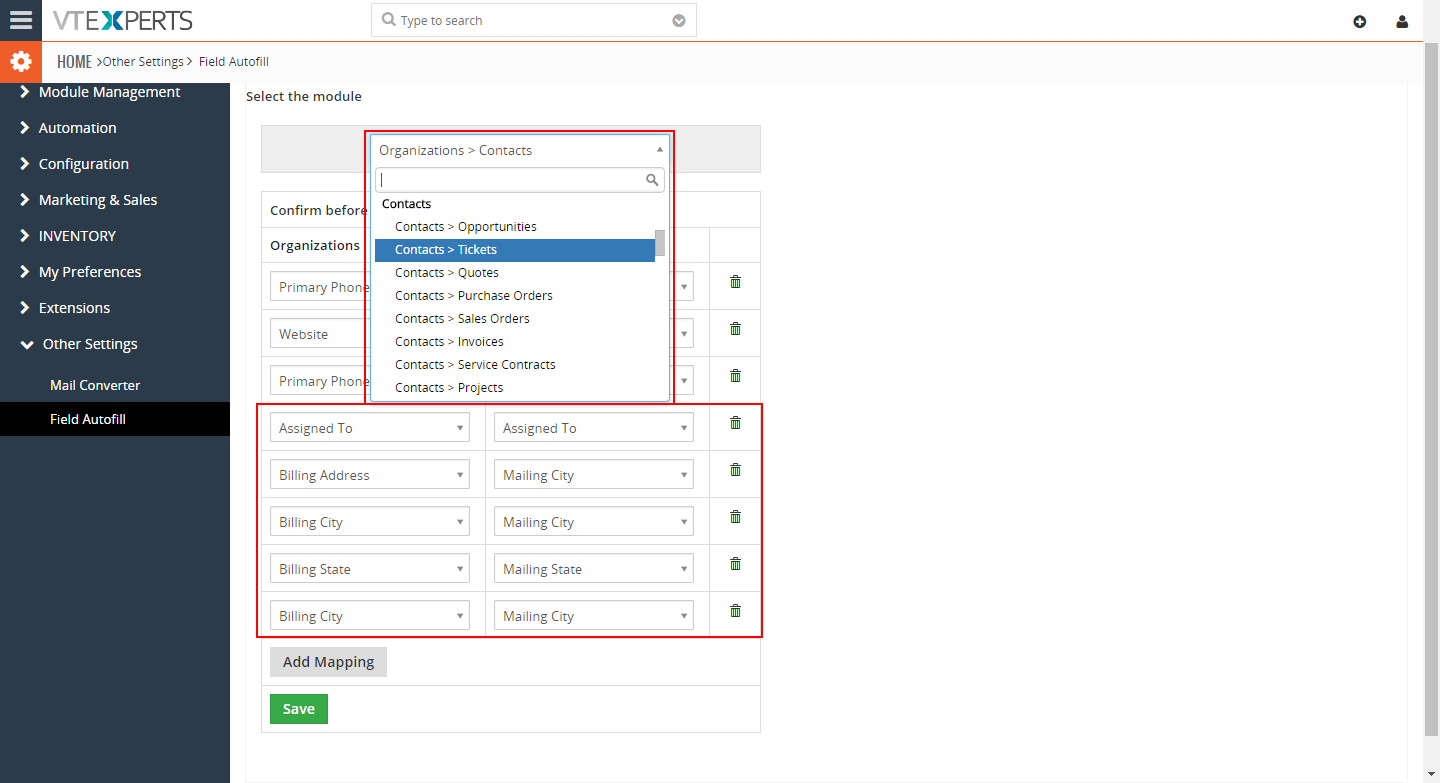
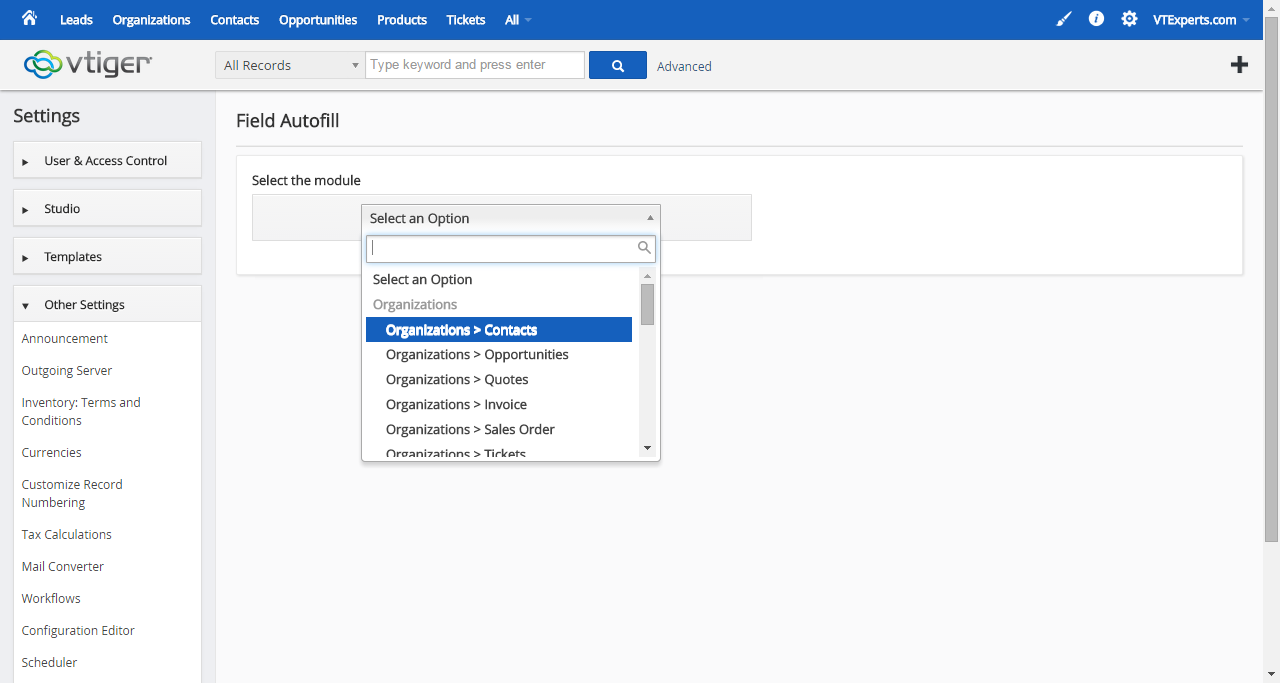
Well, with Field Autofill for VTiger, it’s now possible. It includes intuitive configuration panel where you can configure mapping of fields from one module to another. It works with all standard & custom modules and fields.

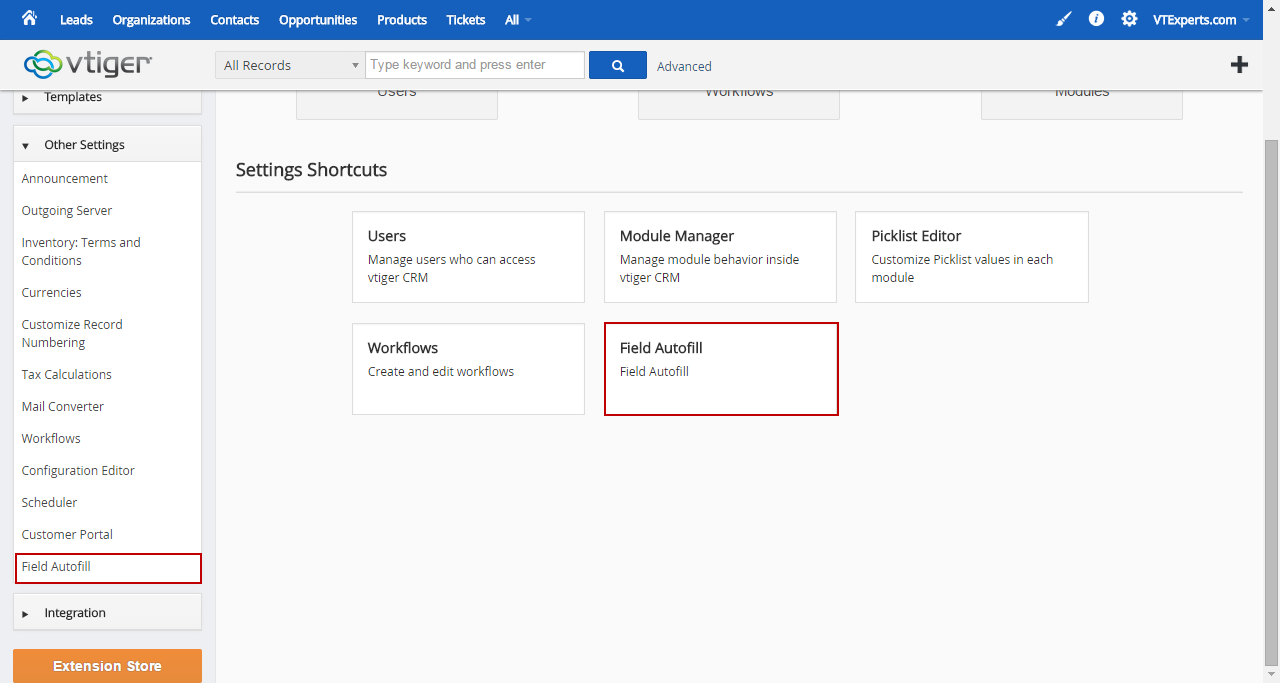
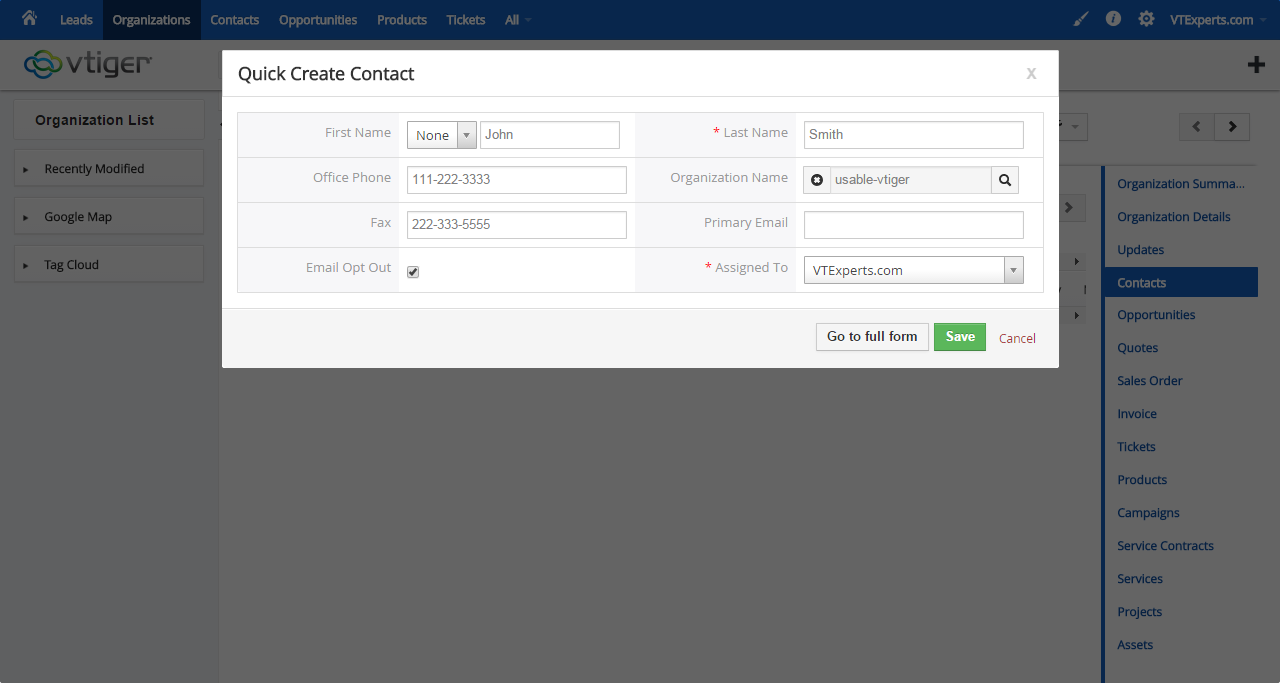


Here are some of the key features that make our extension unique:
- Works with Most Related List & Related Fields
- Automatically pre-fills all types of fields (Text, Numeric, Currency, Picklist, Multi-select, Checkbox, Phone, Email, Date, etc..)
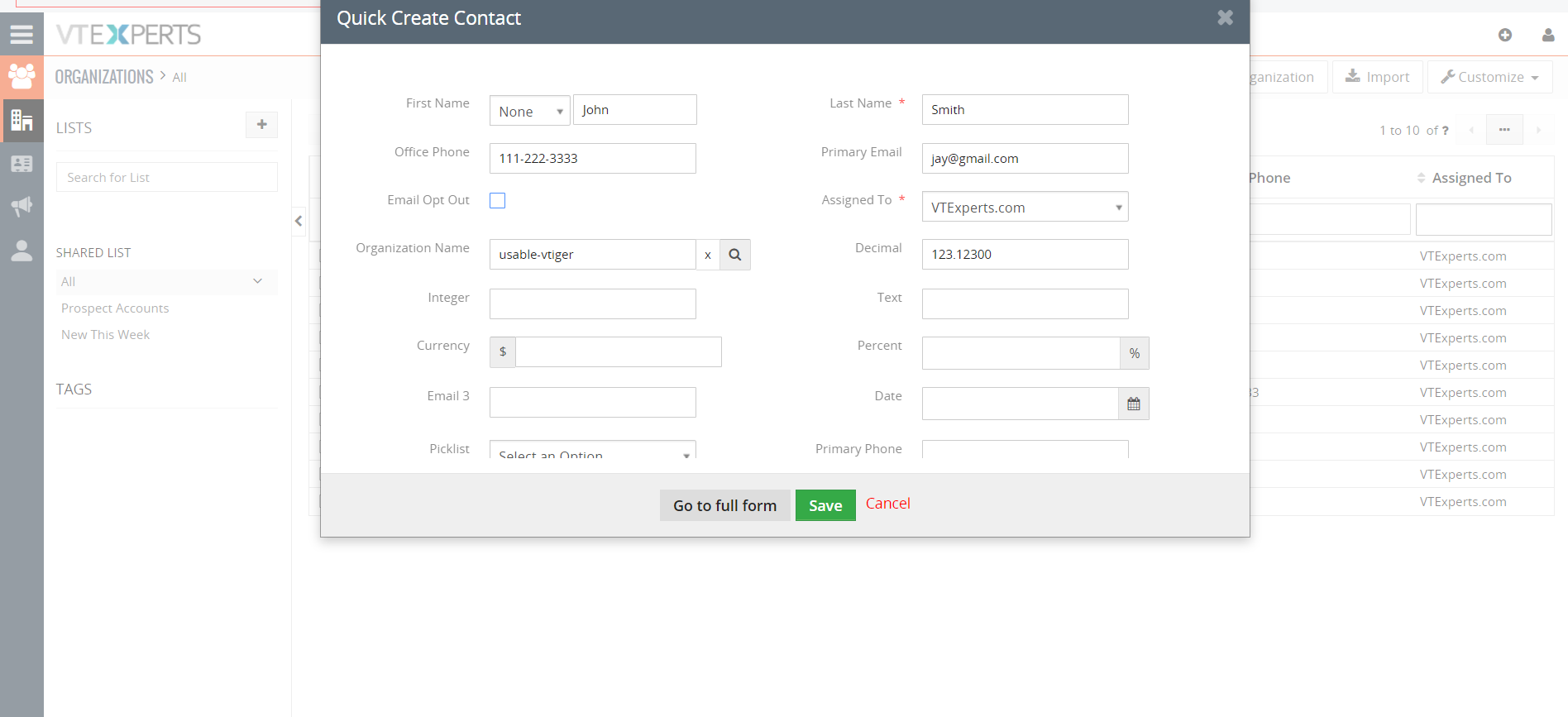
- Works with Full & Quick Create views
- Flexible Configuration Panel with the customizability to specify the mapping for each transition
- Allows to disable “Overwrite Popup”
- Supports Custom & Standard Modules/Linkages
- Overrides existing auto-fill mapping with the extension Field Autofill for VTiger
- Module Manager Compatible (100% Modular)
List of Conversions/Auto-fills Available(Partial list – Currently supports ALL Modules/Linkages)
- Organizations to Contacts
- Organizations to Opportunities
- Organizations to Quotes
- Organizations to Invoices
- Organizations to Sales Orders
- Organizations to Tickets
- Organizations to Service Contracts
- Organizations to Projects
- Contacts to Opportunities
- Contacts to Quotes
- Contacts to Invoices
- Contacts to Sales Orders
- Contacts to Tickets
- Contacts to Purchase Orders
- Quotes to Invoices
- Quotes to Sales Orders
- Sales Orders to Invoices
- Service Contracts to Tickets
- Vendors to Purchase Orders
- Projects to Project Tasks
- Projects to Project Milestones
We provide a unique demo instance for all our extensions. Each demo instance is pre-configured to only show features available for the specific extension. It is likely that some of the standard vTiger modules have been disabled to make the demo more user friendly.
VTiger 7 Demo
Please use credentials below to access the demo.
- Link: https://demo7.vtexperts.com/fieldautofill/index.php (Will open in new window)
- User: demo
- Pass: demo
VTiger 6 Demo
Please use credentials below to access the demo.
- Link: https://demo.vtexperts.com/fieldautofill/index.php (Will open in new window)
- User: demo
- Pass: demo
If you are not able to access the demo or find an issue - please send us an email at support@vtexperts.com or via contact form.
All extensions come with an extensive user guide, which includes setup instructions, suggestions as well as usability tips. Please click the link below to access user guide for this extension.
User Guide: https://www.vtexperts.com/helpdesk/field-autofillprefill (Will open in new window)
For assistance or any questions - please contact us via help@vtexperts.com.
5 reviews for Field Autofill Extension
 Autofill Supports Related Blocks May 20, 2021 - While creating a new record through VTExperts related list and blocks extension, do the fields fetch data thourgh autofill extension? Yes, now Related blocks and lists is supported by the autofill feature. Autofill supports Related Blocks, this means whenever a user adds a record throught the realted blocks and the autofill is configured on the field of the fetched records, Autofill extension will fetch the data and fill it into the fields of the new record. Related Block : Extension for VTiger enabling a display of related records on the Detail, Create, and Edit Views. Intuitive configuration panel allows system administrators to configure which modules (Related Lists) will be displayed on the Detail/Edit Views. Field Autofill : Field Autofill for VTiger is yet another amazing productivity tool. It saves time by autofilling the data into the CRM. Previously, field autofill do not fill in the data when a record is… Read More
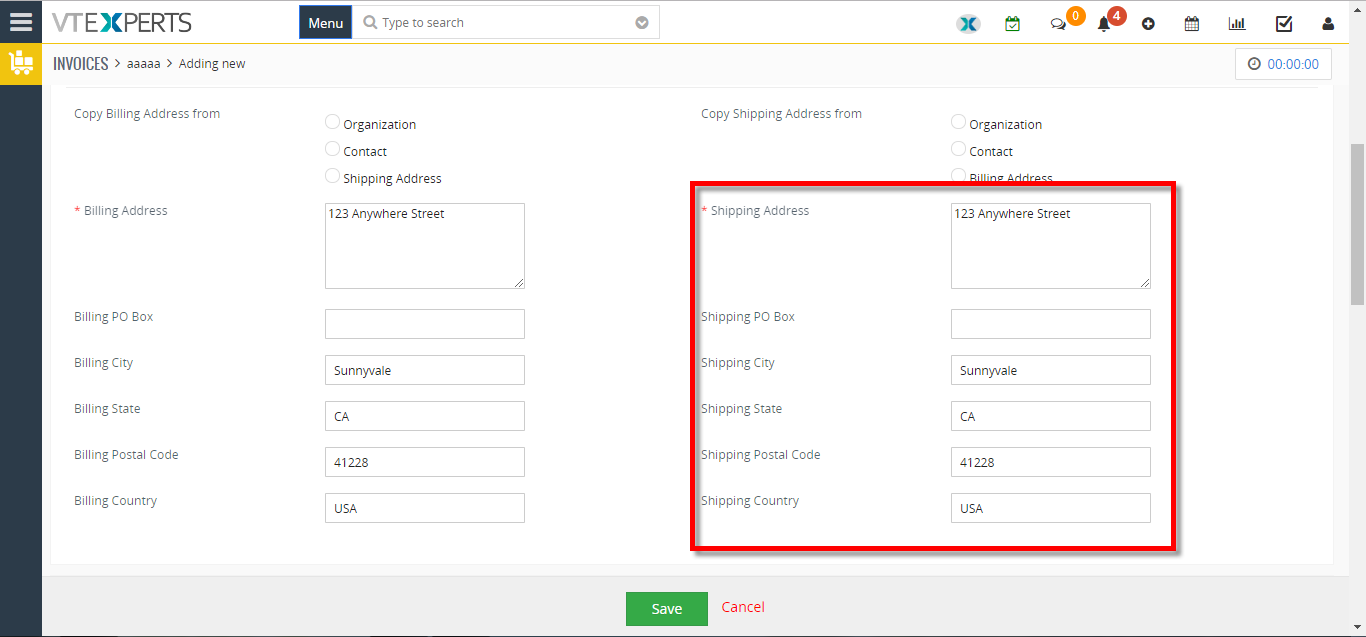 Prefill More Fields From Organizations To Invoice In VTiger 7 June 2, 2018 - In Vtiger 7, Users can avoid repetitive data entry when creating related records by using our Field Autofill extension. you can create a contact from within Organization and not have to re-enter Office Phone, Fax, Address, etc.. How to Prefill more Fields from Organizations to Invoice Go to the “Menu” and select “CRM Settings“. Under “Other Settings” select “Filed autofill“. Select the modules you want to automatically transfer data to, in this example we’ll be using Organization to Invoice. Click on the "Add Mapping" button and select the records from which you want the data to transfer, in this example we are using Billing Address to Billing Address. You can map Multiple fields. When creating an Invoice select an “Organization” and a dialog box will popup asking to auto fill the fields with the selected organization data according to your configuration, by clicking on the “Yes” button it will automatically fill the fields. … Read More
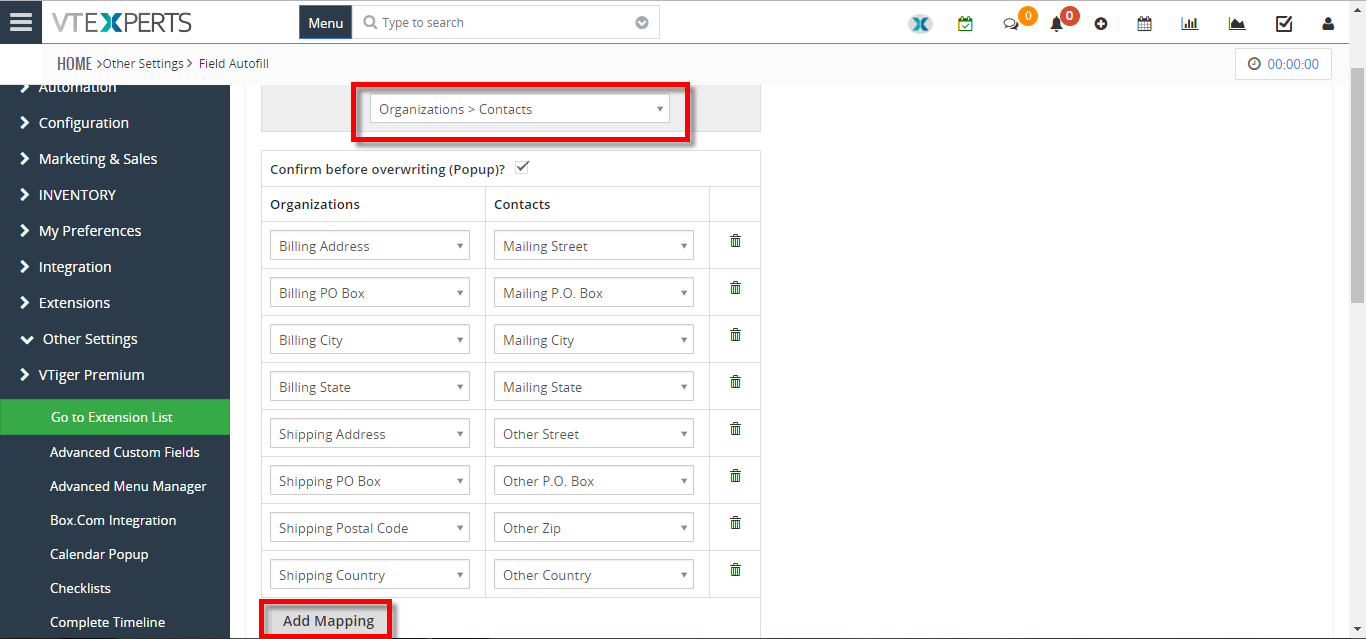 Transfer/Auto Fill Phone Number From Organization To A New Contact In VTiger 7 February 2, 2018 - In Vtiger 7, User can avoid repetitive data entry when creating related records by using our Field Autofill extension. User can create a contact from within Organization and not have to re-enter Office Phone, Fax, Address, etc.. How to Transfer/Auto Fill Phone Number from Organization to a New Contact Go to the "Menu" and select "CRM Settings". Under "Other Settings" select "Filed autofill". Select the modules you want to automatically transfer data, for this example we'll be using Organization to Contact and click on the "Add Mapping" button. Select the records from which you want the data to transfer to, for this example we are using Primary Phone to Office Phone. When creating a contact select an "Organization" and a dialog box will popup asking for to auto fill the fields with the selected organization data according to your configuration, by clicking on the "Yes" button it will automatically fill the fields. … Read More
Related products
Field Autofill for VTiger is yet another amazing productivity tool. The extension is designed to eliminate repetitive data entry when creating related records. Wouldn’t it be nice to create a contact from within Organization and not have to re-enter Office Phone, Fax, Address, etc.?
Well, with Field Autofill for VTiger, it’s now possible. It includes intuitive configuration panel where you can configure mapping of fields from one module to another. It works with all standard & custom modules and fields.
Here are some of the key features that make our extension unique:
- Works with Most Related List & Related Fields
- Automatically pre-fills all types of fields (Text, Numeric, Currency, Picklist, Multi-select, Checkbox, Phone, Email, Date, etc..)
- Works with Full & Quick Create views
- Flexible Configuration Panel with the customizability to specify the mapping for each transition
- Allows to disable “Overwrite Popup”
- Supports Custom & Standard Modules/Linkages
- Overrides existing auto-fill mapping with the extension Field Autofill for VTiger
- Module Manager Compatible (100% Modular)
List of Conversions/Auto-fills Available(Partial list – Currently supports ALL Modules/Linkages)
- Organizations to Contacts
- Organizations to Opportunities
- Organizations to Quotes
- Organizations to Invoices
- Organizations to Sales Orders
- Organizations to Tickets
- Organizations to Service Contracts
- Organizations to Projects
- Contacts to Opportunities
- Contacts to Quotes
- Contacts to Invoices
- Contacts to Sales Orders
- Contacts to Tickets
- Contacts to Purchase Orders
- Quotes to Invoices
- Quotes to Sales Orders
- Sales Orders to Invoices
- Service Contracts to Tickets
- Vendors to Purchase Orders
- Projects to Project Tasks
- Projects to Project Milestones
We provide a unique demo instance for all our extensions. Each demo instance is pre-configured to only show features available for the specific extension. It is likely that some of the standard vTiger modules have been disabled to make the demo more user friendly.
VTiger 7 Demo
Please use credentials below to access the demo.
- Link: https://demo7.vtexperts.com/fieldautofill/index.php (Will open in new window)
- User: demo
- Pass: demo
VTiger 6 Demo
Please use credentials below to access the demo.
- Link: https://demo.vtexperts.com/fieldautofill/index.php (Will open in new window)
- User: demo
- Pass: demo
If you are not able to access the demo or find an issue - please send us an email at support@vtexperts.com or via contact form.
All extensions come with an extensive user guide, which includes setup instructions, suggestions as well as usability tips. Please click the link below to access user guide for this extension.
User Guide: https://www.vtexperts.com/helpdesk/field-autofillprefill (Will open in new window)
For assistance or any questions - please contact us via help@vtexperts.com.
5 reviews for Field Autofill Extension
-
saves a lot of extra work
-
friendly staff great service start to end
-
It is a perfect app without any bug
-
I would give it 4 stars
-
I bought this application to employ autofill and it also maps modules between fields


 Autofill Supports Related Blocks May 20, 2021 - While creating a new record through VTExperts related list and blocks extension, do the fields fetch data thourgh autofill extension? Yes, now Related blocks and lists is supported by the autofill feature. Autofill supports Related Blocks, this means whenever a user adds a record throught the realted blocks and the autofill is configured on the field of the fetched records, Autofill extension will fetch the data and fill it into the fields of the new record. Related Block : Extension for VTiger enabling a display of related records on the Detail, Create, and Edit Views. Intuitive configuration panel allows system administrators to configure which modules (Related Lists) will be displayed on the Detail/Edit Views. Field Autofill : Field Autofill for VTiger is yet another amazing productivity tool. It saves time by autofilling the data into the CRM. Previously, field autofill do not fill in the data when a record is… Read More Prefill More Fields From Organizations To Invoice In VTiger 7 June 2, 2018 - In Vtiger 7, Users can avoid repetitive data entry when creating related records by using our Field Autofill extension. you can create a contact from within Organization and not have to re-enter Office Phone, Fax, Address, etc.. How to Prefill more Fields from Organizations to Invoice Go to the “Menu” and select “CRM Settings“. Under “Other Settings” select “Filed autofill“. Select the modules you want to automatically transfer data to, in this example we’ll be using Organization to Invoice. Click on the "Add Mapping" button and select the records from which you want the data to transfer, in this example we are using Billing Address to Billing Address. You can map Multiple fields. When creating an Invoice select an “Organization” and a dialog box will popup asking to auto fill the fields with the selected organization data according to your configuration, by clicking on the “Yes” button it will automatically fill the fields. … Read More Transfer/Auto Fill Phone Number From Organization To A New Contact In VTiger 7 February 2, 2018 - In Vtiger 7, User can avoid repetitive data entry when creating related records by using our Field Autofill extension. User can create a contact from within Organization and not have to re-enter Office Phone, Fax, Address, etc.. How to Transfer/Auto Fill Phone Number from Organization to a New Contact Go to the "Menu" and select "CRM Settings". Under "Other Settings" select "Filed autofill". Select the modules you want to automatically transfer data, for this example we'll be using Organization to Contact and click on the "Add Mapping" button. Select the records from which you want the data to transfer to, for this example we are using Primary Phone to Office Phone. When creating a contact select an "Organization" and a dialog box will popup asking for to auto fill the fields with the selected organization data according to your configuration, by clicking on the "Yes" button it will automatically fill the fields. … Read More
Information
- Vtiger 8.x
- Vtiger 7.x
- Vtiger 6.x
- Ioncube & PHP SOAP (hands-on)
- Install & Setup (hands-on)
- Meeting Server Requirements
- Assisting with any issues related to plugins
Joel (verified owner) –
saves a lot of extra work
Ray (verified owner) –
friendly staff great service start to end
Barry (verified owner) –
It is a perfect app without any bug
Dharuv (verified owner) –
I would give it 4 stars
Jorge (verified owner) –
I bought this application to employ autofill and it also maps modules between fields