

vTiger CRM Navigation Menu
How to Organize Navigation Bar in vTiger?
August 26, 2013
Article
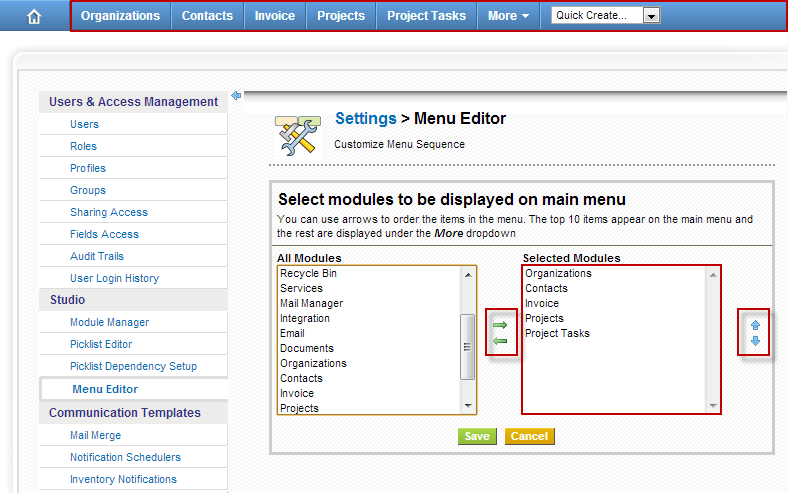
vTigerCRM has a nice feature which allows users to arrange the navigation bar menu items. It’s helpful when you have many modules enabled, but not all of them are used on a daily basis. To add or remove menu items from the vTiger navigation bar follow the instructions below: Mouse over the “gear” icon on the right upper corner Click “CRM Settings” Under “Studio” section, hit “vTiger Menu Editor” “Selected Modules” are the modules which will show up on the main navigation bar. Use the arrows to add,remove and order the modules.
How To Disable Modules In vTiger?
August 26, 2013
Article
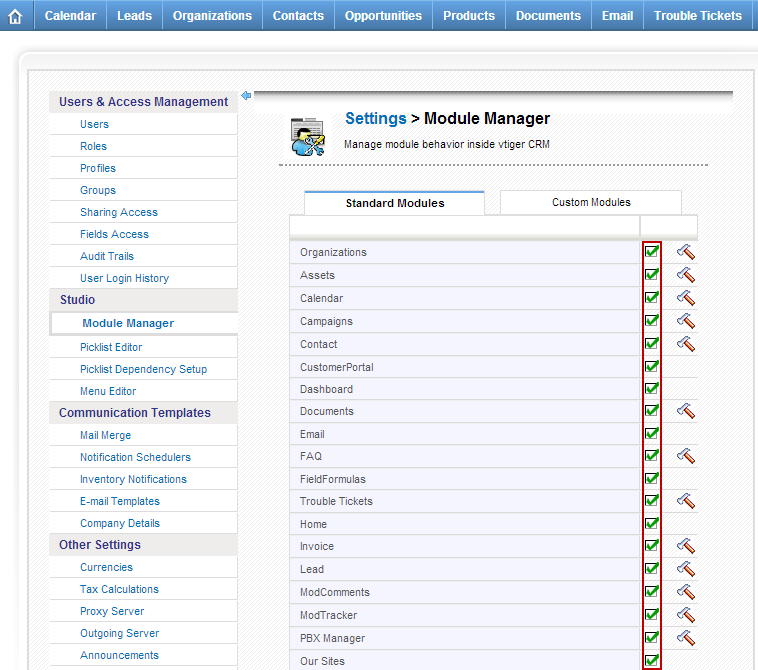
Out of the box vTiger comes with a lot of enabled modules. In most cases you will not be using all the modules and those can take up a valuable space on your screen. You can either use the “vTiger Menu Editor” and remove them from the navigation bar, or if you are certain that you do not need them – just follow the instructions below and disable the unnecessary vTiger modules. Note, the modules can be re-enabled at any time. Mouse over the “gear” icon on the right upper corner Click “CRM Settings” Under “Studio” section, hit “Module Manager” Mouse over the check-box – it will say “Disable Module” Click on the check-box and it will change to red X.
